Anbieter
Ein Anbieter verbindet Casdoor mit einem externen Dienst, wie z. B. einem Identitätsanbieter für die Anmeldung, einem E-Mail-Dienst oder einem Cloud-Speicher. Sie erstellen einen Anbieter einmal und fügen ihn dann den Anwendungen hinzu, die ihn nutzen.
Anbieterkategorien
| Category | Purpose |
|---|---|
| Audit | Send the audit records of Casdoor to a Syslog server. See Syslog audit provider |
| Captcha | Protect sign-in and sign-up with a captcha. See Captcha providers |
| Send email, such as verification codes and notifications. See Email providers | |
| Face ID | Recognize faces for Face ID sign-in. See Face ID providers |
| ID Verification | Verify the identity of users from ID documents. See Identity verification providers |
| Log | Forward permission audit events to a logging backend, or store them as entries. See Log providers |
| MFA | Provide a second factor, such as RADIUS. See MFA providers |
| Notification | Send messages to chat services, such as Slack and Telegram. See Notification providers |
| OAuth | Let users sign in with external identity providers, such as GitHub and Google. See OAuth providers |
| Zahlung | Take payments for products and subscriptions. See Payment providers |
| SAML | Let users sign in with external SAML identity providers. See SAML providers |
| Scan | Scan servers for security issues and MCP endpoints. See Scan providers |
| SMS | Send SMS verification codes. See SMS providers |
| Speicher | Store files on the local file system or in cloud object storage. See Storage providers |
Wer kann einen Anbieter verwenden
Nur Administratoren erstellen Anbieter. Ob ein Anbieter verfügbar ist, hängt davon ab, wer ihn erstellt hat:
| Created by | Available to |
|---|---|
A global administrator: a user of the built-in organization, or a user with IsGlobalAdmin | All applications |
An organization administrator: a user with IsAdmin | Applications of the same organization |
Protokollanbieter der Typen System Log, SELinux Log und Agent lesen die Protokolle des Casdoor-Servers oder akzeptieren Daten an seiner Adresse, daher können nur globale Administratoren sie speichern. Ein Organisationsadministrator, der versucht, einen solchen Anbieter zu speichern, erhält Unauthorized operation.
Welche Adressen ein Anbieter erreichen kann
A provider of an organization other than admin, built-in, and the trusted organizations can connect only to Internet addresses. Casdoor refuses private, loopback, link-local, and unspecified addresses, and the shared address space 100.64.0.0/10. It checks the address that the host name resolves to. For HTTP requests, it checks every connection, including redirects. This stops an organization administrator from reaching the internal network of the Casdoor server, such as a database or a cloud metadata endpoint, through a provider.
Die Regel betrifft diese Verbindungen:
| Category | Connection |
|---|---|
The SMTP server, or the endpoint of Custom HTTP Email | |
| SMS | The endpoint of Custom HTTP SMS |
| Notification | The endpoint of Custom HTTP |
| Storage | The endpoint of the storage service |
| OAuth | The token, user info, and logout endpoints of the provider, and the OIDC discovery that the Request button fetches. The types GitHub, Google, Facebook, LinkedIn, Steam, Line, Amazon, Instagram, TikTok, Twitter, Uber, and Yahoo always use the proxy instead |
Um eine Verbindung zu einem Dienst in Ihrem internen Netzwerk herzustellen, wie z. B. einem lokalen SMTP-Server, erstellen Sie den Anbieter als globaler Administrator. Wenn ein Organisationsadministrator bei einem OIDC-Anbieter auf Request klickt, wendet Casdoor dieselbe Regel auf den Discovery-Fetch an, unabhängig davon, zu welcher Organisation der Anbieter gehört.
Damit die Administratoren einer Organisation Provider verwalten können, die sich mit dem internen Netzwerk verbinden, muss ein globaler Administrator Trusted organization für diese Organisation aktivieren (Commercial Edition). Die Regel gilt dann nicht für die Provider dieser Organisation, auch nicht für die Schaltfläche Request für ihre Administratoren.
Einen Anbieter erstellen
- Gehen Sie im Casdoor-Admin-Konsolenbereich zu Identity > Providers und fügen Sie einen Anbieter hinzu.
- Wählen Sie die Category und den Type. Casdoor füllt Name und Display name automatisch aus: Der Name folgt dem Muster
provider_<category>_<type>, und der Anzeigename ist<Category> <Type>. Casdoor aktualisiert ein Feld nicht mehr, sobald Sie es selbst bearbeiten. - Füllen Sie die Felder des Typs aus. Die Seite jedes Anbietersyps listet sie auf.
- Speichern Sie den Anbieter.
Einen Anbieter zu einer Anwendung hinzufügen
Ein Anbieter wirkt nur in den Anwendungen, denen Sie ihn hinzufügen.
-
Öffnen Sie die Bearbeitungsseite der Anwendung, gehen Sie zum Tab Providers und fügen Sie eine Zeile hinzu.
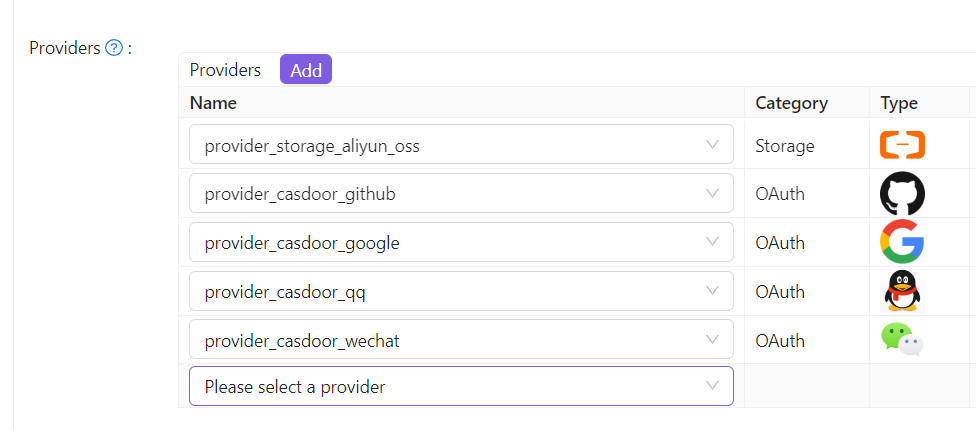
-
Wählen Sie den Anbieter. Die Liste zeigt alle Anbieter an, die für die Anwendung verfügbar sind.
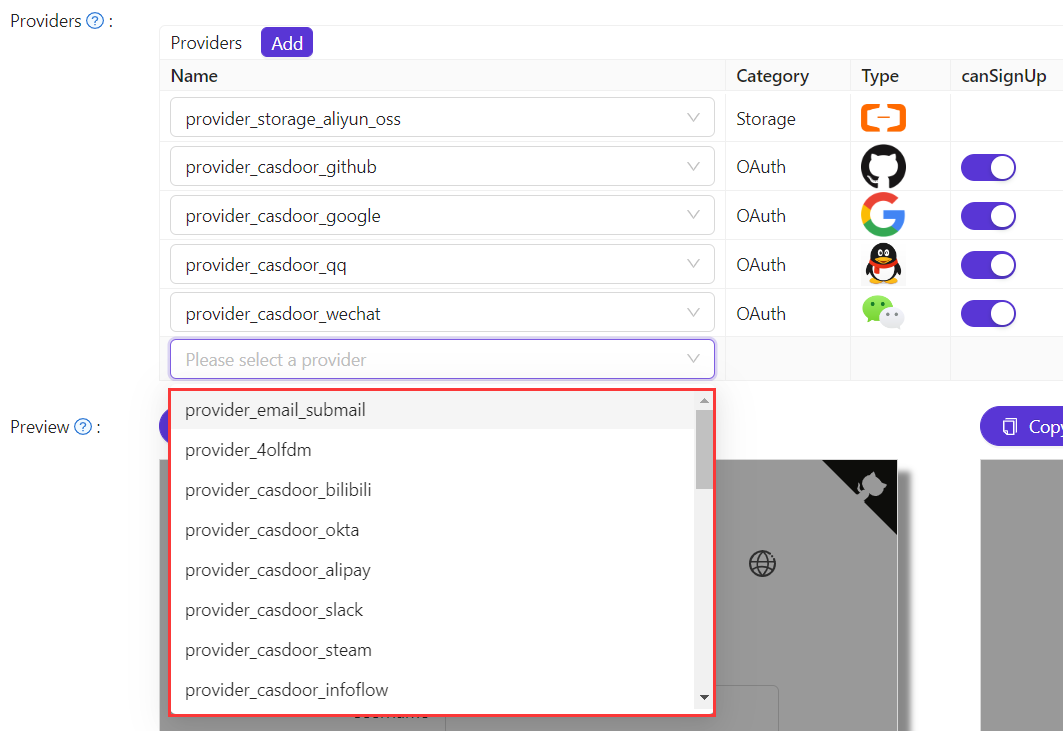
-
Legen Sie für OAuth- und Captcha-Anbieter fest, wie die Anwendung sie verwendet. Siehe Anbieter zu einer Anwendung hinzufügen und Standard-Captcha konfigurieren.
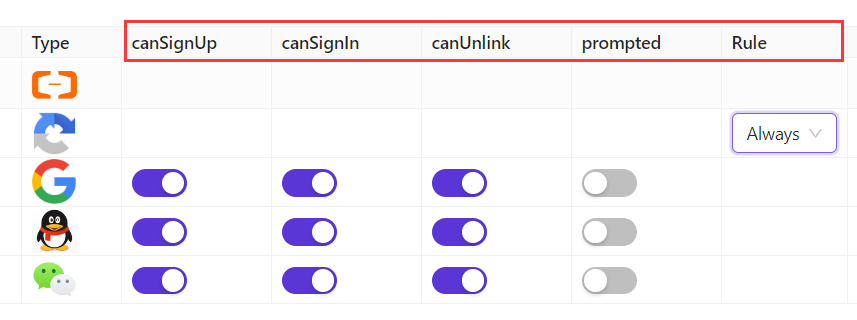
-
Speichern Sie die Anwendung.