Casdoor as an open-source SAML 2.0 identity provider (IdP)
Casdoor is a SAML 2.0 identity provider (IdP). This page explains what you configure in the service provider (SP) and in Casdoor, and which user data the SAML response carries. For step-by-step guides for specific service providers, see the other pages of this section.
Configure the service provider
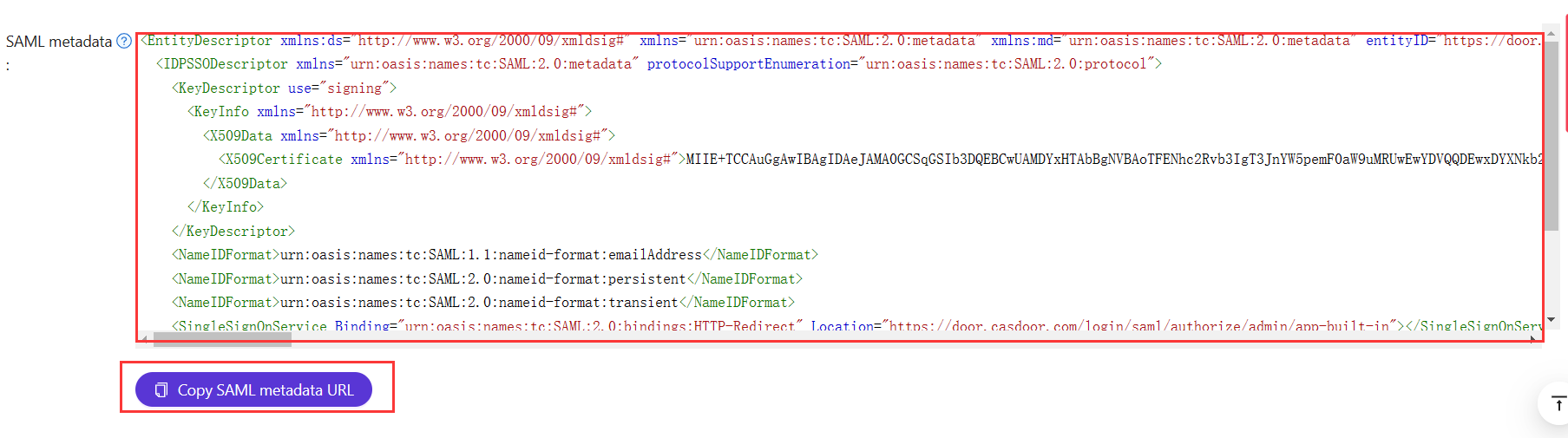
A service provider typically asks for three values: the single sign-on URL, the issuer, and the public certificate of the IdP. Most service providers read all three from the SAML metadata of the IdP, by URL or from an uploaded file.
The metadata URL of a Casdoor application is:
<casdoor-host>/api/saml/metadata?application=admin/<application-name>
For example, for Casdoor at https://door.casdoor.com and the application app-built-in:
https://door.casdoor.com/api/saml/metadata?application=admin/app-built-in
To get the URL in the Casdoor admin console, open the edit page of the application, go to the SAML tab, and click Copy SAML metadata URL. To download the metadata as an XML file, open the URL in a browser.
Configure the Casdoor application
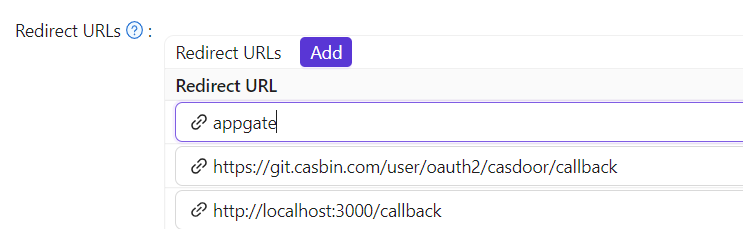
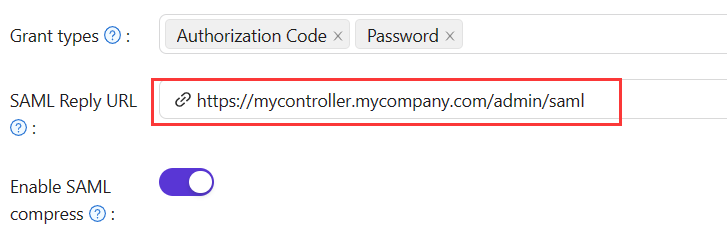
On the edit page of the application, set two fields:
| Field | Value |
|---|---|
| Redirect URLs | The identifier of the service provider, which the SP calls the audience or the entity ID. Enter exactly the same value as in the SP |
| SAML reply URL | The Assertion Consumer Service (ACS) URL of the SP, which receives and verifies the SAML response. Leave it empty to use the redirect binding |
Response binding
Casdoor can send the SAMLResponse with an HTTP POST request or an HTTP GET request. Choose what your service provider supports:
| SAML reply URL | Binding | Where Casdoor sends the response |
|---|---|---|
| Set | POST | To the reply URL. The reply URL overrides the AssertionConsumerServiceURL of the SAMLRequest |
| Empty | GET | To the AssertionConsumerServiceURL that Casdoor reads from the SAMLRequest |
When Casdoor itself signs users in at an external SAML IdP, such as Azure AD, the external IdP posts its SAML response to the /api/acs endpoint of Casdoor. This endpoint accepts cross-origin POST requests, so that an IdP on another domain can send the response.
Start the sign-in from Casdoor (IdP-initiated SSO)
In IdP-initiated SSO, the user starts at Casdoor instead of at the service provider. Casdoor sends the SP a SAML response that no AuthnRequest asked for. Use it for portal links and bookmarks.
-
On the SAML tab of the application, set SAML reply URL to the ACS URL of the SP. Without it, the sign-in fails with
the SAML reply URL should not be empty for IdP-initiated SSO. -
Make sure that the first entry of Redirect URLs is the entity ID of the SP. Casdoor uses it as the audience of the assertion.
-
Save the application. The SAML tab then shows the IdP-initiated SSO URL:
<casdoor-host>/login/saml/authorize/admin/<application-name> -
Click Copy IdP-initiated SSO URL, and give the URL to your users.
A user who opens the URL signs in to Casdoor, and Casdoor posts the SAML response to the reply URL with the HTTP-POST binding. The response has no InResponseTo attribute, because no request preceded it. To pass a RelayState to the SP, add it to the URL as a query parameter, for example ?RelayState=/dashboard.
Sign users out of the SP (single logout)
Casdoor supports SAML Single Logout (SLO) in both directions. To turn it on, set SAML single logout URL on the SAML tab of the application to the SingleLogoutService URL of the SP.
The metadata of the application announces the SingleLogoutService of Casdoor, with the HTTP-Redirect and the HTTP-POST bindings, at:
<casdoor-backend-host>/api/saml/logout/admin/<application-name>
Every assertion carries a SessionIndex in its AuthnStatement, which identifies the Casdoor session of the sign-in.
SP-initiated logout
When a user signs out at the SP, the SP sends a LogoutRequest to the SingleLogoutService of Casdoor, with GET or POST, in the SAMLRequest parameter and an optional RelayState:
- Casdoor checks the request. Its
Issuermust be in Redirect URLs, it must contain aNameID, and the application must have a SAML single logout URL. - Casdoor ends the Casdoor sessions that the
SessionIndexvalues of the request name. Without aSessionIndex, it ends only the browser session that sent the request, and only if theNameIDbelongs to its user. - Casdoor signs the user out of the other applications of those sessions, with OIDC back-channel logout and SAML logout requests.
- Casdoor answers with a signed
LogoutResponseover the binding of the request: a redirect to the SAML single logout URL forGET, or a form that the browser posts there forPOST.
IdP-initiated logout
When a user signs out of Casdoor, through /api/logout or through /api/sso-logout, Casdoor sends a signed LogoutRequest to the SAML single logout URL of every SAML application that the user signed in to in the ended sessions. The same happens when Casdoor ends sessions for other reasons, for example when a user is forbidden to sign in, or when a new sign-in exceeds the session limit. Casdoor posts these requests from the server, as with OIDC back-channel logout, not through the browser. When the SP sends its LogoutResponse to the same SingleLogoutService endpoint, Casdoor checks that its Issuer is in Redirect URLs and that its status is Success.
User profile in the response
By default, the SAMLResponse carries three attributes of the user:
| XML Attribute Name | User field |
|---|---|
| DisplayName | displayName |
| Name | name |
If the service provider needs only the NameID and no attributes, turn on Disable SAML attributes on the application. Casdoor then leaves the attributes out of the response. This avoids XML namespace problems with service providers that validate the response strictly.
Add SAML attributes
If the service provider requires other attributes, add them to the SAML attributes table of the application. A value can contain the following variables: $user.owner, $user.name, $user.displayName, $user.email, $user.id, $user.phone, $user.roles, $user.permissions, and $user.groups.
For example, the following two rows:
| Name | Name format | Value |
|---|---|---|
https://www.aliyun.com/SAML-Role/Attributes/RoleSessionName | Unspecified | $user.name |
https://www.aliyun.com/SAML-Role/Attributes/Role | Unspecified | acs:ram::1879818006829152:role/$user.roles,acs:ram::1879818006829152:saml-provider/testa |
Produce these attributes in the response:
<saml:Attribute Name="https://www.aliyun.com/SAML-Role/Attributes/RoleSessionName" NameFormat="urn:oasis:names:tc:SAML:2.0:attrname-format:unspecified">
    <saml:AttributeValue xsi:type="xs:string">admi122n@outlook.com</saml:AttributeValue>
</saml:Attribute>
<saml:Attribute Name="https://www.aliyun.com/SAML-Role/Attributes/Role" NameFormat="urn:oasis:names:tc:SAML:2.0:attrname-format:unspecified">
    <saml:AttributeValue xsi:type="xs:string"> acs:ram::1879818006829152:role/role1,acs:ram::1879818006829152:saml-provider/testa</saml:AttributeValue>
    <saml:AttributeValue xsi:type="xs:string"> acs:ram::1879818006829152:role/role2,acs:ram::1879818006829152:saml-provider/testa</saml:AttributeValue>
</saml:Attribute>
Control the assertion signature
Casdoor always signs the SAML response. To also sign the assertion inside the response, turn on Enable SAML assertion signature on the application. The option is off by default.
Versions 2.81.0 to 2.247.x always signed the assertion as well. Some service providers, such as Sentry, reject responses with a signed assertion, so since version 2.248.0, Casdoor signs only the response envelope unless the option is on. The signed response keeps the assertion authentic too.
Test with a Go service provider
gosaml2 is a SAML 2.0 implementation for service providers in Go. The following program uses it to test Casdoor as an IdP.
The example assumes Casdoor at http://localhost:7001/ and the application app-built-in of the organization built-in.
-
Add
http://localhost:6900/acs/exampleandhttp://localhost:6900/saml/acs/exampleto the Redirect URLs ofapp-built-in. -
Run the program:
import (
    "crypto/x509"
    "fmt"
    "net/http"

    "io/ioutil"

    "encoding/base64"
    "encoding/xml"

    saml2 "github.com/russellhaering/gosaml2"
    "github.com/russellhaering/gosaml2/types"
    dsig "github.com/russellhaering/goxmldsig"
)

func main() {
    res, err := http.Get("http://localhost:7001/api/saml/metadata?application=admin/app-built-in")
    if err != nil {
        panic(err)
    }

    rawMetadata, err := ioutil.ReadAll(res.Body)
    if err != nil {
        panic(err)
    }

    metadata := &types.EntityDescriptor{}
    err = xml.Unmarshal(rawMetadata, metadata)
    if err != nil {
        panic(err)
    }

    certStore := dsig.MemoryX509CertificateStore{
        Roots: []*x509.Certificate{},
    }

    for _, kd := range metadata.IDPSSODescriptor.KeyDescriptors {
        for idx, xcert := range kd.KeyInfo.X509Data.X509Certificates {
            if xcert.Data == "" {
                panic(fmt.Errorf("metadata certificate(%d) must not be empty", idx))
            }
            certData, err := base64.StdEncoding.DecodeString(xcert.Data)
            if err != nil {
                panic(err)
            }

            idpCert, err := x509.ParseCertificate(certData)
            if err != nil {
                panic(err)
            }

            certStore.Roots = append(certStore.Roots, idpCert)
        }
    }

    randomKeyStore := dsig.RandomKeyStoreForTest()

    sp := &saml2.SAMLServiceProvider{
        IdentityProviderSSOURL:      metadata.IDPSSODescriptor.SingleSignOnServices[0].Location,
        IdentityProviderIssuer:      metadata.EntityID,
        ServiceProviderIssuer:       "http://localhost:6900/acs/example",
        AssertionConsumerServiceURL: "http://localhost:6900/v1/_saml_callback",
        SignAuthnRequests:           true,
        AudienceURI:                 "http://localhost:6900/saml/acs/example",
        IDPCertificateStore:         &certStore,
        SPKeyStore:                  randomKeyStore,
    }

    http.HandleFunc("/v1/_saml_callback", func(rw http.ResponseWriter, req *http.Request) {
        err := req.ParseForm()
        if err != nil {
            rw.WriteHeader(http.StatusBadRequest)
            return
        }
        samlReponse := req.URL.Query().Get("SAMLResponse")
        assertionInfo, err := sp.RetrieveAssertionInfo(samlReponse)
        if err != nil {
            fmt.Println(err)
            rw.WriteHeader(http.StatusForbidden)
            return
        }
        fmt.Println(assertionInfo)
        if assertionInfo.WarningInfo.InvalidTime {
            fmt.Println("here12:", assertionInfo.WarningInfo.InvalidTime)
            rw.WriteHeader(http.StatusForbidden)
            return
        }

        if assertionInfo.WarningInfo.NotInAudience {
            fmt.Println(assertionInfo)
            fmt.Println("here13:", assertionInfo.WarningInfo.NotInAudience)
            rw.WriteHeader(http.StatusForbidden)
            return
        }

        fmt.Fprintf(rw, "NameID: %s\n", assertionInfo.NameID)

        fmt.Fprintf(rw, "Assertions:\n")

        for key, val := range assertionInfo.Values {
            fmt.Fprintf(rw, "  %s: %+v\n", key, val)
        }
        fmt.Println(assertionInfo.Values.Get("FirstName"))
        fmt.Fprintf(rw, "\n")

        fmt.Fprintf(rw, "Warnings:\n")
        fmt.Fprintf(rw, "%+v\n", assertionInfo.WarningInfo)
    })

    println("Visit this URL To Authenticate:")
    authURL, err := sp.BuildAuthURL("")
    if err != nil {
        panic(err)
    }

    println(authURL)

    println("Supply:")
    fmt.Printf("  SP ACS URL      : %s\n", sp.AssertionConsumerServiceURL)

    err = http.ListenAndServe(":6900", nil)
    if err != nil {
        panic(err)
    }
}
The console shows:
Visit this URL To Authenticate:
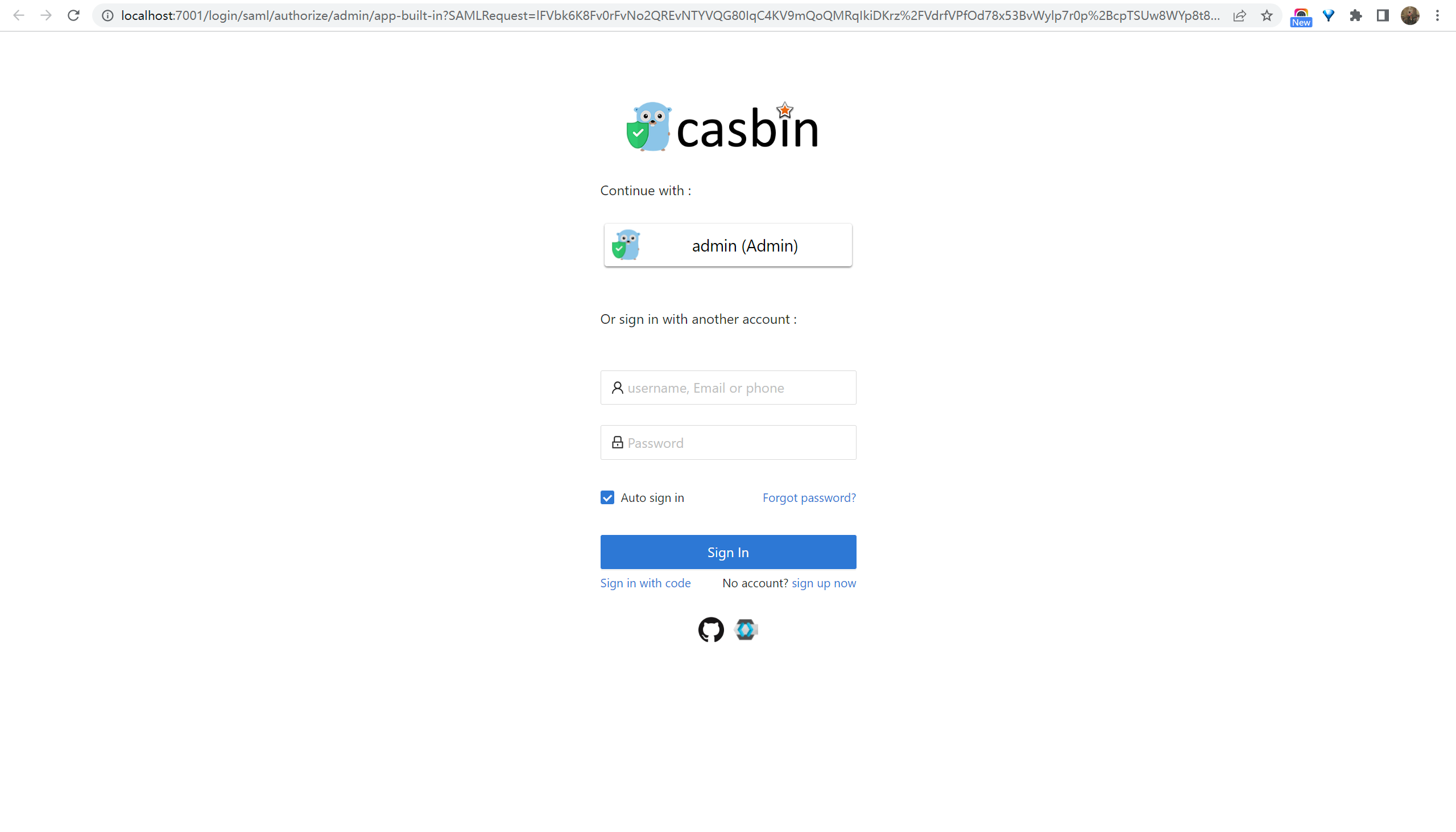
http://localhost:7001/login/saml/authorize/admin/app-built-in?SAMLRequest=lFVbk6K8Fv0rFvNo2QR...
Supply:
SP ACS URL : http://localhost:6900/v1/_saml_callback -
Open the URL. The Casdoor sign-in page appears.
-
Sign in. The program prints the SAML response.

See also
- Keycloak (SAML)
- AWS Client VPN (SAML)
- SAML providers: Sign users in to Casdoor with an external SAML IdP.
- What is SAML?: Assertions, bindings, metadata, and how a SAML SSO login works.
- How to test a SAML SSO integration
- SAML 2.0 on Wikipedia