SAML providers
A SAML provider lets users sign in to Casdoor with an external SAML 2.0 identity provider (IdP), such as Keycloak, Azure AD, or Google Workspace. Casdoor is the service provider (SP). The IdP authenticates the user, and Casdoor never sees the credentials.
For the opposite direction, with Casdoor as the IdP of other applications, see Use Casdoor as a SAML identity provider.
Terms
| Term | Meaning |
|---|---|
| Identity provider (IdP) | The service that holds the identities and authenticates users, such as Keycloak or Azure AD |
| Service provider (SP) | The application that relies on the IdP. Here, Casdoor |
| Assertion Consumer Service (ACS) | The endpoint of the SP that receives the SAML assertions of the IdP |
How the sign-in works
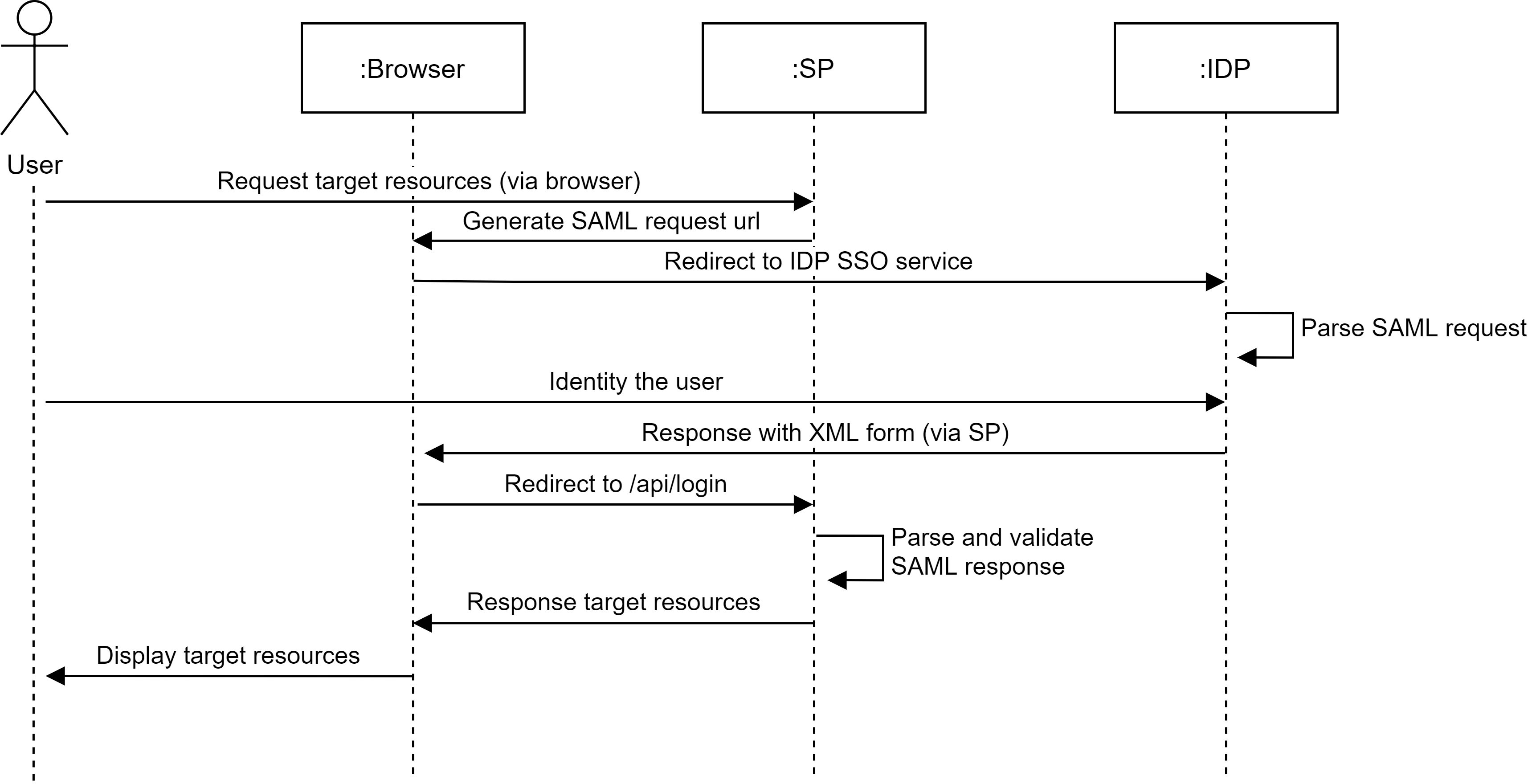
Supported types
| Type | IdP |
|---|---|
Aliyun IDaaS | Alibaba Cloud IDaaS. See Alibaba Cloud IDaaS |
Keycloak | Keycloak. See Keycloak |
Custom | Any SAML 2.0 IdP. See Custom SAML, Azure AD, and Google Workspace |
| Alibaba Cloud IDaaS | Keycloak | Custom |
|---|---|---|
 |  |  |
| ✅ | ✅ | ✅ |
Values for the IdP
When you register Casdoor at the IdP, use the following values. Replace <your-casdoor-domain> with the domain of Casdoor, for example door.example.com.
| Setting at the IdP | Value |
|---|---|
| ACS URL | https://<your-casdoor-domain>/api/acs |
| SP entity ID | The same URL: https://<your-casdoor-domain>/api/acs |
| Binding | HTTP POST. The /api/acs endpoint accepts only POST requests |
Assertion checks
Casdoor accepts a SAML response only if its assertion passes these checks:
| Check | Error if it fails |
|---|---|
The current time is within NotBefore and NotOnOrAfter of the assertion | the SAML assertion is not within its validity period (NotBefore / NotOnOrAfter) |
The AudienceRestriction is https://<your-casdoor-domain>/api/acs, the SP entity ID | the SAML assertion is not issued for this service provider (AudienceRestriction mismatch) |
InResponseTo is the ID of the authentication request that Casdoor sent in the same browser session | the SAML assertion does not answer the AuthnRequest of this login (InResponseTo: <id>) |
| The ID of the assertion wasn't used before | the SAML assertion has already been used: <id> |
Casdoor stores the ID of the authentication request in the session when the user clicks the SAML button on the sign-in page. As a result, Casdoor accepts only sign-ins that start at Casdoor. It rejects IdP-initiated responses, which a user starts from the portal of the IdP, because they answer no request.
Casdoor keeps the IDs of used assertions until the NotOnOrAfter of the assertion, or for 1 hour if the assertion has none. It keeps them in memory, or in Redis if redisEndpoint is set in conf/app.conf. Set redisEndpoint if you run several Casdoor instances, so that they share the list. If Casdoor can't reach Redis at startup, it uses memory. See the Configuration reference.
Usernames
Casdoor reads the user from the attributes of the SAML assertion, according to the attribute mapping of the provider. If the assertion has no username, Casdoor uses, in this order:
- The email address in the assertion
- The NameID of the assertion
Sign-in therefore works with IdPs that don't send a separate username attribute by default, such as Azure AD.
The SAML button on the sign-in page
Casdoor always shows a button for each SAML provider on the sign-in page, even if it is the only sign-in method. Unlike an OAuth provider, a SAML provider never redirects the user automatically. Users choose SAML explicitly, which avoids unexpected redirects where SAML is one option among several.