Overview
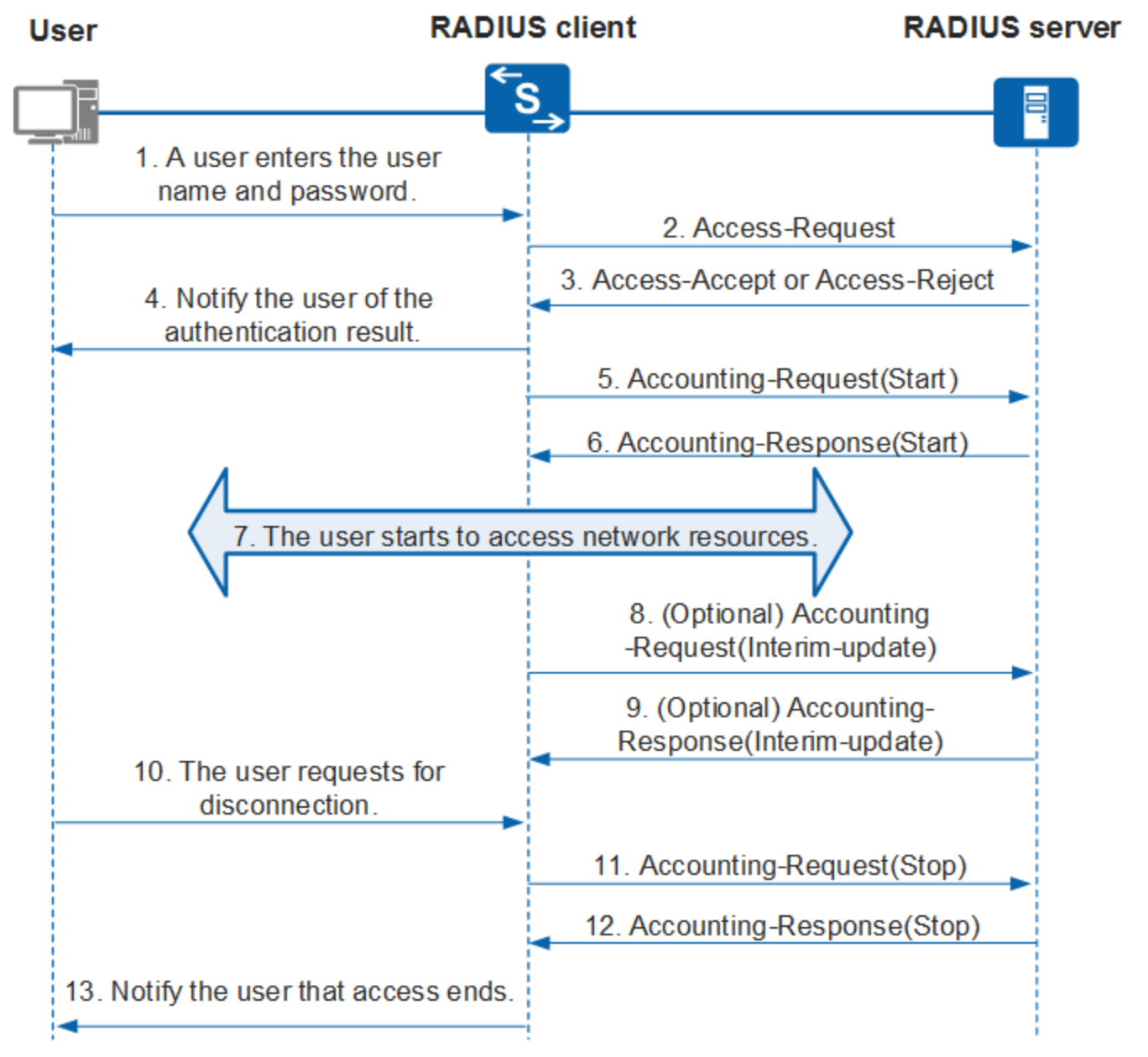
Casdoor can act as a RADIUS server. RADIUS clients (e.g. a NAS or any host with RADIUS client software) send authentication and accounting requests to Casdoor.
Configuration
In conf/app.conf set the RADIUS port, the default organization, and the shared secret:
radiusServerPort = 1812
radiusDefaultOrganization = "built-in"
radiusSecret = "secret"
Then start Casdoor; the RADIUS server will listen on the configured UDP port. Authentication and accounting requests both arrive on this port: Casdoor doesn't open a separate accounting port such as 1813, so point the accounting server of your clients at radiusServerPort too.
radiusSecret is one shared secret for every RADIUS client. Casdoor has no per-client secrets.
radiusDefaultOrganization is the organization that Casdoor uses when a request doesn't name one. If it's empty, Casdoor uses built-in.
Turn on RADIUS for an organization
The RADIUS server serves only the users of organizations that have Enable RADIUS turned on. The switch is off by default, and only global administrators can change it.
- In the Casdoor admin console, open the organization edit page.
- Turn on Enable RADIUS and save.
For an organization with Enable RADIUS off, Casdoor answers every Access-Request with Access-Reject and doesn't answer Accounting-Requests at all. If you used the RADIUS server before this switch existed, turn it on for each organization whose users sign in through RADIUS, or those sign-ins start to fail after the upgrade.
Supported messages
- Access-Request — The client sends an auth request; Casdoor accepts or rejects based on the user and replies with
Access-AcceptorAccess-Reject. For users with multi-factor authentication (MFA), Casdoor replies withAccess-Challengefirst. See MFA. - Accounting-Request — The client sends start/interim/stop accounting; Casdoor records it and replies with
Accounting-Response.
Casdoor supports only PAP: the password must arrive in the User-Password attribute. CHAP, MS-CHAPv2, and EAP methods, such as PEAP or EAP-TTLS, aren't supported. For EAP, put a RADIUS server such as FreeRADIUS in front that terminates EAP and forwards the password to Casdoor with PAP.
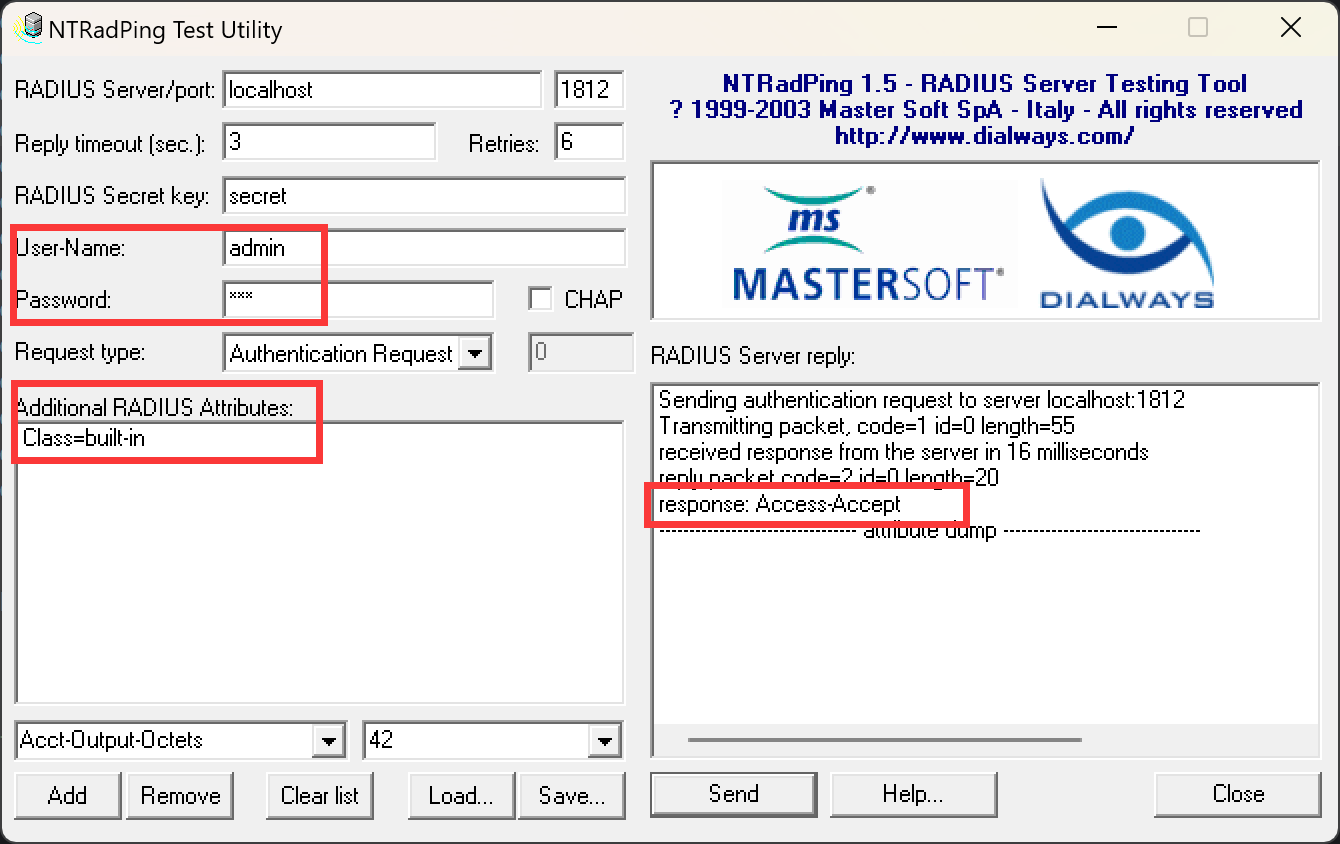
Users in Casdoor belong to an organization. Set the RADIUS request’s Class attribute to the user’s organization name so Casdoor can resolve the user correctly. Without a Class attribute, Casdoor uses radiusDefaultOrganization. In an Accounting-Request, the User-Name can also carry the organization, as <organization>/<username>.
Sign-in policy
Besides a wrong password, Casdoor replies with Access-Reject when:
- The user's organization has Disable signin turned on.
- The user must change the password first, or must set up the MFA that the organization requires. The user has to finish that on the Casdoor sign-in page before a RADIUS sign-in works.
MFA
When the user has MFA turned on, a correct password isn't enough:
- Casdoor replies to the Access-Request with
Access-Challenge, a State attribute, and the Reply-Messageplease enter OTP, which asks for a TOTP code. - The client sends a second Access-Request with the same User-Name, the same State, and the time-based one-time password (TOTP) from the user's authenticator app in User-Password. The State is valid for 120 seconds and only once.
- Casdoor replies with
Access-Acceptif the passcode is correct, otherwise withAccess-Reject.
Only TOTP (authenticator app) MFA works over RADIUS. A user whose MFA is SMS or email only still gets the challenge but can't answer it, so the sign-in is rejected.
Wrong passcodes count against the Failed signin limit of the user's application: the application that the user signed up with, or else the default application of the organization. When the limit is reached, Casdoor rejects the user's passcodes for Failed signin frozen time minutes. This counter is separate from the one for wrong passwords.
Skip MFA for RADIUS
Some RADIUS clients can't answer an Access-Challenge, for example WPA2/WPA3-Enterprise Wi-Fi behind a RADIUS server that terminates EAP. For them, turn on Skip MFA for RADIUS on the organization edit page. Casdoor then replies with Access-Accept after the password check alone, without a challenge, for all users of the organization. MFA for web sign-in doesn't change. The switch is off by default, and only global administrators can change it.
Message-Authenticator
The Message-Authenticator attribute (RFC 2869) protects RADIUS packets against the Blast-RADIUS attack (CVE-2024-3596). The built-in RADIUS server handles it this way:
- When an Access-Request carries a Message-Authenticator, Casdoor verifies it with the shared secret. It drops a request with a wrong one without replying, and it adds a Message-Authenticator to its reply.
- When an Access-Request has no Message-Authenticator, Casdoor processes it as before and replies without one.
Configure your RADIUS clients to send the Message-Authenticator attribute.