Database syncer
The database syncer connects to an external database and syncs user data into Casdoor. A demo users table can be imported from the template XLSX.

Create a syncer
Go to Syncers and create a new syncer with the following. Save when done.
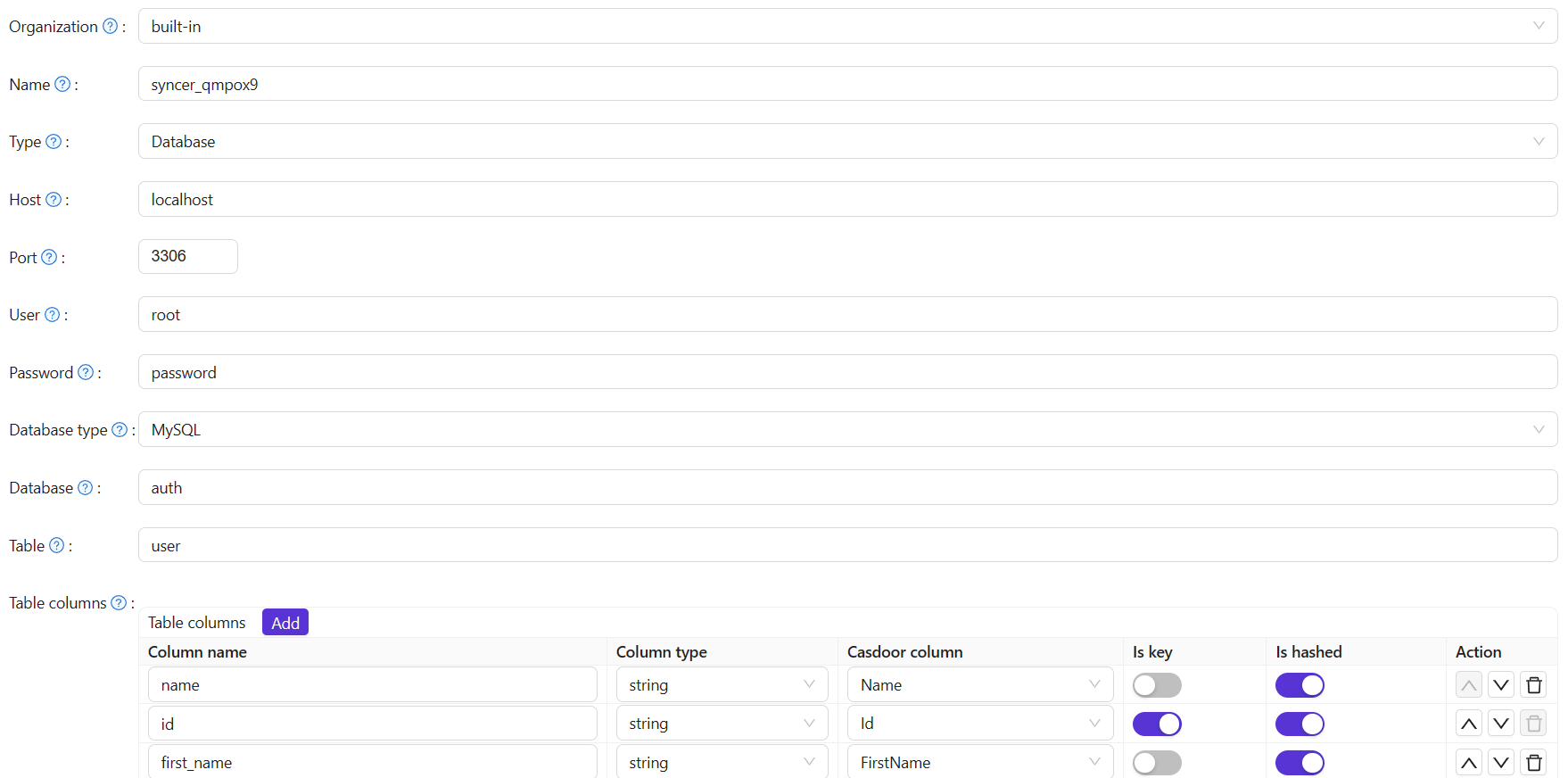
Fill at least ID and Name in the Casdoor column mapping. Other useful fields include createdTime, Password, and DisplayName.
Required fields
| Field | Description |
|---|---|
| Organization | Organization to import users into. |
| Name | Syncer name. |
| Type | Database. |
| Host, Port, User, Password | Source database connection. |
| Database type | MySQL, PostgreSQL, SQL Server, Oracle, or SQLite (Xorm-supported). |
| Database | Source database name. |
| Table | Source user table name. It must start with a letter and contain only letters, digits and underscores, optionally prefixed with a schema, as in <schema>.<table>. |
| Table columns | Column name (source), Column type (source), Casdoor Column (Casdoor user field). |
Optional fields
| Field | Description |
|---|---|
| Is hashed | If enabled, sync runs only when fields included in the hash change; other field-only changes do not trigger sync. |
| Is key | Marks the primary key used to match source and Casdoor users. At least one column must be key; if none is set, the first is used. |
| Avatar base URL | If set and source user.avatar does not start with http, Casdoor stores Avatar base URL + user.avatar. |
| Affiliation table | Table used to sync user affiliation. The name follows the same rules as Table. Int codes can be mapped to names; see getAffiliationMap() and syncer_util (e.g. score for int→string mapping). |
Enable Is enabled and save; the syncer will run. You can also trigger a sync with the Sync button.
Connect through an SSH tunnel
If the source database is reachable only from a host that you can sign in to with SSH, Casdoor can connect through an SSH tunnel. SSH tunnels work with the database types MySQL, PostgreSQL and SQL Server.
- In the syncer, set SSH type to Password or Cert. The SSH fields appear.
- Fill in SSH host, SSH port and SSH user.
- With Password, fill in SSH password. With Cert, select in SSH cert a Casdoor cert that holds the SSH private key.
- Optionally, paste the SSH server's public key into SSH host key. It accepts an
authorized_keysline, aknown_hostsline, or aSHA256:fingerprint. - Set Host and Port to the database address as seen from the SSH host, for example
127.0.0.1and3306, and save.
If SSH host key is empty, Casdoor accepts the key that the SSH server presents on the first connection and saves it into SSH host key (trust on first use). Every later connection must present the same key, otherwise the sync fails with an error that starts with "the SSH host key of <ssh-host> does not match the saved one" and shows the key that the server sent.
A host key mismatch can mean that someone intercepts the connection. Clear SSH host key only if you know that the server's key was changed on purpose. Casdoor then saves the new key on the next connection.
When you change SSH host or SSH port without editing SSH host key, Casdoor clears the saved key, and the next connection saves the key of the new server.
Allowed database hosts
Casdoor limits which databases a syncer can connect to:
- A syncer never connects to Casdoor's own database, that is, the database named by
dbNameinconf/app.confon Casdoor's database server. The error reads "the database:<database>of the syncer is Casdoor's own database, which cannot be synced". - Another database on Casdoor's database server is refused with "the host:
<host>:<port>of the syncer is Casdoor's own database server, which cannot be synced", unless the host is a trusted database host. - For syncers of organizations other than
built-in, and whenever someone other than a global administrator saves, tests or runs a syncer, the host must be an Internet address. With an SSH tunnel, Casdoor checks SSH host instead of Host. A host that resolves to a private, loopback or other intranet address is refused with "the host:<host>is not allowed, only Internet addresses can be requested", unless it's a trusted database host. - Only global administrators can use SQLite syncers. SQLite syncers skip the host checks.
To let the syncers of an organization connect to an intranet database or to another database on Casdoor's database server, a global administrator adds the host to the organization's Trusted database hosts, as a comma-separated list of host (any port) or host:port entries. With an SSH tunnel, the Internet-address check applies to the SSH host, so list that one. See Organization overview.

Update
With Table columns configured for key mapping, differences on the key between source and Casdoor trigger updates:
- Update in source table — changes sync to Casdoor.
- Update in Casdoor — changes sync back to source.
Add
When row counts differ, the syncer adds rows to the table with fewer rows, using the key to match:
- Add user in source table:
- Add user in Casdoor table: