Overview
Casdoor is built on OAuth and uses tokens for user authentication and authorization.
Access token and ID token
A sign-in returns two different JSON Web Tokens (JWTs):
- The access token is for calling APIs. Its
tokenTypeclaim isaccess-token. - The ID token tells your application who signed in. Its
tokenTypeclaim isid-token.
Both tokens carry the same user claims, in the same Token format, and are signed with the same key. They differ in these claims:
| Claim | Access token | ID token |
|---|---|---|
tokenType | access-token | id-token |
jti | Its own ID | Its own ID |
aud | The client ID, or the resource of RFC 8707, or the audience of a token exchange | Always the client ID |
at_hash, c_hash | Not present | Present in the cases that OpenID Connect defines |
For a shared application, the aud of both tokens is <client-id>-org-<organization>, the client ID of the application for the organization of the user. Because the two tokens are separate, one can't be used in place of the other, as RFC 8725, section 3.12, requires. Send the access token to APIs, and use the ID token only to read the identity of the user.
The /api/login endpoint returns the ID token in the data3 field of its response.
Token fields
Casdoor stores each issued token as a record with these fields:
| Field | Description |
|---|---|
owner, name | The ID of the token record |
createdTime | When Casdoor issued the token |
application | The application that the token was issued to |
organization, user | The user of the token |
code | The authorization code that the token was issued for |
accessToken, refreshToken, idToken | The three tokens. Casdoor also stores a hash of each one, in accessTokenHash, refreshTokenHash, and idTokenHash |
expiresIn | The lifetime of the access token, in seconds. 0 means that Casdoor has revoked the token |
scope | The granted scope |
tokenType | Bearer, or DPoP for a token bound with DPoP |
grantType | The grant that issued the token, when it matters for refreshing |
resource | The resource or the token exchange audience that the token is bound to |
sessionId | The Casdoor browser session in which the user signed in, if any |
Token lifecycle and invalidation
When a user signs in, Casdoor issues an access token and a refresh token. The access token is used for API authentication; the refresh token is used to obtain new access tokens without re-authenticating.
To revoke a token, Casdoor sets its expiresIn to 0. The token introspection endpoint then returns "active": false, and the refresh endpoint rejects the refresh token with invalid_grant and refresh token is expired.
When Casdoor revokes tokens
| Event | Tokens that Casdoor revokes |
|---|---|
The user signs out with SSO logout and logoutAll=true | All tokens of the user |
| The user signs out of one session, or an administrator ends a session on the Sessions page | The tokens that were issued in that session |
The user's password is changed through /api/set-password, by the user, by an administrator, or with the forgot-password flow | All tokens of the user, in all applications. Applications must sign the user in again |
| A new sign-in to an application with Enable exclusive signin on and Max sessions at most 1 | The earlier tokens of the user for that application. See Exclusive sign-in |
| The user is forbidden to sign in, or deleted | All tokens of the user |
RP-initiated logout with id_token_hint | The token of the hint |
Tokens that were issued without a browser session, such as tokens of the client credentials grant, aren't affected by the end of a session. A Casdoor session that was created from an access token ends when that token is revoked or has expired.
Automatic cleanup of expired tokens
Casdoor automatically deletes token records that have been expired for a while, so the token table doesn't grow without bound. A token is removed once it has been expired for longer than the retention period of its organization, counted from the token's own expiry time.
Set the retention period in Token retention days on the Advanced tab of the organization. Empty or 0 means the default of 30 days. Tokens of organizations that no longer exist use 30 days.
The cleanup job runs:
- once at startup, in the background, so it doesn't delay the start of the server
- daily at midnight, server time
The cleanup deletes up to 1,000 tokens per batch, and only affects already-expired tokens past the retention period. Active tokens are never touched.
Token format options
When issuing JWTs, choose among four formats:
JWTJWT-EmptyJWT-CustomJWT-Standard
The token format options behave as follows:
- JWT: includes all User fields in the token payload
- JWT-Empty: includes only a short, fixed set of User fields:
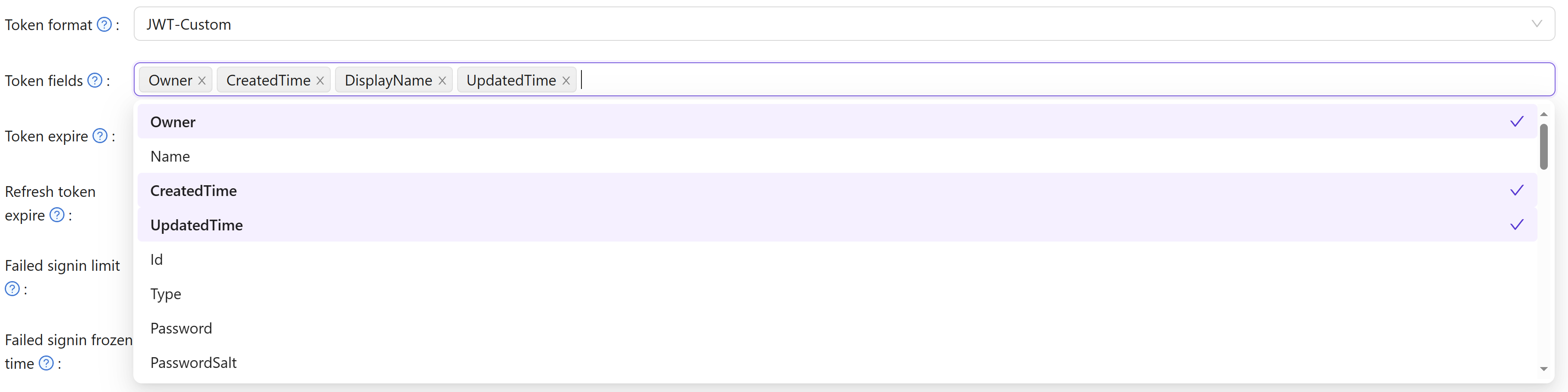
owner,name,id,displayName,avatar,email,email_verifiedandphone - JWT-Custom: includes the custom User Token fields you select (choose attributes in the Token fields)
- JWT-Standard: includes standard OIDC claims (email, phone, gender, address) in OIDC-compliant format
Set the format in Token format on the OIDC/OAuth tab of the application. An empty value means JWT. A new application gets the Default token format of its organization, and the Default token fields of its organization as its Token fields, from the Advanced tab of the organization. Changing these defaults doesn't change existing applications. Applications that clients create through dynamic client registration get the same defaults.
Only JWT-Standard produces an OIDC-compliant address claim. In JWT, JWT-Empty, and JWT-Custom formats the address field is included as a raw []string array (the user's Address property), which does not conform to the OIDC specification. If your application parses the address claim as an object, use the JWT-Standard token format.
Group format
Token group format on the OIDC/OAuth tab of the application decides how the groups claim names the groups of the user, in the response of /api/userinfo and in the token formats that carry the claim: JWT always, JWT-Custom only when Groups is selected in Token fields. JWT-Empty and JWT-Standard tokens have no groups claim:
| Option | Value in groups |
|---|---|
| ID (org/group) | <organization>/<group>. This is the default |
| Path (org/parent/group) | The full path of the group from its top group, such as <organization>/<parent-group>/<group> |
| Name (group) | <group> |
Path (org/parent/group) replaces the useGroupPathInToken option of conf/app.conf, which no longer exists.
Restricting fields with Token fields
The Token fields setting on the application (used to pick custom user attributes for the JWT-Custom format) also acts as a whitelist for the /userinfo endpoint.
- When Token fields is empty, no whitelist is applied: the token payload and the
/userinforesponse include their full default set of fields. This is the default behavior. - When Token fields lists one or more fields, only those fields are returned. Any user attribute not in the list is omitted from both the
JWT-Customtoken payload and the/userinforesponse.
The whitelist is matched against the underlying user-property names. For example, to expose the display name, email, and avatar through /userinfo, add Name, Email, and Avatar to Token fields. Fields still respect the requested OAuth scopes — for instance Email is only returned when the email scope is granted, Location (the address claim) only with the address scope, and Phone only with the phone scope. The sub and aud claims are always returned regardless of the whitelist.
Configuring Token fields restricts /userinfo, not only the token. If you previously relied on /userinfo returning every field, adding entries here will start filtering that response. Leave Token fields empty to keep the full response.
OIDC Address Claim
The OIDC specification defines the address claim as a JSON object with the following fields:
| Field | Description |
|---|---|
formatted | Full mailing address, formatted for display |
street_address | Street address component (may include house number, street name, P.O. box, etc.) |
locality | City or locality |
region | State, province, prefecture, or region |
postal_code | Zip code or postal code |
country | Country name |
How Casdoor maps user data to the address claim
Casdoor stores address information in two separate user fields:
Location(string): A general location string (e.g.,"New York"). This field is used as the plain-stringaddressvalue returned by the/api/userinfoendpoint when theaddressscope is requested.Address(array of strings): An array of address-line strings (e.g.,["123 Main St", "Anytown, NY 12345", "USA"]). This field is the source for the OIDC-compliantaddressclaim in JWT-Standard tokens.
JWT-Standard address claim
When the address scope is requested and the JWT-Standard format is used, Casdoor returns the following object in the token:
{
  "address": {
    "street_address": "123 Main St\nAnytown, NY 12345\nUSA",
    "formatted": "",
    "locality": "",
    "region": "",
    "postal_code": "",
    "country": ""
  }
}
The street_address field contains the user's Address array entries joined with newlines. The remaining OIDC address sub-fields (formatted, locality, region, postal_code, country) are currently empty because Casdoor stores the entire address as free-form lines in the Address array rather than in per-component fields.
Non-standard formats (JWT, JWT-Empty, JWT-Custom)
In JWT, JWT-Empty, and JWT-Custom token formats, the address field is the raw Address property of the user object — a JSON array of strings — not an OIDC address object:
{
  "address": ["123 Main St", "Anytown, NY 12345", "USA"]
}
OIDC clients that expect the address claim to be a JSON object (per the OIDC spec) will fail to parse this. Switch to JWT-Standard if you need a spec-compliant address claim in the token.
Standard OIDC Claims
All JWT token formats include these standard OpenID Connect claims in the payload:
sub- Subject identifier (unique user ID)email- User's email addressemail_verified- Boolean indicating whether the email address is verified: the user confirmed it with a code or a magic link of Casdoor, or the OAuth provider that created the user vouched for itnameorpreferred_username- User's display namepictureoravatar- User's avatar URL
The email_verified claim enables external applications using Casdoor as an identity provider to determine email verification status directly from the token without additional API calls.
When a user signs up through an OAuth provider, Casdoor takes the verification status of the email address from the provider. For example, Google reports it in its email_verified claim, and a Custom OAuth provider can map an emailVerified field. Providers such as GitHub, GitLab, Gitee, Facebook, LinkedIn, DingTalk, Lark, and Twitter count every email address that they return as verified.
The JWT format also carries the lastSigninTime and lastSigninIp fields of the user. In a token of the password grant, they describe the previous sign-in, because Casdoor records the sign-in after it issues the token. The time of the current sign-in is the iat claim.
Custom Token Attributes
With JWT-Custom format, define custom attributes and their data types. Each attribute has a Type field that controls how values are included in the JWT:
- Array: The attribute value will always be returned as an array, even if it contains a single element. This ensures compatibility with OIDC clients that expect array types for fields like roles, groups, or permissions.
- String: The attribute value will be returned as a single string (the first element if multiple values exist).
Empty attributes are automatically omitted from the token to keep the payload clean. When configuring attributes for roles, groups, or permissions, using the Array type is recommended for better OIDC compliance and compatibility with systems like Rancher and Keycloak.