Kubernetes
According to the Kubernetes documentation, the API Server of Kubernetes can be authenticated using OpenID Connect (OIDC). Este artículo le guiará sobre cómo configurar la autenticación en Kubernetes usando Casdoor.
Requisitos del entorno
Prerrequisitos:
- Un clúster de Kubernetes.
- A Casdoor application like this demo website.
- herramienta de comando kubectl (opcional).
Kubernetes oidc-issuer-url only accepts URLs which use the https:// prefix.
Por lo tanto, su aplicación Casdoor debe estar desplegada en un sitio web HTTPS.
Paso 1: Crear una Aplicación Casdoor y una Cuenta de Usuario para Autenticación
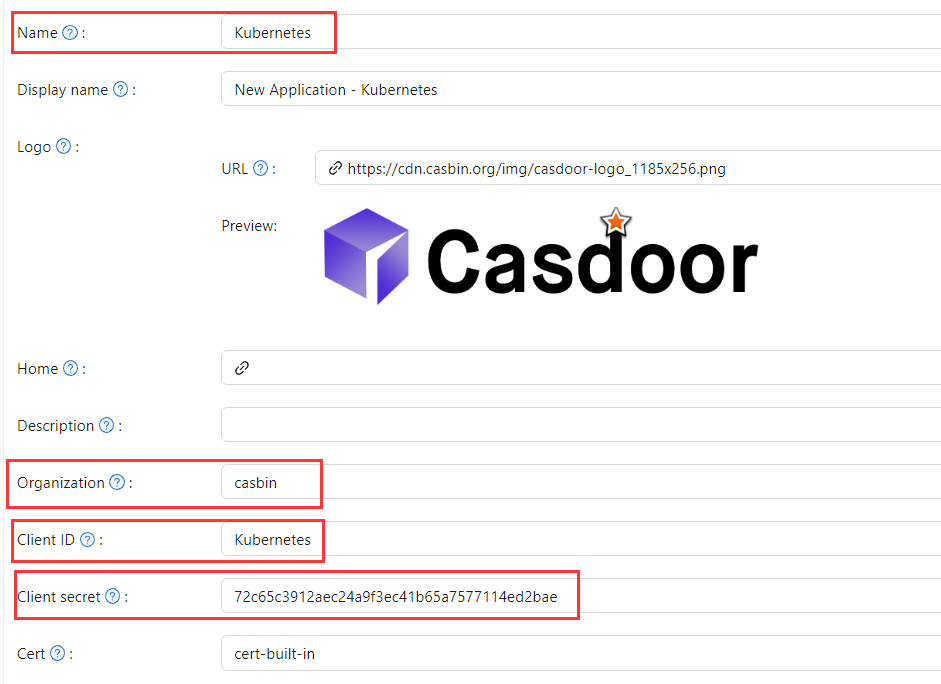
In Casdoor add an application (e.g. Kubernetes). Note Name, Organization, Client ID, and Client secret. Enable the grant types the cluster will use.

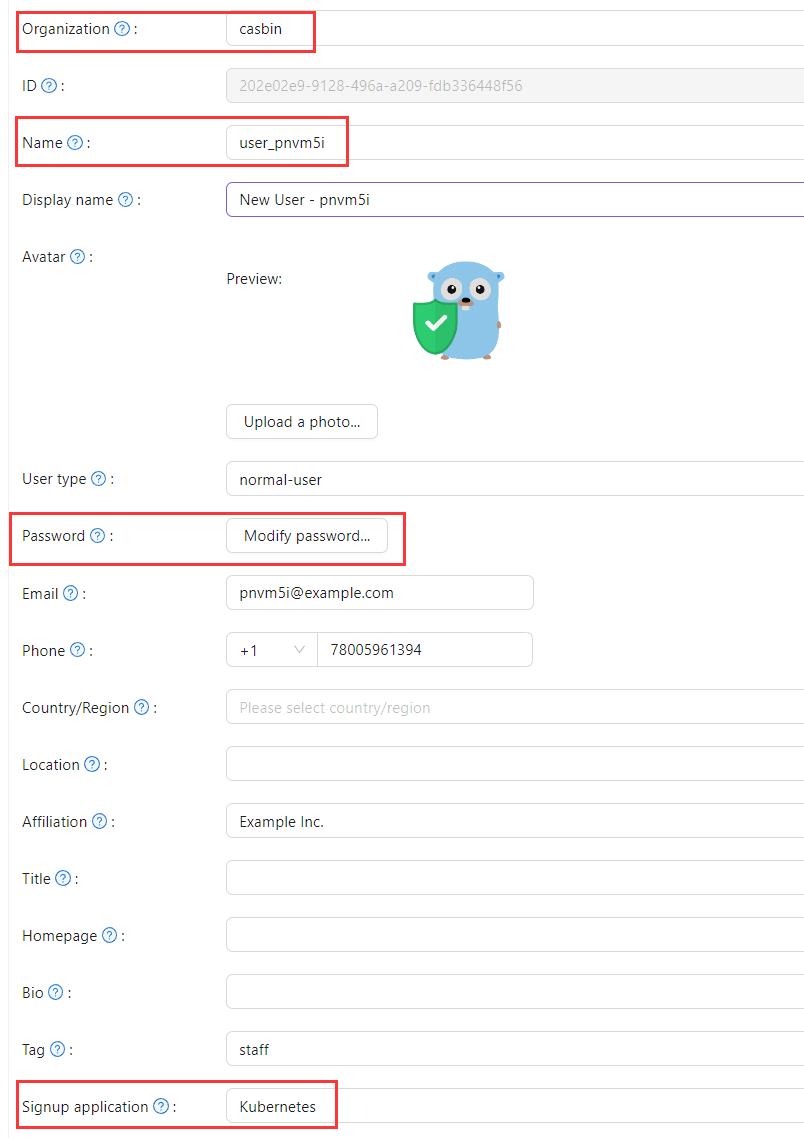
Add a user; set Organization and Signup application to the application you created.
Paso 2: Configurar el Servidor API de Kubernetes con Autenticación OIDC
To enable the OIDC plugin, set the following flags on the API server:
--oidc-issuer-url: URL of the provider that allows the API server to discover public signing keys.--oidc-client-id: A client id that all tokens must be issued for.
Este artículo utiliza minikube para la demostración. Configure the OIDC plugin for the minikube API server using the following command at startup:
minikube start --extra-config=apiserver.oidc-issuer-url=https://demo.casdoor.com --extra-config=apiserver.oidc-client-id=294b09fbc17f95daf2fe
Paso 3: Prueba la Autenticación OIDC
Obtener Información de Autenticación
Debido a la falta de un frontend en kubectl, la autenticación se puede realizar enviando una solicitud POST al servidor de Casdoor.
Here is the code in Python which sends a POST request to the Casdoor server
and retrieves the id_token and refresh_token:
import requests
import json

url = "https://demo.casdoor.com/api/login/oauth/access_token"
payload = json.dumps({
   "grant_type": "password",
   "client_id": "Kubernetes",
   "client_secret": "72c65c3912aec24a9f3ec41b65a7577114ed2bae",
   "username": "user_3u94sf",
   "password": "123456"
})
response = requests.request("POST", url, data=payload)

print(response.text)
Después de ejecutar este código, debería recibir una respuesta similar a la siguiente:
{
  "access_token": "xxx",
  "id_token": "yyy",
  "refresh_token": "zzz",
  "token_type": "Bearer",
  "expires_in": 72000,
  "scope": ""
}
Use the obtained id_token to authenticate with the Kubernetes API server.
Autenticación Basada en Solicitud HTTP
Agregue el token al encabezado de la solicitud.
curl https://www.xxx.com -k -H "Authorization: Bearer $(id_token)"
https://www.xxx.comis the Kubernetes API server deployment address.
Autenticación Basada en Cliente Kubectl
Método de Archivo de Configuración
Write the following configuration to the ~/.kube/config file.
Debe reemplazar cada elemento de configuración en el archivo de configuración anterior con los valores que obtuvo anteriormente.
users:
- name: minikube
  user:
    auth-provider:
      config:
        client-id: Kubernetes
        client-secret: 72c65c3912aec24a9f3ec41b65a7577114ed2bae
        id-token: $(id_token)
        idp-issuer-url: https://demo.casdoor.com
        refresh-token: $(refresh_token)
      name: oidc
Access the API server with kubectl. Intente ejecutar un comando de prueba.
kubectl cluster-info
Método de Argumento de Línea de Comando
Alternatively, pass the id_token in kubectl command-line parameters.
kubectl --token=$(id_token) cluster-info