Send notifications to Google Chat
This guide explains how to send the notifications of Casdoor to Google Chat. Casdoor authenticates with the JSON credentials of a service account, as Application Default Credentials use them.
Learning outcomes
- Add Google Chat as a notification provider with service account credentials.
What you need
- A Google Cloud service account with access to Google Chat, and its JSON key
- Administrator access to the Casdoor admin console
Add the provider in Casdoor
-
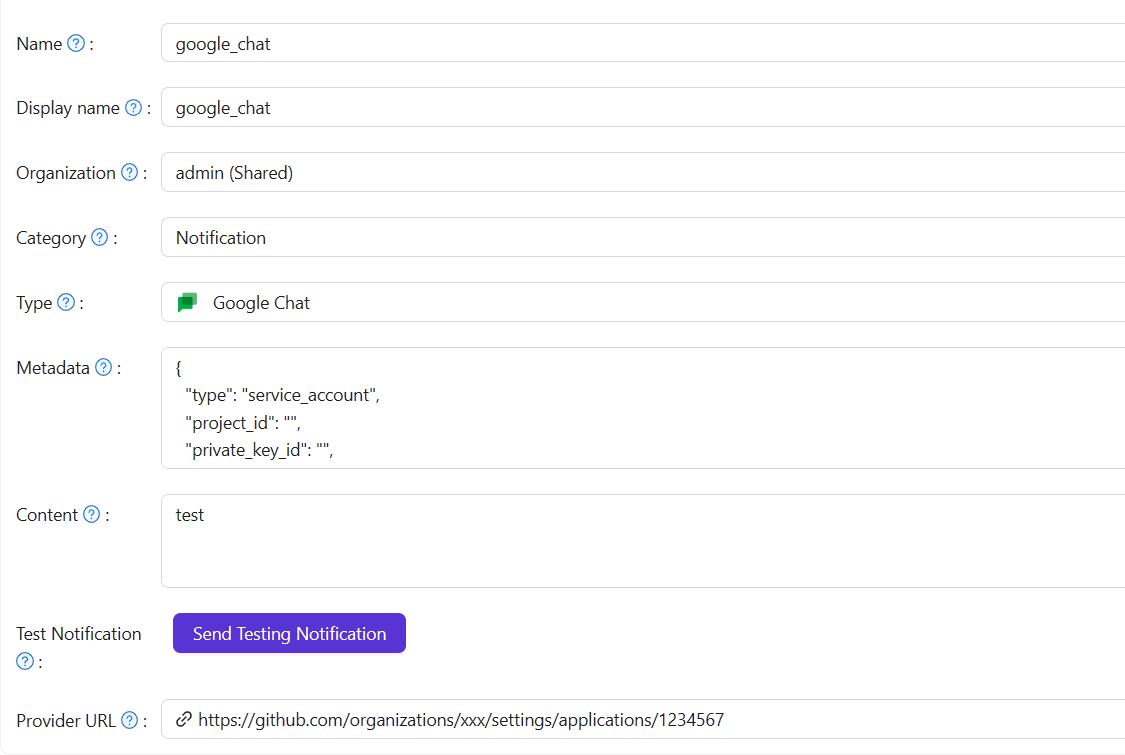
In the Casdoor admin console, go to Identity > Providers and add a provider.
-
Set Category to
Notificationand Type toGoogle Chat. -
Paste the complete JSON key of the service account into Metadata. The key has this form:
{
  "type": "service_account",
  "project_id": "",
  "private_key_id": "",
  "private_key": "",
  "client_email": "",
  "client_id": "",
  "auth_uri": "",
  "token_uri": "",
  "auth_provider_x509_cert_url": "",
  "client_x509_cert_url": ""
}
-
Click Send Testing Notification, and save the provider.