Step-up MFA
Step-up MFA lets an application ask a user who is already signed in for a fresh code of the MFA factor they enabled in Casdoor, right before a sensitive action such as approving a payment, approving a request or acting as another user.
- The user doesn't type the password again and doesn't go through the sign-in page again.
- Users enroll their second factor once, in Casdoor, and it works both at sign-in and at step-up.
- The application never sees or stores the TOTP secret, the email address, the phone number or the recovery codes.
- A passed check returns a short-lived, single-use proof token signed by Casdoor. The application's server redeems it before running the action.
Turn it on
Open Applications, edit the application and go to the Step-up MFA tab.
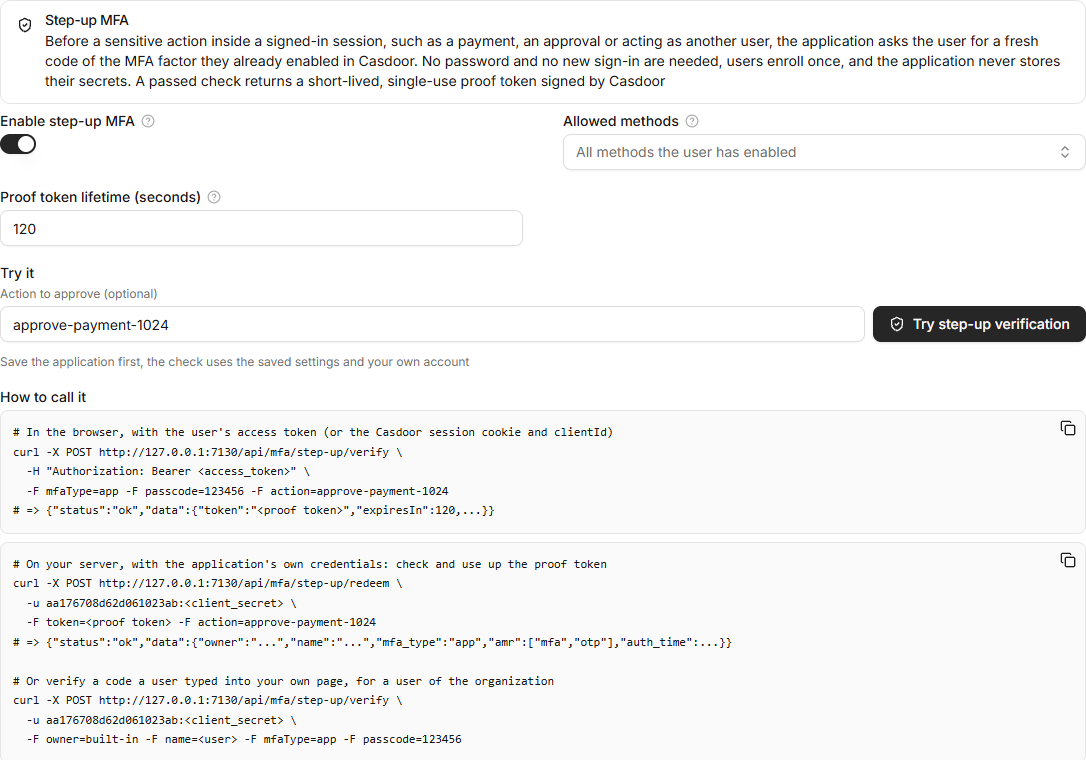
| Champ | Description |
|---|---|
| Enable step-up MFA | Lets the application use the step-up API. Requests for an application without it are refused. |
| Allowed methods | The methods the application accepts: TOTP (authenticator app), Email, Phone (SMS), RADIUS and Recovery code. Empty means every method the user has enabled. |
| Proof token lifetime (seconds) | How long the proof token stays valid. The default is 300 and the maximum is 3600. |
Save the application, then click Try step-up verification to run the check with your own account. The dialog shows only the methods you have enabled. After a correct code, the page shows the proof token and its claims.
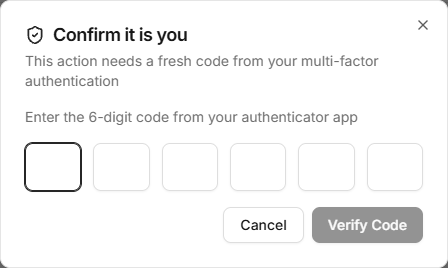
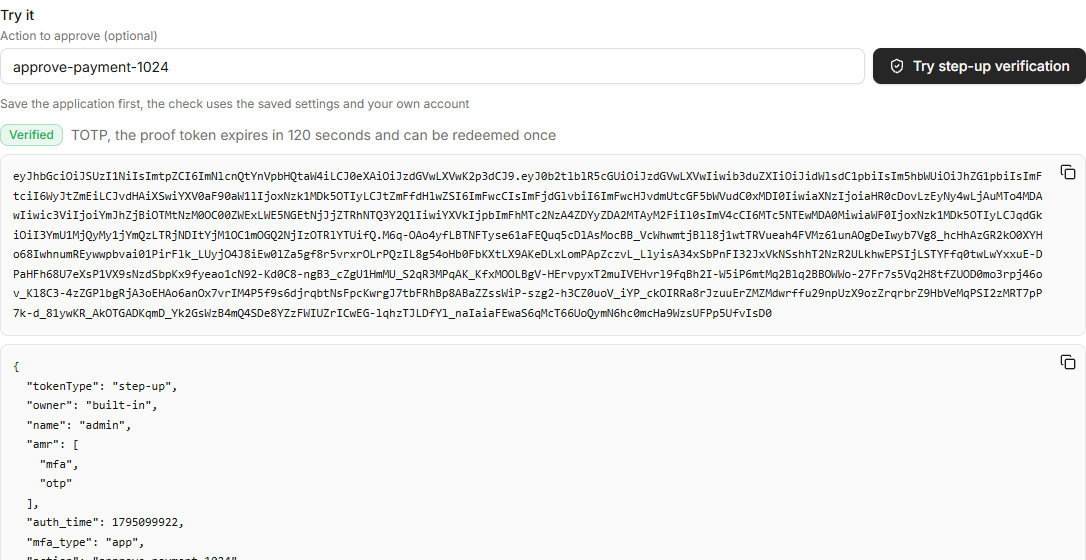
The tab also shows curl examples with the application's client ID, and the latest passed checks with their state: Valid, Expired or Redeemed.
Who is verified
| Caller | User | Application |
|---|---|---|
The user's browser with an access token (Authorization: Bearer <access_token>) | The token's user | The token's application. A different clientId is refused. |
| The user's browser with the Casdoor session cookie | The signed-in user | The clientId parameter. The user must belong to the application's organization. |
| The application's server with its client ID and secret | The user named by owner and name (or userId). It must belong to the application's organization. | The calling application |
The user must not be forbidden or deleted.
API
All endpoints take form data (multipart/form-data or application/x-www-form-urlencoded) and answer in the usual {"status": "ok", "data": ...} format.
List the methods
GET /api/mfa/step-up/methods returns the methods the user has enabled and the application allows, the preferred one first. Email addresses and phone numbers are masked.
{"status": "ok", "data": [{"mfaType": "app", "isPreferred": true}, {"mfaType": "email", "dest": "jo***@example.com"}]}
Send an email or SMS code
POST /api/mfa/step-up/send-code with mfaType set to email or sms. The code goes to the email address or phone number the user enabled for MFA, never to one from the request. It uses the Email or SMS provider of the application, the same as the MFA step of a sign-in.
Verify a code
POST /api/mfa/step-up/verify
| Parameter | Description |
|---|---|
mfaType | app, email, sms, radius or recovery |
passcode | The code. For recovery, the recovery code can also be sent as recoveryCode. |
action | Optional, up to 500 characters. A value naming what the check approves, such as approve-payment-1024. It is copied into the proof token. |
clientId | The application, when the caller uses the Casdoor session cookie |
owner, name | The user, when the application calls with its own credentials |
curl -X POST https://door.casdoor.com/api/mfa/step-up/verify \
  -H "Authorization: Bearer <access_token>" \
  -F mfaType=app -F passcode=123456 -F action=approve-payment-1024
{"status": "ok", "data": {"token": "<proof token>", "tokenType": "step-up", "expiresIn": 300, "mfaType": "app"}}
The check is stricter than the MFA step of a sign-in:
- Only the factor the user enabled is checked. There is no parameter for a secret or a destination, and no fallback to another method.
- The organization's Master verification code is not accepted.
- Remember this account of the MFA step doesn't skip it. Every call needs a fresh code.
- A TOTP code is accepted only once. Casdoor keeps the last accepted time step of each user, so the same code or an older one is refused. This also applies to the MFA step of a sign-in and to the RADIUS server.
- A recovery code is removed after use. Email and SMS codes are single use.
Wrong codes count against the same limit as the MFA step of a sign-in: Failed signin limit and Failed signin frozen time, 5 attempts and 15 minutes by default. Calls from a browser also count against a limit per IP address. Calls from the application's server count only against the user's limit, so one server checking codes for many users is not locked out.
Redeem the proof token
The application's server calls POST /api/mfa/step-up/redeem with its own client ID and secret, before it runs the action:
curl -X POST https://door.casdoor.com/api/mfa/step-up/redeem \
  -u <client_id>:<client_secret> \
  -F token=<proof token> -F action=approve-payment-1024
{"status": "ok", "data": {"tokenType": "step-up", "owner": "built-in", "name": "alice", "amr": ["mfa", "otp"], "auth_time": 1795099922, "mfa_type": "app", "action": "approve-payment-1024", "sub": "...", "aud": ["<client_id>"], "exp": 1795100222, "jti": "..."}}
Casdoor checks the signature, the audience (the calling application), the expiry and, when action is given, that the token was issued for that action. Each token can be redeemed only once. A second redemption fails with The step-up token has already been used.
Proof token
The proof token is a JWT signed with the application's Token cert, with the header typ: step-up+jwt.
| Claim | Value |
|---|---|
tokenType | step-up |
sub | The user's ID, the same as in the ID token |
owner, name | The user's organization and name |
aud | The application's client ID |
amr | ["mfa", "otp"] for TOTP and RADIUS, ["mfa", "sms", "otp"], ["mfa", "email", "otp"], or ["mfa", "recovery"] |
auth_time | The time of this check |
mfa_type | The method used |
action | The action of the request, if any |
iat, exp, jti | Issue time, expiry and a unique ID |
You can also verify the token yourself with the JWKS of Casdoor, https://<your-casdoor-host>/.well-known/jwks (see OIDC client). Then check tokenType, aud, exp and action, and remember each jti until it expires so the token is used only once.
A typical flow
- The user clicks Approve payment in your application.
- Your frontend shows a dialog, lists the methods with
/api/mfa/step-up/methods, and sends an email or SMS code with/api/mfa/step-up/send-codewhen needed. - The user types the code. Your frontend calls
/api/mfa/step-up/verifywith the user's access token andaction=approve-payment-1024, and passes the proof token to your server. - Your server calls
/api/mfa/step-up/redeemwith the sameaction. Only if it succeeds does the server approve the payment.
If you would rather build the dialog in your own backend, your server can call /api/mfa/step-up/verify itself with its client credentials and the user's owner and name, and act on the response directly.
Audit
Every call is written to Records under the verified user, whether it passed or failed. The codes are masked in the record. The Step-up MFA tab lists the latest passed checks of the application.