オープンソースの SAML 2.0 アイデンティティプロバイダー (IdP) としての Casdoor
Casdoor は SAML 2.0 アイデンティティプロバイダー (IdP) です。このページでは、サービスプロバイダー (SP) と Casdoor でそれぞれ何を設定するか、および SAML 応答に含まれるユーザーデータを説明します。特定のサービスプロバイダー向けのステップバイステップガイドについては、このセクションの他のページを参照してください。
サービスプロバイダーを設定する
サービスプロバイダーは通常、3 つの値を要求します。それは、シングルサインオン URL、発行者 (Issuer)、および IdP の公開証明書です。ほとんどのサービスプロバイダーは、URL またはアップロードされたファイルを通じて、IdP の SAML メタデータからこれら 3 つを読み取ります。
Casdoor アプリケーションのメタデータ URL は次の形式です:
<casdoor-host>/api/saml/metadata?application=admin/<application-name>
例えば、https://door.casdoor.com の Casdoor と app-built-in アプリケーションの場合:
https://door.casdoor.com/api/saml/metadata?application=admin/app-built-in
Casdoor 管理コンソールで URL を取得するには、アプリケーションの編集ページを開き、SAML タブに移動して、Copy SAML metadata URL をクリックします。XML ファイルとしてメタデータをダウンロードするには、ブラウザで URL を開いてください。
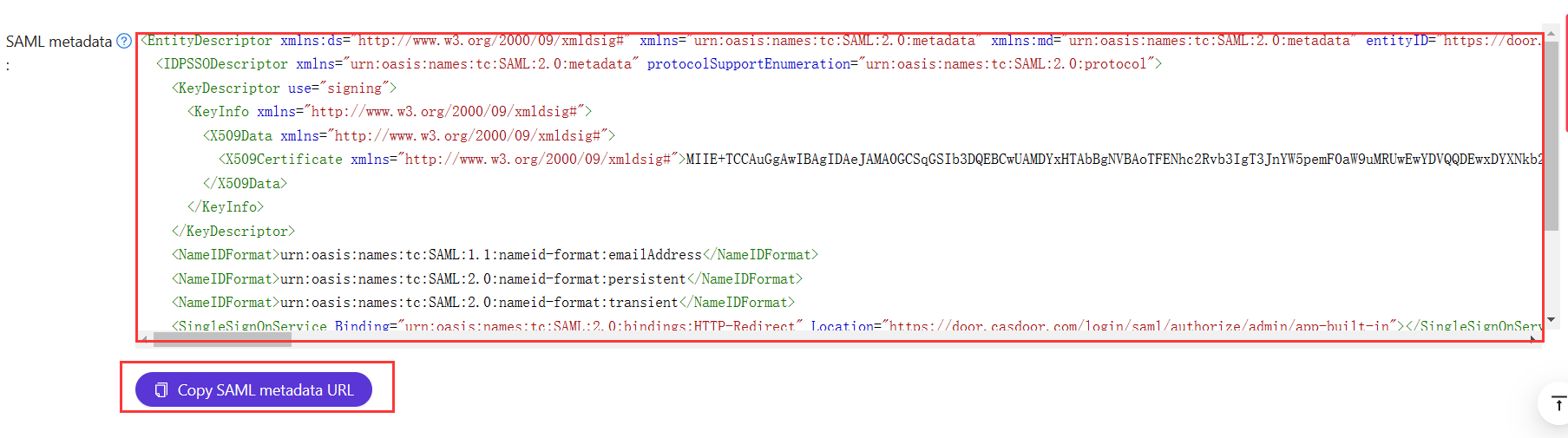
Casdoor アプリケーションを設定する
アプリケーションの編集ページで、2 つのフィールドを設定します:
| Field | 値 |
|---|---|
| Redirect URLs | The identifier of the service provider, which the SP calls the audience or the entity ID. Enter exactly the same value as in the SP |
| SAML reply URL | SP の Assertion Consumer Service (ACS) URL。SAML 応答を受信・検証します。リダイレクトバインディングを使用する場合は空のままにします |
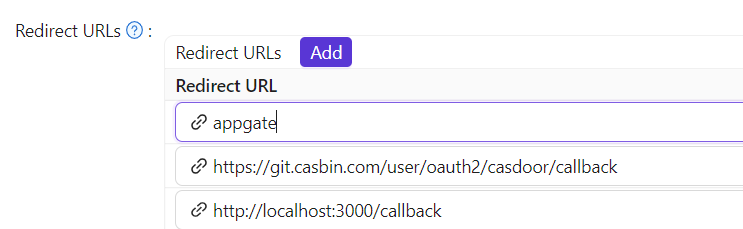
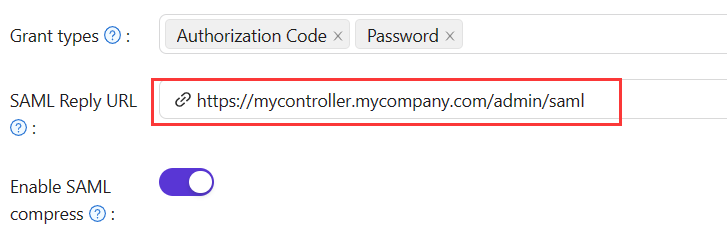
レスポンスバインディング
Casdoor は SAMLResponse を HTTP POST リクエストまたは HTTP GET リクエストで送信できます。サービスプロバイダーがサポートしているものを選択してください:
| SAML reply URL | Binding | Where Casdoor sends the response |
|---|---|---|
| Set | POST | To the reply URL. The reply URL overrides the AssertionConsumerServiceURL of the SAMLRequest |
| Empty | GET | To the AssertionConsumerServiceURL that Casdoor reads from the SAMLRequest |
Casdoor 自体が外部 SAML IdP (Azure AD など) でユーザーをサインインさせる場合、外部 IdP はその SAML 応答を Casdoor の /api/acs エンドポイントに POST します。このエンドポイントはクロスオリジン POST リクエストを受け入れるため、別のドメイン上の IdP から応答を送信できます。
Casdoor からサインインを開始する (IdP 開始型 SSO)
IdP 開始型 SSO では、ユーザーはサービスプロバイダーではなく Casdoor から開始します。Casdoor は、AuthnRequest によって要求されていない SAML 応答を SP に送信します。ポータルリンクやブックマークに使用してください。
-
アプリケーションの SAML タブで、SAML reply URL を SP の ACS URL に設定します。これがないと、
the SAML reply URL should not be empty for IdP-initiated SSOというエラーでサインインが失敗します。 -
Redirect URLs の最初のエントリが SP のエンティティ ID であることを確認してください。Casdoor はこれをアサーションのオーディエンスとして使用します。
-
アプリケーションを保存します。その後、SAML タブに IdP-initiated SSO URL が表示されます:
<casdoor-host>/login/saml/authorize/admin/<application-name> -
Copy IdP-initiated SSO URL をクリックし、その URL をユーザーに提供してください。
URL を開いたユーザーは Casdoor にサインインし、Casdoor は HTTP-POST バインディングを使用してリプライ URL に SAML 応答を POST します。事前にリクエストがなかったため、応答には InResponseTo 属性が含まれません。SP に RelayState を渡すには、クエリパラメータとして URL に追加します。例: ?RelayState=/dashboard
SP からユーザーをサインアウトする (シングルログアウト)
Casdoor は双方向の SAML Single Logout (SLO) をサポートしています。これを有効にするには、アプリケーションの SAML タブにある SAML single logout URL を、SP の SingleLogoutService URL に設定します。
アプリケーションのメタデータは、HTTP-Redirect バインディングと HTTP-POST バインディングで Casdoor の SingleLogoutService を次のように通知します:
<casdoor-backend-host>/api/saml/logout/admin/<application-name>
すべてのアサーションには AuthnStatement 内の SessionIndex が含まれており、これはサインイン時の Casdoor セッションを識別します。
SP 開始のログアウト
ユーザーが SP でサインアウトすると、SP は LogoutRequest を Casdoor の SingleLogoutService に送信します。これは GET または POST メソッドで行われ、SAMLRequest パラメータとオプションの RelayState を含みます:
- Casdoor はリクエストを検証します。その
Issuerは Redirect URLs に含まれている必要があり、NameIDを含み、アプリケーションに SAML single logout URL が設定されている必要があります。 - Casdoor は、リクエストの
SessionIndex値によって指定された Casdoor セッションを終了します。SessionIndexがない場合、リクエストを送信したブラウザセッションのみを終了し、かつNameIDがそのユーザーのものである場合に限り終了します。 - Casdoor は、それらのセッションに含まれる他のアプリケーションからユーザーをサインアウトさせます。これには OIDC バックチャネルログアウトと SAML ログアウトリクエストが使用されます。
- Casdoor は、リクエストで使用されたバインディングに従って署名付きの
LogoutResponseで応答します。GETの場合は SAML single logout URL へのリダイレクト、POSTの場合はブラウザがそこに投稿するフォームです。
IdP 開始のログアウト
ユーザーが /api/logout または /api/sso-logout を介して Casdoor からサインアウトすると、Casdoor は終了したセッション内でユーザーがサインインしていたすべての SAML アプリケーションの SAML single logout URL に署名付きの LogoutRequest を送信します。ユーザーのサインインが禁止された場合や、新しいサインインがセッション制限を超えた場合など、他の理由で Casdoor がセッションを終了する場合も同様です。これらのリクエストは、OIDC バックチャネルログアウトと同様に、サーバーから直接投稿され、ブラウザを介しません。SP が同じ SingleLogoutService エンドポイントに LogoutResponse を送信した場合、Casdoor はその Issuer が Redirect URLs に含まれていることと、ステータスが Success であることを確認します。
レスポンス内のユーザープロファイル
デフォルトでは、SAMLResponse にはユーザーの 3 つの属性が含まれます:
| XML属性名 | ユーザーフィールド |
|---|---|
| メールアドレス | メール |
| 表示名 | displayName |
| 名前 | name |
サービスプロバイダーが NameID のみを必要とし、属性を必要としない場合は、アプリケーションで Disable SAML attributes をオンにします。これにより、Casdoor はレスポンスから属性を除外します。これは、レスポンスを厳密に検証するサービスプロバイダーにおける XML 名前空間の問題を回避するのに役立ちます。
SAML 属性の追加
サービスプロバイダーが他の属性を要求する場合は、アプリケーションの SAML attributes テーブルに追加します。値には次の変数を含めることができます: $user.owner, $user.name, $user.displayName, $user.email, $user.id, $user.phone, $user.roles, $user.permissions, および $user.groups。
例えば、次の 2 行は:
| 名前 | 名前フォーマット | Value |
|---|---|---|
https://www.aliyun.com/SAML-Role/Attributes/RoleSessionName | 指定なし | $user.name |
https://www.aliyun.com/SAML-Role/Attributes/Role | 指定なし | acs:ram::1879818006829152:role/$user.roles,acs:ram::1879818006829152:saml-provider/testa |
レスポンスに次の属性を生成します:
<saml:Attribute Name="https://www.aliyun.com/SAML-Role/Attributes/RoleSessionName" NameFormat="urn:oasis:names:tc:SAML:2.0:attrname-format:unspecified">
    <saml:AttributeValue xsi:type="xs:string">admi122n@outlook.com</saml:AttributeValue>
</saml:Attribute>
<saml:Attribute Name="https://www.aliyun.com/SAML-Role/Attributes/Role" NameFormat="urn:oasis:names:tc:SAML:2.0:attrname-format:unspecified">
    <saml:AttributeValue xsi:type="xs:string"> acs:ram::1879818006829152:role/role1,acs:ram::1879818006829152:saml-provider/testa</saml:AttributeValue>
    <saml:AttributeValue xsi:type="xs:string"> acs:ram::1879818006829152:role/role2,acs:ram::1879818006829152:saml-provider/testa</saml:AttributeValue>
</saml:Attribute>
アサーションの署名制御
Casdoor は常に SAML レスポンスに署名します。レスポンス内のアサーションにも署名するには、アプリケーションで Enable SAML assertion signature をオンにします。このオプションはデフォルトでオフです。
バージョン 2.81.0 から 2.247.x までは、常にアサーションにも署名していました。Sentry など一部のサービスプロバイダーは、署名付きアサーションを含むレスポンスを拒否するため、バージョン 2.248.0 以降では、このオプションがオンでない限り、Casdoor はレスポンスエンベロープのみに署名します。署名付きレスポンスにより、アサーションの真正性も維持されます。
Go サービスプロバイダーでのテスト
gosaml2 は、Go 言語によるサービスプロバイダー向けの SAML 2.0 実装です。以下のプログラムは、IdP としての Casdoor をテストするためにこれを使用します。
この例では、Casdoor が http://localhost:7001/ で実行されており、組織 built-in のアプリケーション app-built-in を想定しています。
-
app-built-inの Redirect URLs にhttp://localhost:6900/acs/exampleとhttp://localhost:6900/saml/acs/exampleを追加します。 -
プログラムを実行します:
import (
    "crypto/x509"
    "fmt"
    "net/http"

    "io/ioutil"

    "encoding/base64"
    "encoding/xml"

    saml2 "github.com/russellhaering/gosaml2"
    "github.com/russellhaering/gosaml2/types"
    dsig "github.com/russellhaering/goxmldsig"
)

func main() {
    res, err := http.Get("http://localhost:7001/api/saml/metadata?application=admin/app-built-in")
    if err != nil {
        panic(err)
    }

    rawMetadata, err := ioutil.ReadAll(res.Body)
    if err != nil {
        panic(err)
    }

    metadata := &types.EntityDescriptor{}
    err = xml.Unmarshal(rawMetadata, metadata)
    if err != nil {
        panic(err)
    }

    certStore := dsig.MemoryX509CertificateStore{
        Roots: []*x509.Certificate{},
    }

    for _, kd := range metadata.IDPSSODescriptor.KeyDescriptors {
        for idx, xcert := range kd.KeyInfo.X509Data.X509Certificates {
            if xcert.Data == "" {
                panic(fmt.Errorf("metadata certificate(%d) must not be empty", idx))
            }
            certData, err := base64.StdEncoding.DecodeString(xcert.Data)
            if err != nil {
                panic(err)
            }

            idpCert, err := x509.ParseCertificate(certData)
            if err != nil {
                panic(err)
            }

            certStore.Roots = append(certStore.Roots, idpCert)
        }
    }

    randomKeyStore := dsig.RandomKeyStoreForTest()

    sp := &saml2.SAMLServiceProvider{
        IdentityProviderSSOURL:      metadata.IDPSSODescriptor.SingleSignOnServices[0].Location,
        IdentityProviderIssuer:      metadata.EntityID,
        ServiceProviderIssuer:       "http://localhost:6900/acs/example",
        AssertionConsumerServiceURL: "http://localhost:6900/v1/_saml_callback",
        SignAuthnRequests:           true,
        AudienceURI:                 "http://localhost:6900/saml/acs/example",
        IDPCertificateStore:         &certStore,
        SPKeyStore:                  randomKeyStore,
    }

    http.HandleFunc("/v1/_saml_callback", func(rw http.ResponseWriter, req *http.Request) {
        err := req.ParseForm()
        if err != nil {
            rw.WriteHeader(http.StatusBadRequest)
            return
        }
        samlReponse := req.URL.Query().Get("SAMLResponse")
        assertionInfo, err := sp.RetrieveAssertionInfo(samlReponse)
        if err != nil {
            fmt.Println(err)
            rw.WriteHeader(http.StatusForbidden)
            return
        }
        fmt.Println(assertionInfo)
        if assertionInfo.WarningInfo.InvalidTime {
            fmt.Println("here12:", assertionInfo.WarningInfo.InvalidTime)
            rw.WriteHeader(http.StatusForbidden)
            return
        }

        if assertionInfo.WarningInfo.NotInAudience {
            fmt.Println(assertionInfo)
            fmt.Println("here13:", assertionInfo.WarningInfo.NotInAudience)
            rw.WriteHeader(http.StatusForbidden)
            return
        }

        fmt.Fprintf(rw, "NameID: %s\n", assertionInfo.NameID)

        fmt.Fprintf(rw, "Assertions:\n")

        for key, val := range assertionInfo.Values {
            fmt.Fprintf(rw, "  %s: %+v\n", key, val)
        }
        fmt.Println(assertionInfo.Values.Get("FirstName"))
        fmt.Fprintf(rw, "\n")

        fmt.Fprintf(rw, "Warnings:\n")
        fmt.Fprintf(rw, "%+v\n", assertionInfo.WarningInfo)
    })

    println("Visit this URL To Authenticate:")
    authURL, err := sp.BuildAuthURL("")
    if err != nil {
        panic(err)
    }

    println(authURL)

    println("Supply:")
    fmt.Printf("  SP ACS URL      : %s\n", sp.AssertionConsumerServiceURL)

    err = http.ListenAndServe(":6900", nil)
    if err != nil {
        panic(err)
    }
}
コンソールに表示される内容は次のとおりです:
Visit this URL To Authenticate:
http://localhost:7001/login/saml/authorize/admin/app-built-in?SAMLRequest=lFVbk6K8Fv0rFvNo2QR...
Supply:
SP ACS URL : http://localhost:6900/v1/_saml_callback -
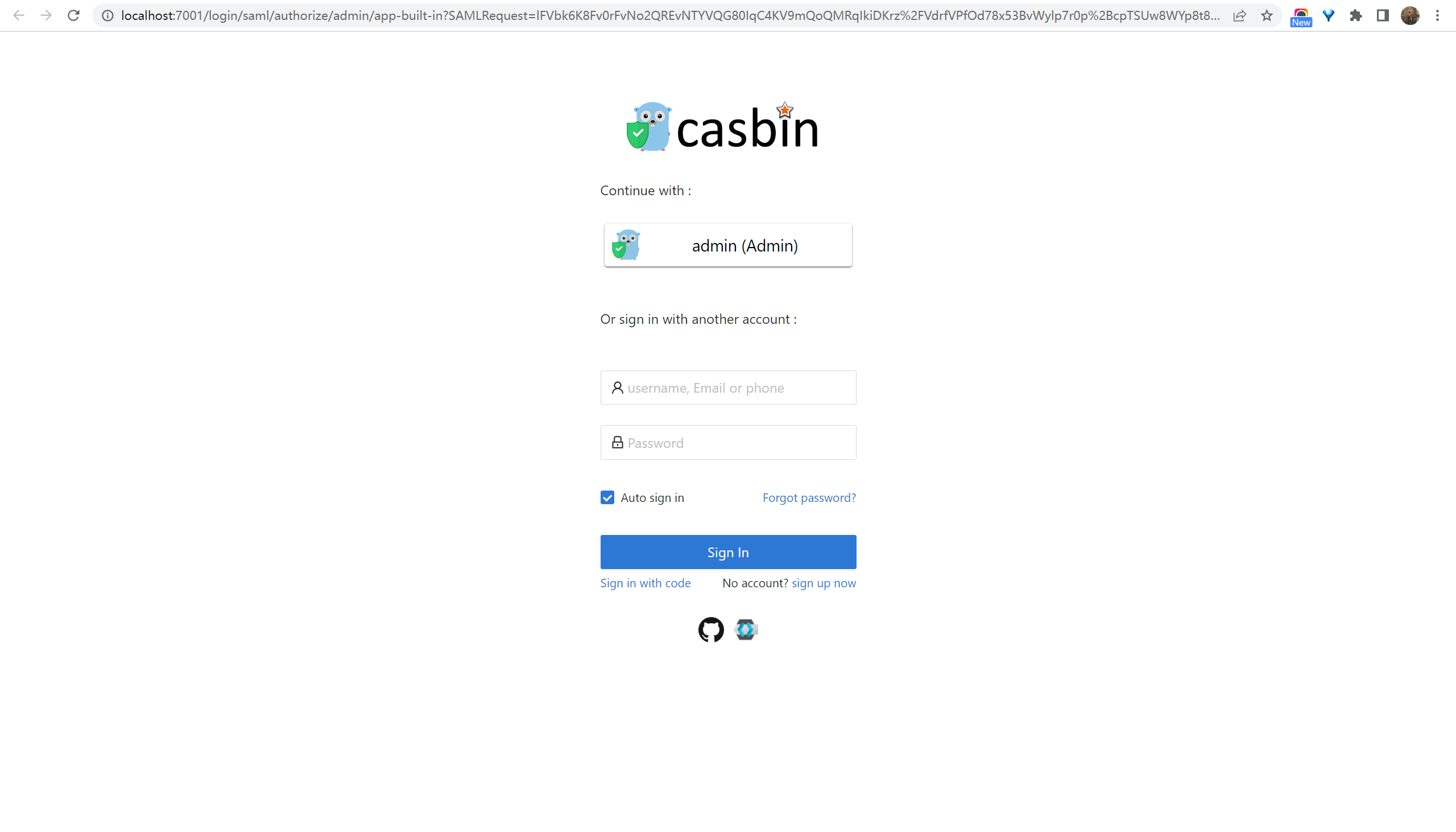
URL を開きます。Casdoor のサインインページが表示されます。
-
サインインします。プログラムは SAML レスポンスを表示します。

関連項目
- Keycloak (SAML)
- AWS Client VPN (SAML)
- SAML プロバイダー: 外部 SAML IdP を使用してユーザーを Casdoor にサインインさせます。
- SAML とは何か?: アサーション、バインディング、メタデータ、そして SAML SSO ログインの仕組みについて。
- SAML SSO 統合のテスト方法
- Wikipedia の SAML 2.0