LDAP 設定と同期
LDAP は組織ごとに設定されます。同期されたユーザーは、その組織に作成されます。組織ページで LDAP 設定を編集するには、グローバル管理者を使用してください。

LDAP サーバーへの接続
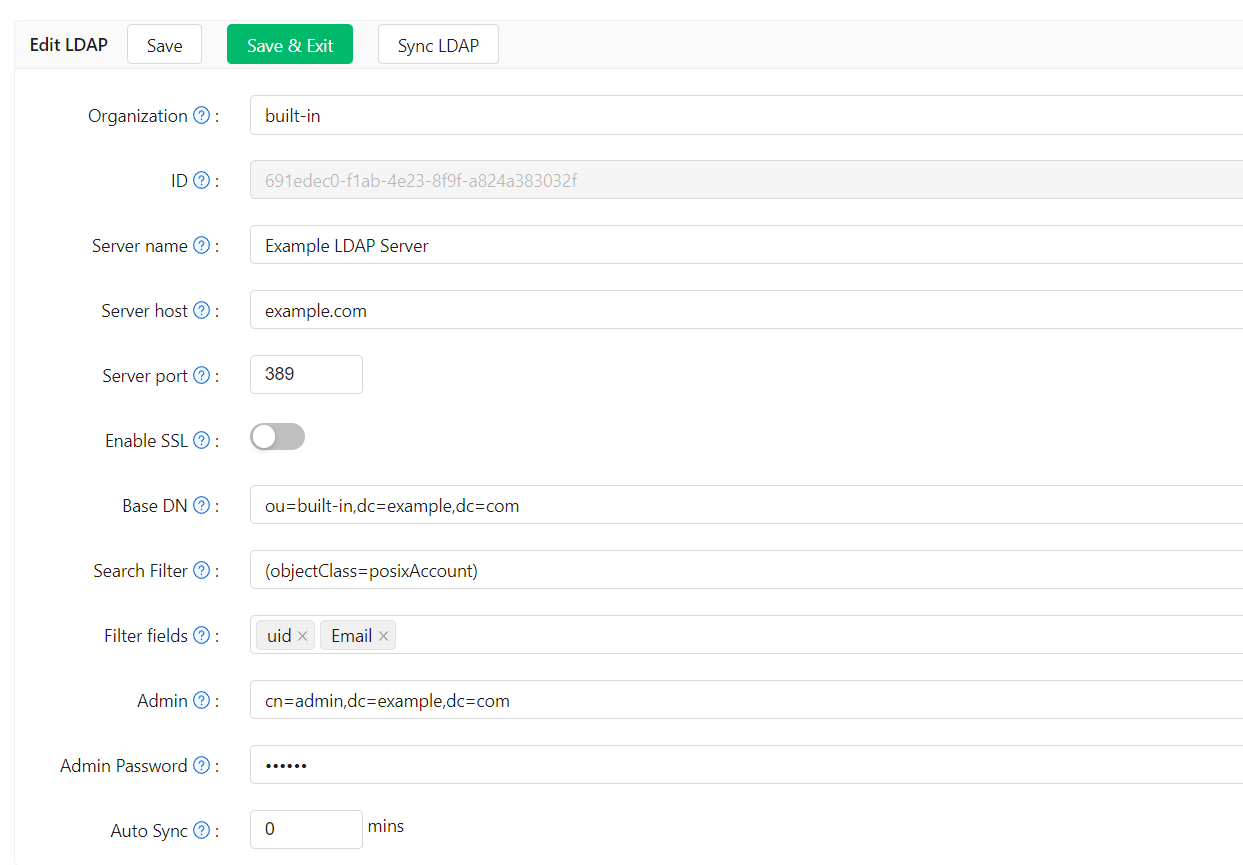
| フィールド | 説明 |
|---|---|
| サーバー名 | Friendly name for this server (e.g. Example LDAP Server). |
| サーバーホスト | Host or IP of the LDAP server (e.g. example.com). |
| サーバーポート | Port number, numeric only (e.g. 389). |
| Enable SSL | Connect over LDAPS. Required by Microsoft Active Directory for password changes. |
| Base DN | Base distinguished name for search. Casdoor uses subtree search and returns all users under this DN. The admin account must have at least read access at this base (e.g. ou=Example,dc=example,dc=com). |
| Search filter | LDAP filter for user search (e.g. (objectClass=posixAccount)). If the filter contains {} (a placeholder used by some LDAP configurations, e.g. (uid={})), Casdoor replaces it with * when listing users, treating it as a wildcard. |
| フィルターフィールド | LDAP attributes used to identify the user (e.g. uid, mail, mobile). The value entered at Casdoor login is matched against these; typically uid is used as the login name. |
| 管理者 | Bind DN or ID for the LDAP admin (depends on server; e.g. cn=manager,dc=example,dc=com). |
| Admin password | Password for the admin account. |
| Password type | How Casdoor encodes a password that it sets on the LDAP server without the user's old password, for example after a reset: Plain, SSHA or MD5. Not used with Active Directory. |
| Auto sync | 0 = disabled. Any other value = sync interval in minutes. |
| Enable groups | When enabled, Casdoor syncs LDAP groups and OUs as Casdoor groups and assigns users to them. |
| Enable password reset | When enabled, users synced from this server can reset their password through the forgot-password flow. Off by default. See Reset passwords of LDAP users. |
ユーザーの同期
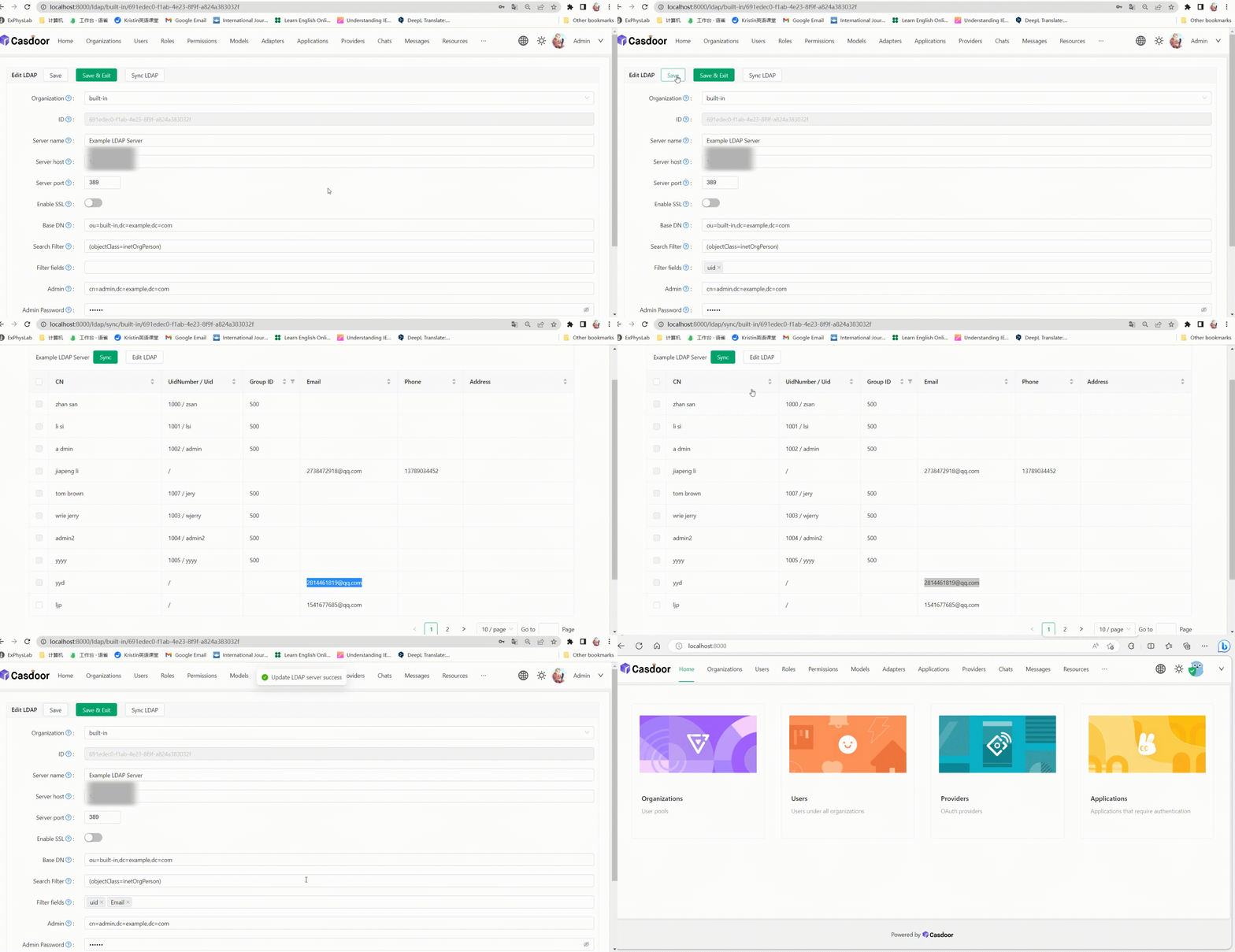
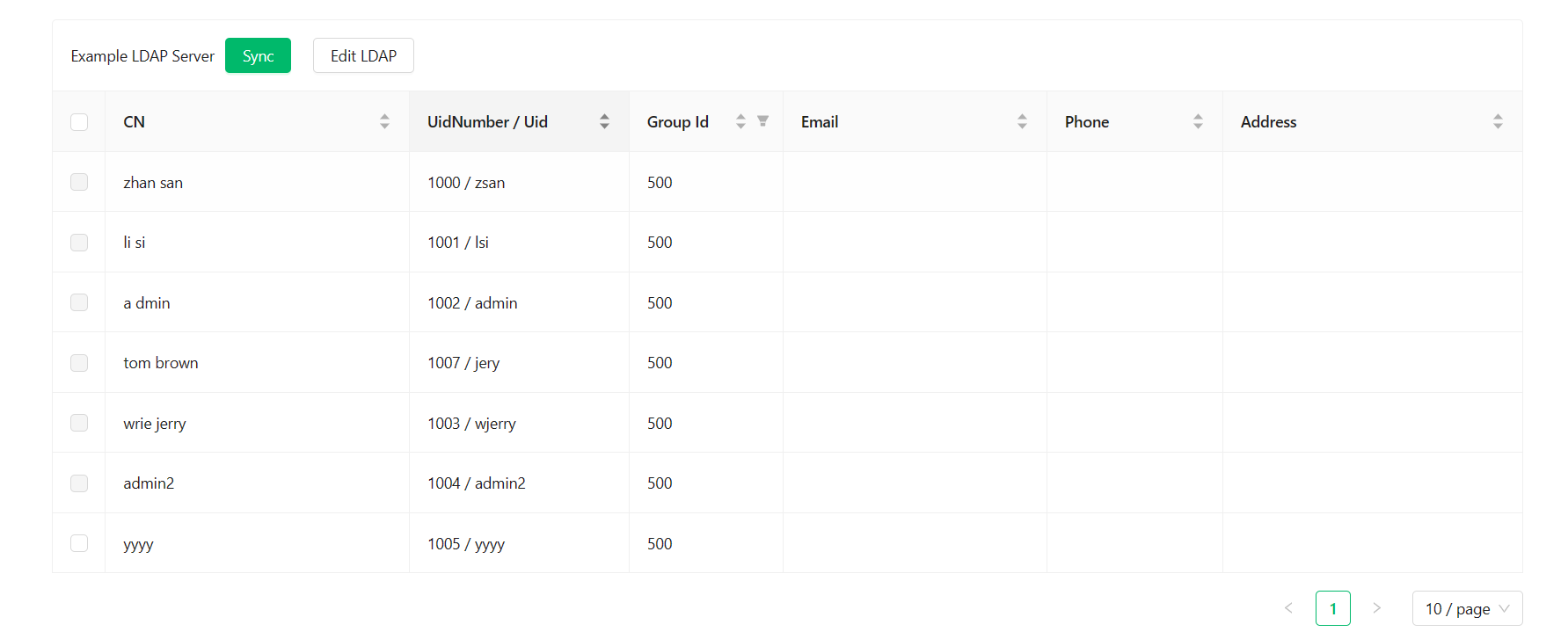
同期テーブルには、設定されたベース DN の下のユーザーが表示されます。すでに同期済みのユーザーは、チェックボックスが無効化されて表示されます。ユーザーを選択して同期を実行すると、それらが組織にインポートされます。
同期はグローバル管理者に限定されません。組織の管理者も、その組織の LDAP ユーザーを一覧表示し、同期することができます。上記の LDAP サーバー設定の編集には、依然としてグローバル管理者が必要です。
グループと OU の同期
Enable groups が有効な場合、Casdoor はユーザーの同期前に LDAP ディレクトリに対してグループオブジェクトのクエリを実行します。ベース DN を検索し、以下のいずれかの object class を持つエントリを探します:groupOfNames, groupOfUniqueNames, posixGroup, および (Active Directory の場合は) group。一致する各エントリは Casdoor グループとして作成されます。その後、ユーザーは自身の memberOf 属性に記載されているグループに割り当てられます。
自動同期サイクルでは、メンバーシップの評価前にグループが存在するようにするため、ユーザー同期の前にグループ同期が実行されます。グループの検索が失敗した場合は、エラーがログに記録され、残りの同期処理は継続されます。
ユーザーを同期すると、LDAP グループに追加されますが、LDAP で管理されていない既存のグループからは削除されないため、手動で割り当てられたグループは保持されます。
POSIX ID の同期
LDAP ユーザーに uidNumber がある場合、同期はその値を Casdoor ユーザーの UID number にコピーしますが、ユーザーがまだこの値を持っていない場合に限ります。Casdoor で設定した値は上書きされません。
Enable groups が有効な場合、グループ同期は各グループの gidNumber を同様に Casdoor グループの GID number に読み込みます。新しいグループにはこれが設定され、既存のグループには GID number が 0 の場合にのみ設定されます。
Casdoor の組み込み LDAP サーバーは、これらの番号を uidNumber および gidNumber として公開します。Set POSIX user and group IDs を参照してください。
LDAP ユーザーのパスワードのリセット
同期された LDAP ユーザーのパスワードは LDAP サーバー上に存在します。デフォルトでは、Casdoor は認証コードを送信する前に、これらのユーザーに対するパスワード再発行フローを拒否し、「the password of the LDAP user: <name> is managed by the LDAP server, please contact your administrator to reset it」というエラーを表示します。フローは通常読み取り専用アクセスしか持たない Admin アカウントを通じて LDAP サーバーに新しいパスワードを書き込むことで完了します。
LDAP ユーザーが自分でパスワードをリセットできるようにするには:
- Admin アカウントがユーザーのパスワード属性に対する書き込み権限を持っていることを確認してください。
- Microsoft Active Directory を使用している場合は、Enable SSL を有効にしてください。Active Directory は LDAPS 経由でのみ新しい
unicodePwdを受け入れます。 - LDAP 編集ページで Enable password reset を有効にして保存してください。
組織内のいずれかの LDAP サーバーで Enable password reset が有効になっている場合、パスワード再発行フローが許可されます。Active Directory 以外のサーバーの場合、Casdoor はサーバーの Password type (Plain, SSHA または MD5) でエンコードされた userPassword を書き込みます。
サインイン、旧パスワードを使用したパスワード変更、および管理者によるリセットは、このスイッチに依存しません。
LDAP サーバーの属性フィルタリング
デフォルトでは、Casdoor の組み込み LDAP サーバーは各ユーザーエントリのすべての標準属性を公開します。組織編集ページで LDAP attributes を設定することにより、返される属性を制限できます。
リストが空でない場合、選択された属性のみが検索結果のエントリに含まれます。利用可能な属性は次のとおりです:
uid, cn, mail, email, mobile, displayName, givenName, sn, uidNumber, gidNumber, homeDirectory, loginShell, gecos, sshPublicKey, memberOf, title, userPassword, c, co, sambaSID, sambaPrimaryGroupSID, sambaAcctFlags, sambaPwdLastSet, sambaDomainName, sambaLMPassword, sambaPasswordHistory, sambaNTPassword
すべての属性を返す(デフォルトの動作)には、リストを空のままにしてください。
パスワード属性である userPassword と sambaNTPassword は例外です。サーバーは、組織で Enable LDAP password が有効になっている場合に限り、これらを返します。これは LDAP attributes の設定に関係ありません。Enable LDAP password を変更できるのはグローバル管理者のみです。Password attributes を参照してください。
デフォルトグループ
同期後にユーザーに割り当てる 1 つ以上のグループ。複数のデフォルトグループを選択でき、同期されたすべてのユーザーがそれらすべてに追加されます。
LDAP ユーザーの uid が組織内の既存ユーザーの name と一致する場合、Casdoor は修正された name(uid + ランダムサフィックス)を持つ新しいユーザーを作成します。LDAP サーバーにそのような uid がないため、そのユーザーは LDAP 経由でサインインできない可能性があります。既存の Casdoor のユーザー名を LDAP の uid として再利用しないでください。
電話番号の正規化
When users are synced from LDAP, Casdoor normalizes the imported phone number using libphonenumber. If the LDAP entry includes a country code (via the CountryCode attribute), it is used as the region hint to parse the number. Country names such as "China" are resolved to their two-letter ISO codes ("CN") automatically; values that are not valid ISO codes are ignored.
解析後、電話番号は国内形式の数字のみ(国プレフィックスやフォーマット文字を除く)として保存されます。解析に失敗した場合や無効な場合は、そのまま保存されます。