Configure a permission
このページでは、organization のポリシーを定義するために使用する権限編集ページのフィールドについて説明します。
このページを開くには、Casdoor 管理コンソールの Permissions ページに移動し、権限を追加するか、既存の権限を開いてください。
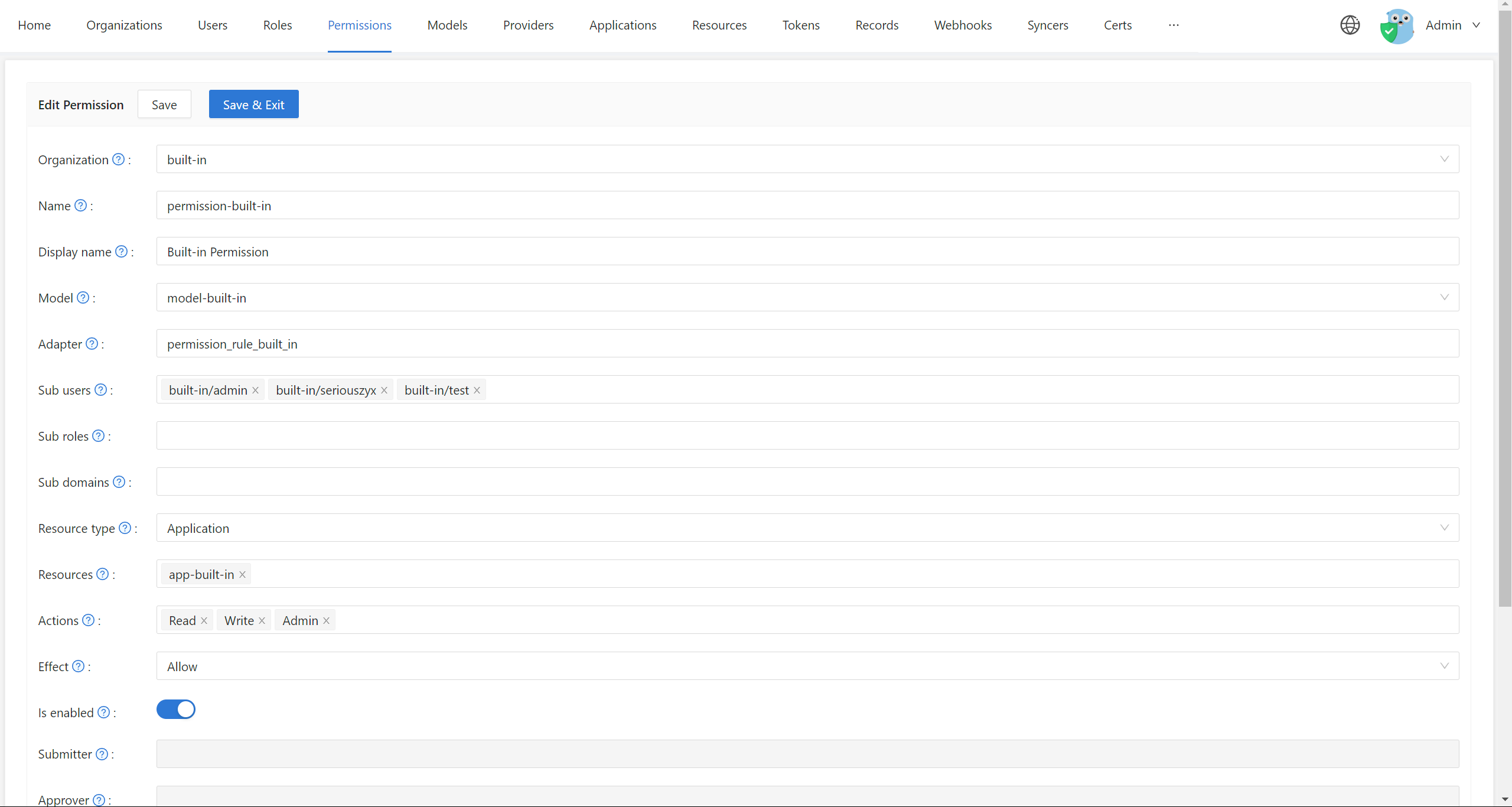
基本フィールド
| Field | Description |
|---|---|
| Organization | The organization that owns the permission. An organization can have many permissions |
| Name | Unique name of the permission in the organization. The Casbin APIs refer to the permission by it |
| Display name | Name shown in the UI |
モデルとアダプター
| Field | Description |
|---|---|
| Model | ACL、RBAC、ABAC など、権限を評価するためのモデルです。モデルは Models ページで作成します。supported models を参照してください |
| アダプター | The database table in which Casdoor stores the policy rules of the permission. If empty, the rules go to the permission_rule table. If the table doesn't exist, Casdoor creates it |
各モデルに独自のアダプターテーブルを割り当てます。構造が異なるモデルが同じテーブルを共有すると、Casdoor がポリシーを読み込む際に競合が発生します。
モデルは権限の機能を定義します。権限ページで Sub users や Sub roles などの RBAC フィールドが表示されない場合、選択されたモデルに role_definition が含まれていません。ロールをサポートするようにモデルを編集してください。詳しくは Adapters を参照してください。
Subjects
これらのフィールドは、権限の対象者を定義します。
| Field | Description |
|---|---|
| 購読ユーザー | Users that the permission applies to, for example alice and bob. Leave empty to not restrict by user |
| サブロール | Roles that the permission applies to, for example admin and editor. Casdoor adds a rule such as g, user, role for each user of the roles |
| サブグループ | Groups that the permission applies to, for example dev-team. Every member inherits the permission. * matches all groups of the organization |
| サブドメイン | Domains that the permission applies to, for multi-tenant models. Leave empty if your model has no domains |
Subject は加算的に適用されます。ユーザーが直接リストに含まれている場合、いずれかのロールを持っている場合、またはいずれかのグループのメンバーである場合に、そのユーザーは権限を持ちます。ロールにはグループを含めることができるため、グループを通じてロール経由で権限が付与されることもあります。
Resources and actions
これらのフィールドは、権限が制御する対象と操作を定義します。
| Field | Description |
|---|---|
| リソースタイプ | Application, TreeNode, Custom, or API. With Application, Casdoor itself uses the permission to decide who may sign in to the applications in Resources. See Restrict who can sign in to an application |
| リソース | What you protect. With Application, select applications, or All (*) for every application. With API, select paths of the Casdoor API. With Custom, enter any strings, such as URLs (/api/users), file names (document.pdf), or identifiers (project:123). These aren't the files on the Resources page of Casdoor |
| アクション | Any strings that name what users do, such as HTTP methods (GET, POST), operations (read, write), or your own verbs (approve, publish) |
Casdoor は、リソースとアクションのすべての組み合わせに対してルールを作成します。
Casdoor はアクションを保存する前に小文字に変換し、すべてのリソースにすべてのアクションを適用します。一部の特定のリソースでのみアクションを許可するには、モデル内で表現するか、個別の権限を作成してください。
効果
Effect は、Casdoor が自社のアプリケーションへのアクセス制御に権限を使用する場合のみ有効です。アプリケーションから Casbin API を呼び出す場合は、このフィールドの効果はありません。代わりにモデル内で allow と deny を表現してください。
アプリケーションへのサインイン可能なユーザーを制限する
Resource type が Application の権限は、その Resources に含まれるアプリケーションへのサインインを誰が許可されるかを制御します。Casdoor はすべてのサインイン時およびユーザーの Apps ページでアプリケーションを一覧表示する際にこれらの権限を確認します。
Casdoor は、Is enabled がオンであり、かつ State が Approved である権限のみを考慮します。ユーザーを含む subjects を持つ各権限について、Casdoor はリクエスト (<user-id>, <application-name>, "Read") およびユーザーの一致する各ロールに対する同じリクエストを適用します。その後:
- Effect が
Denyの権限が一致した場合、サインインは拒否されます。 - それ以外の場合、Effect が
Allowの権限が一致した場合、サインインは許可されます。 - それ以外の場合、アプリケーションが
Allow権限のみを持っており、ユーザーをカバーするものが何もない場合、サインインは拒否されます。 - それ以外の場合(例えば、どの権限もアプリケーションを対象としていない場合など)、サインインは許可されます。
拒否されたサインインは Unauthorized operation エラーで失敗します。
共有アプリケーションの場合、Casdoor はアプリケーションの組織ではなく、サインインするユーザーの組織から権限を読み取ります。
built-in 組織のユーザーと、組織の管理者(Is admin がオンのユーザー)は常にこのチェックを通過します。これにより、管理者が自分自身をロックアウトすることを防ぎます。
Expiry
Expire time (expireTime) は、権限を自動的に期限切れにするために使用します。例えば、数時間のみアクセスを許可する場合や、ISO/IEC 27001 のコントロール 5.18 で要求されるような期間限定のアクセスを提供する場合などに利用できます。日付と時刻を選択するか、1 hour、1 day、7 days、または 30 days をクリックして、現在からその期間後の時刻に設定します。Never を選択すると値がクリアされ、権限は期限切れになりません。API を介して expireTime に指定する際は、RFC 3339 タイムスタンプ形式(例:2026-12-31T23:59:59+08:00)を使用します。
Casdoor checks the permissions at startup and then every minute. For every enabled permission whose expire time has passed, it removes the Casbin policies of the permission and turns off Is enabled. An expired permission can therefore still apply for up to a minute.
アクセスを再度付与するには、より遅い期限時刻を設定するかクリアし、それから Is enabled を再びオンにします。
有効な RFC 3339 形式ではない期限時刻は無視されるため、権限は期限切れになりません。タイムゾーンオフセットを含め、フォーマットを確認してください。
例
以下の権限は (sub, obj, act) リクエストを使用するモデルを利用しています:
| Field | Value |
|---|---|
| Model | rbac_model |
| Sub roles | admin, editor |
| Resources | /api/users, /api/posts |
| Actions | read, write |
ロール admin または editor を持つユーザーは、/api/users と /api/posts に対して read および write が可能です。