プロバイダー
プロバイダーは、Casdoor を外部サービス (サインイン用の ID プロバイダー、メールサービス、クラウドストレージなど) に接続します。プロバイダーを一度作成すると、それを使用する複数のアプリケーションに追加できます。
プロバイダーのカテゴリ
| Category | Purpose |
|---|---|
| Audit | Send the audit records of Casdoor to a Syslog server. See Syslog audit provider |
| キャプチャ | Protect sign-in and sign-up with a captcha. See Captcha providers |
| メール | Send email, such as verification codes and notifications. See Email providers |
| Face ID | Recognize faces for Face ID sign-in. See Face ID providers |
| ID Verification | Verify the identity of users from ID documents. See Identity verification providers |
| Log | Forward permission audit events to a logging backend, or store them as entries. See Log providers |
| MFA | Provide a second factor, such as RADIUS. See MFA providers |
| Notification | Send messages to chat services, such as Slack and Telegram. See Notification providers |
| OAuth | Let users sign in with external identity providers, such as GitHub and Google. See OAuth providers |
| 支払い | Take payments for products and subscriptions. See Payment providers |
| SAML | Let users sign in with external SAML identity providers. See SAML providers |
| Scan | Scan servers for security issues and MCP endpoints. See Scan providers |
| SMS | Send SMS verification codes. See SMS providers |
| ストレージ | Store files on the local file system or in cloud object storage. See Storage providers |
プロバイダーを利用できるユーザー
プロバイダーを作成できるのは管理者のみです。プロバイダーが利用可能な範囲は、作成者によって異なります:
| Created by | Available to |
|---|---|
A global administrator: a user of the built-in organization, or a user with IsGlobalAdmin | All applications |
An organization administrator: a user with IsAdmin | Applications of the same organization |
Log providers of the types System Log, SELinux Log, and Agent read the logs of the Casdoor server or accept data on its address, so only a global administrator can save them. An organization administrator who saves one gets Unauthorized operation.
プロバイダーが接続できるアドレス
A provider of an organization other than admin, built-in, and the trusted organizations can connect only to Internet addresses. Casdoor refuses private, loopback, link-local, and unspecified addresses, and the shared address space 100.64.0.0/10. It checks the address that the host name resolves to. For HTTP requests, it checks every connection, including redirects. This stops an organization administrator from reaching the internal network of the Casdoor server, such as a database or a cloud metadata endpoint, through a provider.
このルールは次の接続に適用されます:
| Category | Connection |
|---|---|
The SMTP server, or the endpoint of Custom HTTP Email | |
| SMS | The endpoint of Custom HTTP SMS |
| Notification | The endpoint of Custom HTTP |
| Storage | The endpoint of the storage service |
| OAuth | The token, user info, and logout endpoints of the provider, and the OIDC discovery that the Request button fetches. The types GitHub, Google, Facebook, LinkedIn, Steam, Line, Amazon, Instagram, TikTok, Twitter, Uber, and Yahoo always use the proxy instead |
内部ネットワーク上のサービス(ローカル SMTP サーバーなど)に接続するには、グローバル管理者としてプロバイダーを作成してください。組織管理者が OIDC プロバイダーで Request をクリックした場合、プロバイダーがどの組織に属していても、Casdoor はディスカバリフェッチに対して同じルールを適用します。
ある組織の管理者が内部ネットワークに接続するプロバイダーを管理できるようにするには、グローバル管理者がその組織に対して Trusted organization を有効にする必要があります(商用エディション)。その後、このルールはその組織のプロバイダーには適用されず、その管理者による Request ボタンにも適用されません。
プロバイダーの作成
- Casdoor 管理コンソールで、Identity > Providers に移動し、プロバイダーを追加します。
- Category と Type を選択します。Casdoor は Name と Display name を自動入力します: 名前は
provider_<category>_<type>のパターンに従い、表示名は<Category> <Type>になります。フィールドを手動で編集すると、Casdoor による更新は停止されます。 - 型のフィールドを入力します。各プロバイダータイプのページに一覧があります。
- プロバイダーを保存します。
アプリケーションにプロバイダーを追加する
プロバイダーは、追加したアプリケーションでのみ有効になります。
-
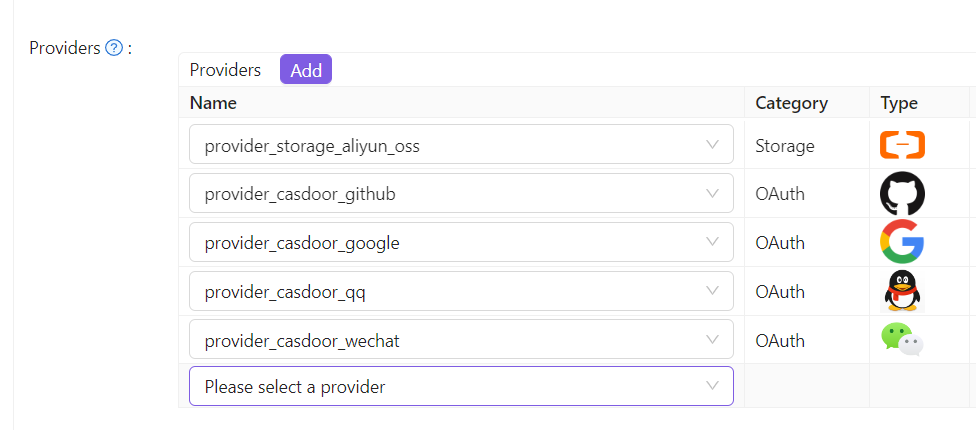
アプリケーションの編集ページを開き、Providers タブに移動して行を追加します。
-
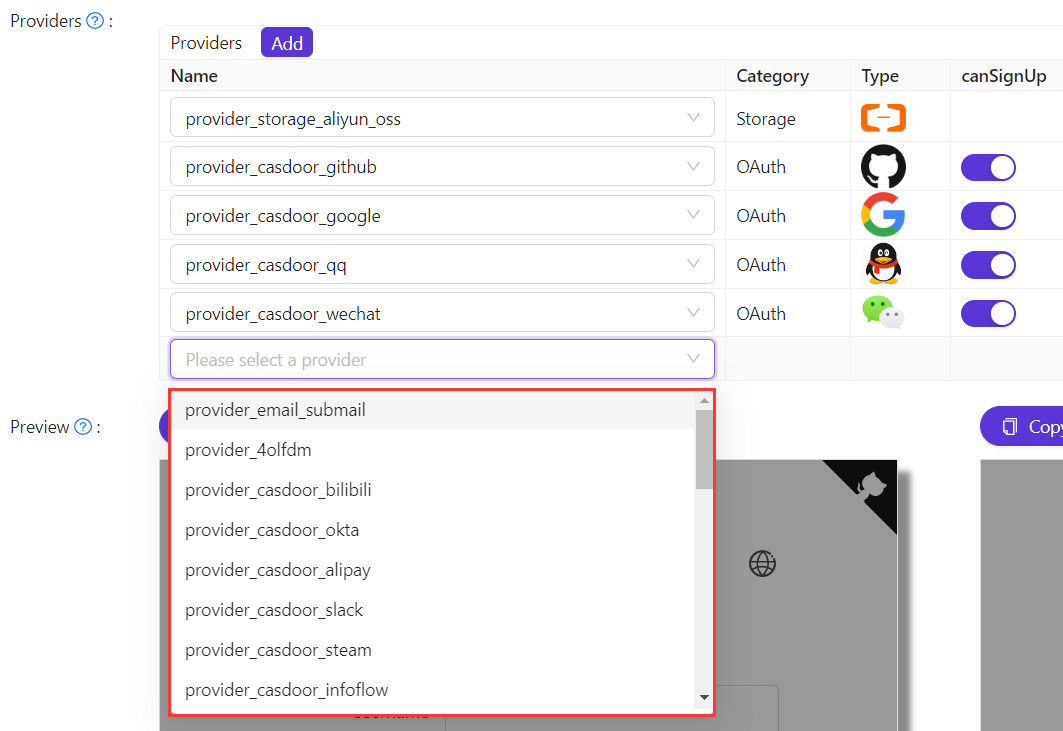
プロバイダーを選択します。リストには、そのアプリケーションで利用可能なすべてのプロバイダーが表示されます。
-
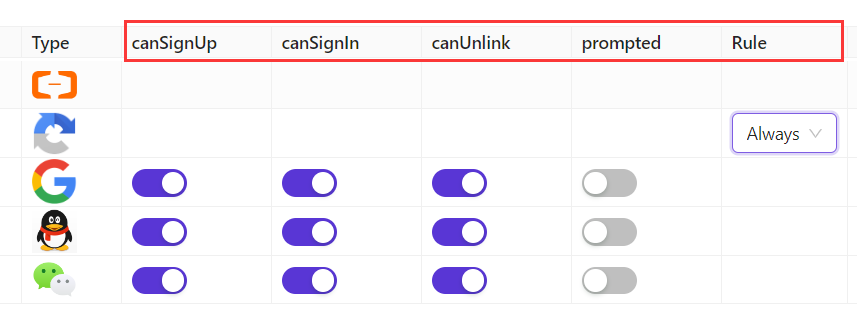
OAuth および captcha プロバイダーの場合は、アプリケーションでの使用方法を設定します。Add providers to an application および Configure the default captcha を参照してください。
-
アプリケーションを保存します。