Step-up MFA
Step-up MFA lets an application ask a user who is already signed in for a fresh code of the MFA factor they enabled in Casdoor, right before a sensitive action such as approving a payment, approving a request or acting as another user.
- The user doesn't type the password again and doesn't go through the sign-in page again.
- Users enroll their second factor once, in Casdoor, and it works both at sign-in and at step-up.
- The application never sees or stores the TOTP secret, the email address, the phone number or the recovery codes.
- A passed check returns a short-lived, single-use proof token signed by Casdoor. The application's server redeems it before running the action.
Turn it on
Open Applications, edit the application and go to the Step-up MFA tab.
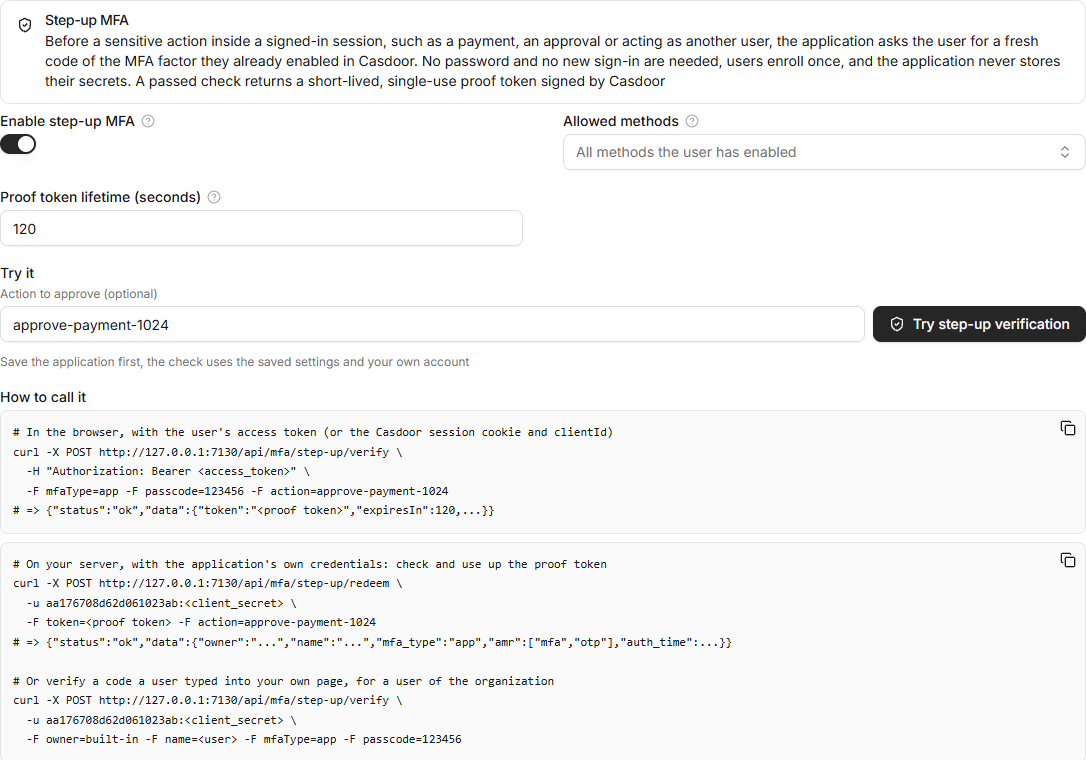
| フィールド | 説明 |
|---|---|
| Enable step-up MFA | Lets the application use the step-up API. Requests for an application without it are refused. |
| Allowed methods | The methods the application accepts: TOTP (authenticator app), Email, Phone (SMS), RADIUS and Recovery code. Empty means every method the user has enabled. |
| Proof token lifetime (seconds) | How long the proof token stays valid. The default is 300 and the maximum is 3600. |
Save the application, then click Try step-up verification to run the check with your own account. The dialog shows only the methods you have enabled. After a correct code, the page shows the proof token and its claims.
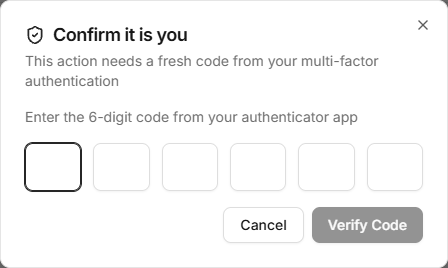
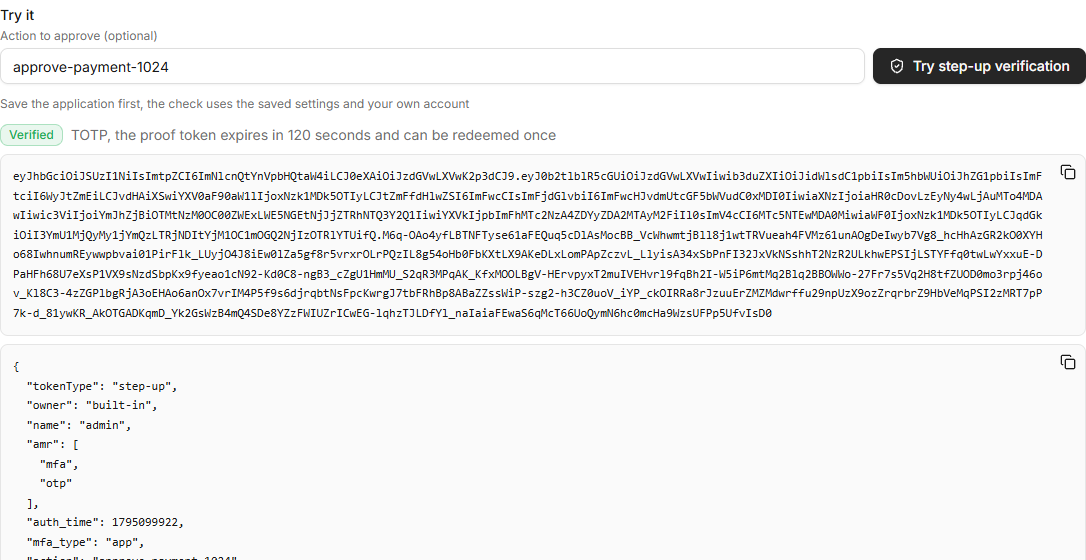
The tab also shows curl examples with the application's client ID, and the latest passed checks with their state: Valid, Expired or Redeemed.
Who is verified
| Caller | User | Application |
|---|---|---|
The user's browser with an access token (Authorization: Bearer <access_token>) | The token's user | The token's application. A different clientId is refused. |
| The user's browser with the Casdoor session cookie | The signed-in user | The clientId parameter. The user must belong to the application's organization. |
| The application's server with its client ID and secret | The user named by owner and name (or userId). It must belong to the application's organization. | The calling application |
The user must not be forbidden or deleted.
API
All endpoints take form data (multipart/form-data or application/x-www-form-urlencoded) and answer in the usual {"status": "ok", "data": ...} format.
List the methods
GET /api/mfa/step-up/methods returns the methods the user has enabled and the application allows, the preferred one first. Email addresses and phone numbers are masked.
{"status": "ok", "data": [{"mfaType": "app", "isPreferred": true}, {"mfaType": "email", "dest": "jo***@example.com"}]}
Send an email or SMS code
POST /api/mfa/step-up/send-code with mfaType set to email or sms. The code goes to the email address or phone number the user enabled for MFA, never to one from the request. It uses the Email or SMS provider of the application, the same as the MFA step of a sign-in.
Verify a code
POST /api/mfa/step-up/verify
| Parameter | 説明 |
|---|---|
mfaType | app, email, sms, radius or recovery |
passcode | The code. For recovery, the recovery code can also be sent as recoveryCode. |
action | Optional, up to 500 characters. A value naming what the check approves, such as approve-payment-1024. It is copied into the proof token. |
clientId | The application, when the caller uses the Casdoor session cookie |
owner, name | The user, when the application calls with its own credentials |
curl -X POST https://door.casdoor.com/api/mfa/step-up/verify \
  -H "Authorization: Bearer <access_token>" \
  -F mfaType=app -F passcode=123456 -F action=approve-payment-1024
{"status": "ok", "data": {"token": "<proof token>", "tokenType": "step-up", "expiresIn": 300, "mfaType": "app"}}
The check is stricter than the MFA step of a sign-in:
- Only the factor the user enabled is checked. There is no parameter for a secret or a destination, and no fallback to another method.
- The organization's Master verification code is not accepted.
- Remember this account of the MFA step doesn't skip it. Every call needs a fresh code.
- A TOTP code is accepted only once. Casdoor keeps the last accepted time step of each user, so the same code or an older one is refused. This also applies to the MFA step of a sign-in and to the RADIUS server.
- A recovery code is removed after use. Email and SMS codes are single use.
誤ったコードの入力は、サインイン時の MFA ステップと同じ制限の対象となります: Failed signin limit と Failed signin frozen time(デフォルトでは 5 回試行と 15 分)。ブラウザからの呼び出しも IP アドレスごとの制限の対象となります。アプリケーションのサーバーからの呼び出しはユーザーごとの制限のみを対象とするため、多数のユーザーに対してコードを確認する単一のサーバーがロックアウトされることはありません。
証明トークンの交換
アプリケーションのサーバーは、アクションを実行する前に、自身のクライアント ID とシークレットを使用して POST /api/mfa/step-up/redeem を呼び出します:
curl -X POST https://door.casdoor.com/api/mfa/step-up/redeem \
  -u <client_id>:<client_secret> \
  -F token=<proof token> -F action=approve-payment-1024
{"status": "ok", "data": {"tokenType": "step-up", "owner": "built-in", "name": "alice", "amr": ["mfa", "otp"], "auth_time": 1795099922, "mfa_type": "app", "action": "approve-payment-1024", "sub": "...", "aud": ["<client_id>"], "exp": 1795100222, "jti": "..."}}
Casdoor は署名、オーディエンス(呼び出し元のアプリケーション)、有効期限を確認し、action が指定されている場合は、そのアクション用に発行されたトークンであることを確認します。各トークンは一度だけ交換できます。2 回目の交換は The step-up token has already been used エラーで失敗します。
証明トークン
証明トークンは、ヘッダーに typ: step-up+jwt を含む、アプリケーションの Token cert で署名された JWT です。
| Claim | Value |
|---|---|
tokenType | step-up |
sub | ユーザーの ID、ID トークンと同じもの |
owner, name | ユーザーの組織名と名前 |
aud | アプリケーションのクライアント ID |
amr | TOTP および RADIUS の場合は ["mfa", "otp"]、SMS の場合は ["mfa", "sms", "otp"]、メールの場合は ["mfa", "email", "otp"]、リカバリコードの場合は ["mfa", "recovery"] |
auth_time | このチェックが行われた時刻 |
mfa_type | 使用された認証方法 |
action | リクエストの action(存在する場合) |
iat, exp, jti | 発行時刻、有効期限、一意な ID |
また、Casdoor の JWKS (https://<your-casdoor-host>/.well-known/jwks) を使用して自分でトークンを検証することもできます(OIDC クライアントを参照)。その後、tokenType、aud、exp、および action を確認し、トークンが一度だけ使用されるように、各 jti を有効期限まで記憶しておいてください。
典型的なフロー
- ユーザーはアプリケーション内の Approve payment をクリックします。
- フロントエンドはダイアログを表示し、
/api/mfa/step-up/methodsでメソッドを一覧表示し、必要に応じて/api/mfa/step-up/send-codeでメールまたは SMS コードを送信します。 - ユーザーはコードを入力します。フロントエンドは、ユーザーのアクセストークンと
action=approve-payment-1024を使用して/api/mfa/step-up/verifyを呼び出し、証明トークンをサーバーに渡します。 - サーバーは同じ
actionを使用して/api/mfa/step-up/redeemを呼び出します。これが成功した場合のみ、サーバーは支払いを承認します。
ダイアログを独自バックエンドで構築する方が望ましい場合、サーバーはクライアント認証情報とユーザーの owner および name を使用して /api/mfa/step-up/verify を直接呼び出し、レスポンスに基づいて処理を行うことができます。
監査
すべての呼び出しは、成否にかかわらず、検証済みユーザーの下にある Records に書き込まれます。レコード内ではコードはマスクされます。Step-up MFA タブには、アプリケーションの最新の成功したチェックが一覧表示されます。