Fluxos
A flow is a small no-code automation of an organization. At a trigger, such as right before a user signs in, Casdoor runs the steps of the flow one by one: conditions decide whether the flow goes on, and actions do something, such as refusing the sign-in, asking for multi-factor authentication (MFA), adding a claim to the tokens or calling your own service.
Resultados da aprendizagem
- Create a flow from a template.
- Test a flow on a user without changing anything.
- Call your own service from a flow and change the result with its answer.
O que você precisa
- An admin account of the organization.
Create a flow
-
In the Casdoor admin console, go to Identity > Flows and click Add.
Casdoor creates a disabled flow and opens it.
-
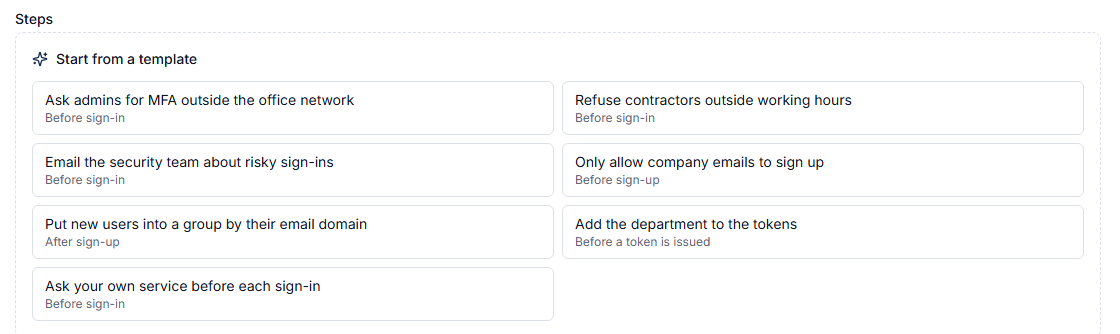
Pick a template under Start from a template, or add steps yourself with Condition and Action.
-
Choose the Trigger, and optionally Only for these applications. An empty list means every application of the organization.
-
Check the steps, then turn on Enabled and click Save.
The steps form a chain under the trigger. A condition that doesn't hold ends the flow, so the steps after a condition run only when it holds. Each step can be moved up or down, turned off with its switch, or deleted.
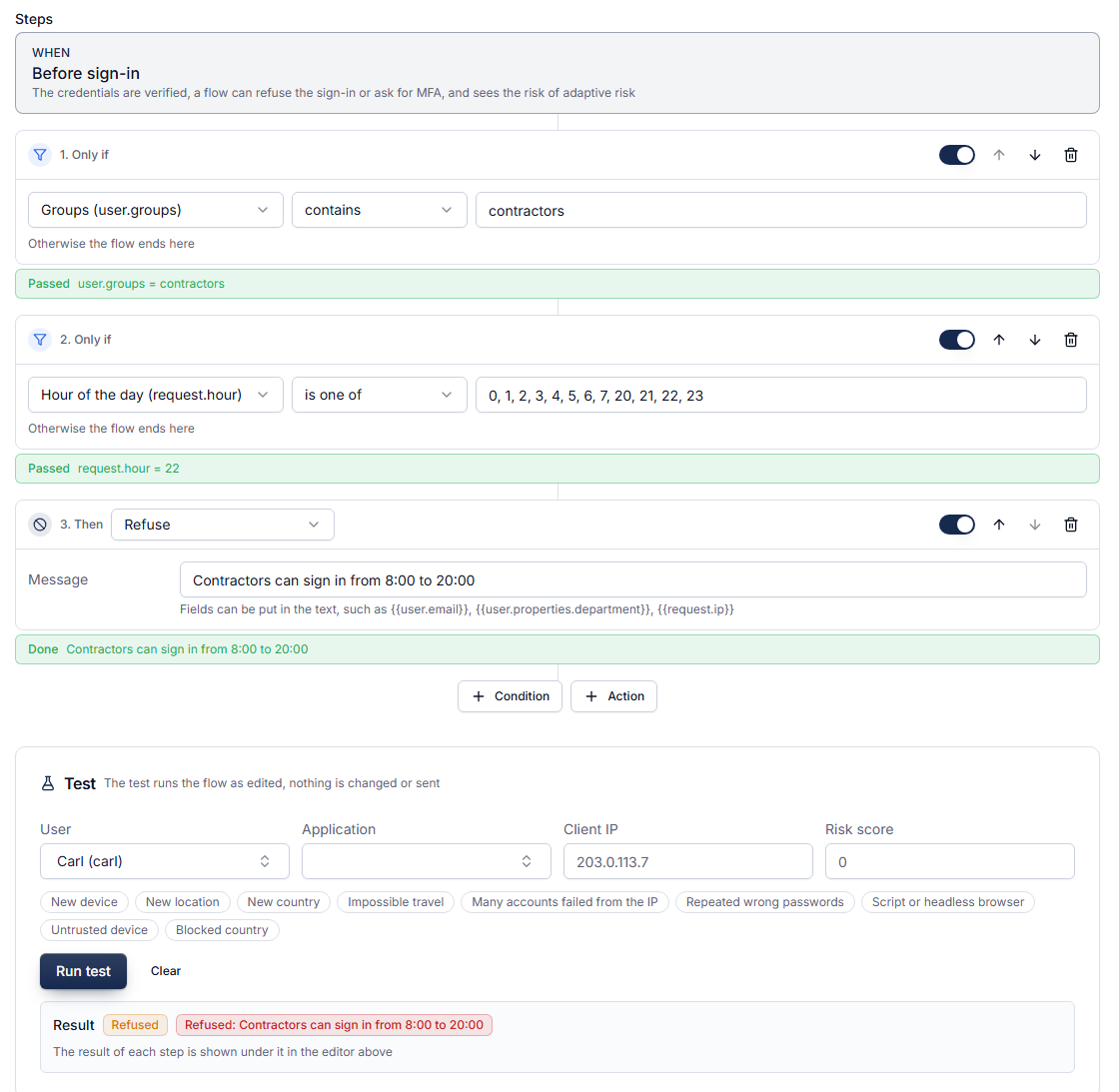
Several flows can run at the same trigger. They run in the order of their Order, then of their names. A flow that refuses stops the flows after it.
Triggers
| Trigger | When it runs | What a flow can do |
|---|---|---|
| Before sign-up | The sign-up form is filled in, the user is not saved yet. | Refuse the sign-up, set fields of the new user, add the user to a group, call an HTTP endpoint. |
| After sign-up | The user has been added. Runs in the background. | Set fields, change groups and roles, call an HTTP endpoint, send an email. |
| Before sign-in | The credentials are verified, before MFA and before the session is created. Sees the result of adaptive risk. | Refuse the sign-in, ask for MFA, set fields, change groups and roles, call an HTTP endpoint, send an email. |
| After sign-in | The user has signed in. Runs in the background. | Set fields, change groups and roles, call an HTTP endpoint, send an email. |
| Before a token is issued | An access token and an ID token are about to be issued to an application. | Refuse the token, add claims, call an HTTP endpoint. |
The sign-up triggers cover the sign-up page and the first sign-in with a third-party identity provider that creates the account.
Conditions
A condition compares a field with a value. Text is compared without regard to case.
| Campo | Descrição |
|---|---|
user.name, user.displayName, user.email, user.phone | The user's name, display name, email and phone. |
user.emailDomain | The part of the email after @, in lowercase. |
user.emailVerified, user.isAdmin, user.isMfaEnabled | Whether the email is verified, the user is an admin of the organization, the user has set up MFA. |
user.type, user.tag, user.region, user.affiliation, user.title, user.countryCode | Fields of the user. |
user.groups, user.roles | The names of the user's groups and roles, a list. |
user.signupApplication, user.createdTime, user.accountAgeDays | Where and when the user signed up, and how many days ago. |
user.properties.<key> | A custom property of the user. |
application.name | The application that the user signs up or signs in to. |
request.ip, request.country, request.userAgent | The client's IP address, its country from the IP database, and its user agent. |
request.hour, request.weekday | The hour (0 to 23) and the day of the week (monday to sunday) on the Casdoor server. |
risk.score, risk.signals, risk.decision | The score, the signals and the decision (Allow, MFA or Deny) of adaptive risk. Before sign-in only. |
claims.<name> | A claim added by an earlier step. Before a token is issued only. |
| Operator | Holds when |
|---|---|
| is, is not | The field equals the value, or doesn't. |
| contains, doesn't contain | The text contains the value. For a list, the list has the value. |
| starts with, ends with | The text starts or ends with the value. |
| is one of, is none of | The field is one of the comma-separated values. For a list, the list has any of them. |
| matches the regex | The text matches the regular expression. |
| is greater than, is less than | The field and the value are numbers and compare so. |
| is set (or true), is empty (or false) | The field isn't empty, false or 0, or it is. |
| is in the networks, is not in the networks | The IP address is in one of the comma-separated IP addresses and CIDR ranges, or not. |
Ações
| Action | Description |
|---|---|
| Refuse | Refuses the sign-up, the sign-in or the token with Message. |
| Ask for MFA | The user has to pass MFA. A device that remembers the MFA doesn't skip it, and a user without MFA verifies the email or the phone of the account. |
| Add a token claim | Adds a claim to the access token and the ID token. Value type JSON parses the value, such as {"beta": true}. Claims that Casdoor sets, such as sub, iss and aud, can't be changed. |
| Set a user field | Sets displayName, firstName, lastName, avatar, tag, region, location, affiliation, title, homepage, bio, language, gender, education, or a custom property properties.<key>. |
| Add to group, Remove from group | Changes the user's groups. The group must exist. |
| Grant role, Revoke role | Adds the user to a role or removes the user from it. |
| Call an HTTP endpoint | Calls your service, see Call your own service. |
| Send an email | Sends an email with the organization's email provider. To is the user's email when empty. |
| End the flow | Ends the flow. |
The text of a parameter can hold fields in double braces, such as {{user.email}}, {{user.properties.department}} or {{request.ip}}.
Test a flow
Under the editor, choose a user in Test, optionally an application, a client IP, a risk score and risk signals, and click Run test. The flow runs as it is in the editor, saved or not, and nothing is changed: the actions only say what they would do, no email is sent, and HTTP endpoints are called only when their Call it in tests is on. The result of each step is shown under the step.
Recent runs lists the latest runs of the saved flow, with the user, the result and the result of each step.
Call your own service
The Call an HTTP endpoint action sends the user, the request and the risk to your service as JSON, and your service can change the result with its answer. Use it for checks that Casdoor doesn't have, such as a lookup in your CRM or your HR system.
| Parameter | Descrição |
|---|---|
| URL | The endpoint and the method: POST (default), PUT or GET. |
| Signing secret | When set, the body is signed with HMAC-SHA256 in the header X-Casdoor-Signature. |
| Headers | More request headers, one per line, as Name: value. |
| Timeout (seconds) | 5 by default, at most 30. |
| When the call fails | End the flow with an error (default), Ignore and continue, or Refuse. A call fails when it can't connect, times out, or returns a status other than 2xx. |
| Call it in tests | Calls the endpoint when the flow is tested. |
This is the request of a Before sign-in flow:
POST /casdoor/pre-signin HTTP/1.1
Content-Type: application/json
User-Agent: Casdoor-Flow
X-Casdoor-Signature: sha256=5859636c8247daf287b9e32b39ead07422324245882167794f69d80654981bc6
{
  "application": "app-built-in",
  "request": {
    "country": "",
    "ip": "::1",
    "userAgent": "Mozilla/5.0 (Windows NT 10.0; Win64; x64) Chrome/141.0"
  },
  "risk": {
    "score": 0,
    "signals": [],
    "decision": "Allow",
    "location": "intranet"
  },
  "time": "2026-11-23T22:53:04+08:00",
  "trigger": "pre-signin",
  "user": {
    "createdTime": "2026-11-23T22:35:50+08:00",
    "displayName": "Admin",
    "email": "admin@example.com",
    "groups": null,
    "id": "70ec365e-6dfd-40b2-98ae-aa31109b6f1a",
    "name": "admin",
    "owner": "built-in",
    "phone": "12345678910",
    "properties": {},
    "tag": "staff",
    "type": "normal-user"
  }
}
risk is present at the Before sign-in trigger when adaptive risk is on. At the Before a token is issued trigger the body has claims with the claims added so far.
Answer with HTTP 200 and a JSON object, every field optional. An empty or non-JSON body changes nothing.
{
  "deny": "Your account is locked in the CRM",
  "requireMfa": true,
  "claims": {"crm_tier": "gold"},
  "user": {"title": "Sales manager", "properties.region": "EMEA"},
  "stop": true
}
| Field | Effect |
|---|---|
deny | Refuses, with this message. Where the trigger allows Refuse. |
requireMfa | Asks for MFA. Before sign-in only. |
claims | Adds these claims. Before a token is issued only. |
user | Sets these user fields, the same fields as Set a user field. Where the trigger allows Set a user field. |
stop | Ends the flow after this step. |
Verify the signature before you trust the request. In Node.js, with the raw body:
const crypto = require("crypto");

function isFromCasdoor(rawBody, signature, secret) {
  const expected = "sha256=" + crypto.createHmac("sha256", secret).update(rawBody).digest("hex");
  return signature.length === expected.length && crypto.timingSafeEqual(Buffer.from(signature), Buffer.from(expected));
}
The flows of an organization other than built-in can call only Internet addresses, like its webhooks and providers, unless a global admin makes it a trusted organization.