RuoYi
Casdoor 可以轻松地与 RuoYi-cloud 集成。
步骤1:部署Casdoor
部署 Casdoor. 见 服务器安装。 Ensure the server is running (e.g. http://localhost:8000) and you can open the login page (e.g. http://localhost:7001) and sign in as built-in/admin with the password that you set. See Sign in to the admin console.
步骤 2:配置 Casdoor
在 Casdoor 中配置组织、应用和同步器。注意:
- 编辑同步器时,检查表列:
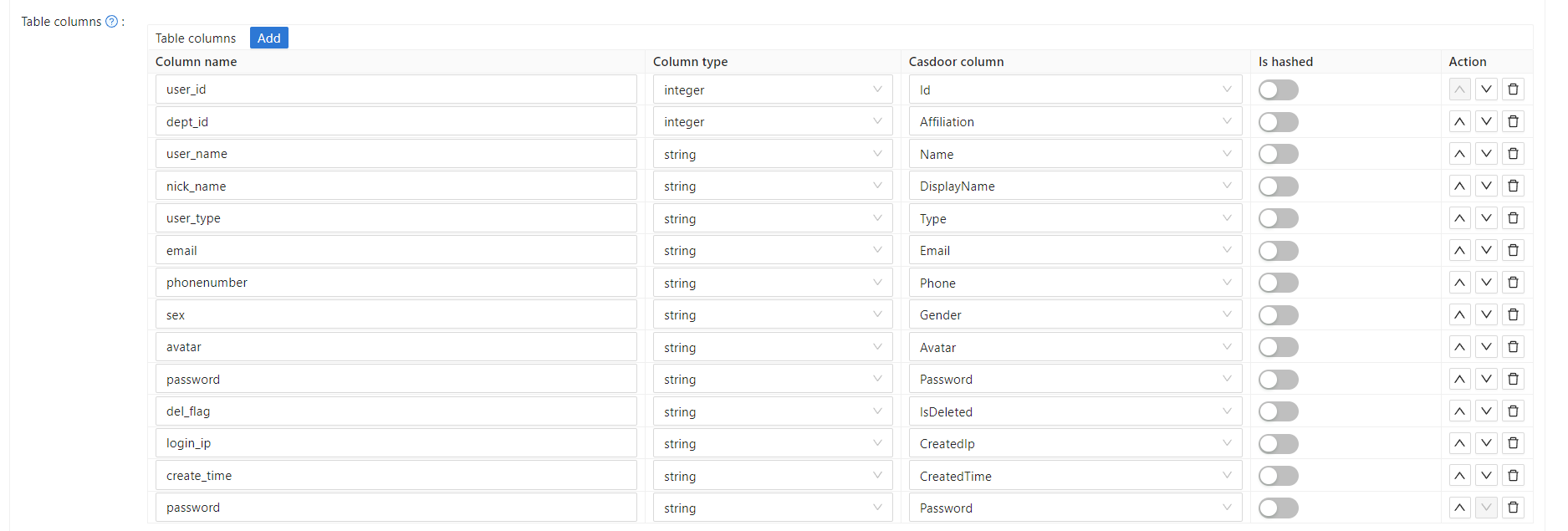 。
- 编辑组织时,选择正确的密码类型:
 。
- 启用软删除。
步骤 3. 改造前端
3.1 跳转到 Casdoor 的登录页面
使用前端 SDK(例如 vue-sdk)。初始化后,使用 getSigninUrl() 获取 Casdoor 登录 URL。
根据需要连接链接并移除任何冗余的 RuoYi-Cloud 登录界面(例如账号/密码输入框)。
3.2 接收 Casdoor 返回的 code 和 state
通过 Casdoor 成功登录后,Casdoor 会将 code 和 state 发送到我们设置的页面。我们可以使用 create() 函数检索 code 和 state。
created() {
    let url = window.document.location.href; // get URL
    let u = new URL(url);
    this.loginForm.code = u.searchParams.get('code'); // get code and state
    this.loginForm.state = u.searchParams.get('state');
    if (this.loginForm.code != null && this.loginForm.state != null) { // if code and state are not null, execute handleLogin
      this.handleLogin();
    }
}
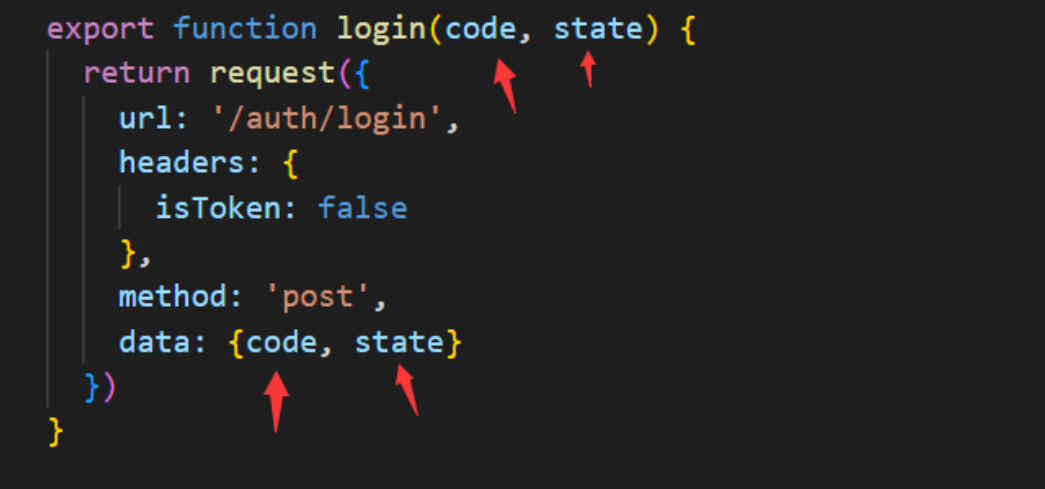
对于 RuoYi-Cloud,我们只需修改其原始的发送账号和密码的方法,改为发送 code 和 state。因此,相对于原始登录,变化仅在于发送到后端的内容。
步骤 4:重构后端
4.1 接收前端返回的 code 和 state
@PostMapping("login")
public R<?> callback(@RequestBody CodeBody code) {
    String token = casdoorAuthService.getOAuthToken(code.getCode(), code.getState());
    CasdoorUser casdoorUser = casdoorAuthService.parseJwtToken(token);
    if (casdoorUser.getName() != null) {
        String casdoorUserName = casdoorUser.getName();
        if (sysLoginService.getUserByCasdoorName(casdoorUserName) == null) {
            sysLoginService.casdoorRegister(casdoorUserName); // Add this user to the database if they don't exist
        }
    }
    LoginUser userInfo = sysLoginService.casdoorLogin(casdoorUser.getName()); // Get the user's information from the database
    return R.ok(tokenService.createToken(userInfo));
}
在此方法中,我们使用 casdoor-SpringBoot-sdk 方法并对 RuoYi-Cloud 方法进行微调。
例如,RuoYi-Cloud 原始方法使用密码注册账号。我已将其更改为使用 casdoorRegister 方法注册账号。
我还添加了一个方法 getUserByCasdoorName 来检查账号是否存在,并将方法 executeUserInfo 更改为 executeWithAccount 以反映此变更。
这是一个简单的修改,因为我们只需要移除检查密码的部分。
步骤 5:总结
5.1 前端
- 需要移除现有的登录和注册页面。
- 此外,前端需要接受 code 和 state 参数并将其发送到后端。
5.2 后端
RuoYi 后端已经实现了完善的登录和注册功能。我们只需要进行一些小的修改,这使得过程非常便捷。
步骤 6:详细步骤
-
部署并配置 Casdoor。务必为组织选择 bcrypt 密码类型,因为 RuoYi-Cloud 也使用 bcrypt 作为密码加密方式。
-
使用 Casdoor 同步器将数据库用户复制到您的 Casdoor Organization。这将把原始账户导入到 Casdoor 中。
-
部署 Casdoor 后,修改前端代码。禁用若依(RuoYi)的验证码检查。
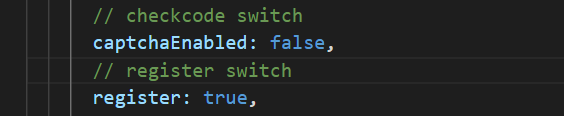
请注意,需要在 Nacos 中再次禁用 RuoYi-Cloud 的验证码。 此外,需要将
sys.account.registerUser设置为true以启用 RuoYi-Cloud 的注册功能。 -
添加一个让用户通过 Casdoor 登录的按钮,并修改数据中的
loginForm。
 该 URL 也可以从 Casdoor-Vue-SDK 或 Casdoor-SpringBoot-SDK 中获取。
-
由于我们不再使用原始的登录方法,请删除 cookie 和 checkcode 方法。
新的
created函数应如下所示:created() {
let url = window.document.location.href; // Get the URL
let u = new URL(url);
this.loginForm.code = u.searchParams.get('code'); // Get the code and state
this.loginForm.state = u.searchParams.get('state');
if (this.loginForm.code != null && this.loginForm.state != null) { // If code and state are not null, execute handleLogin
this.handleLogin();
}
} -
实际上,我们只需要更改发送到后端的参数并删除不必要的函数。无需进行其他更改。
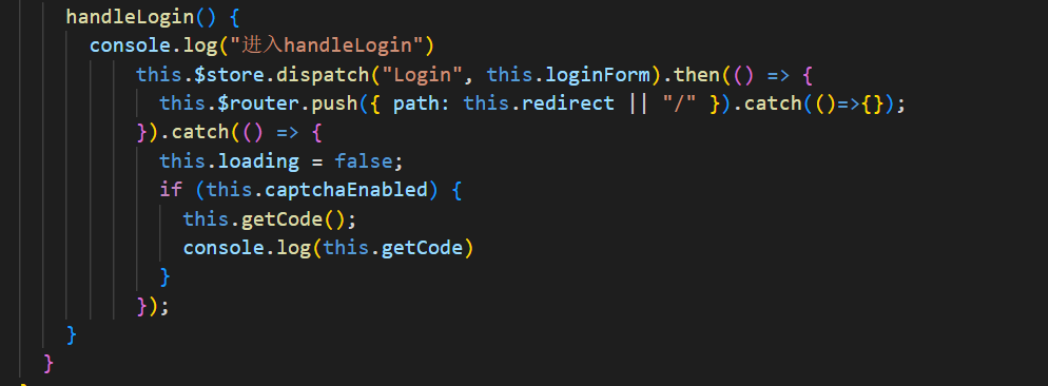
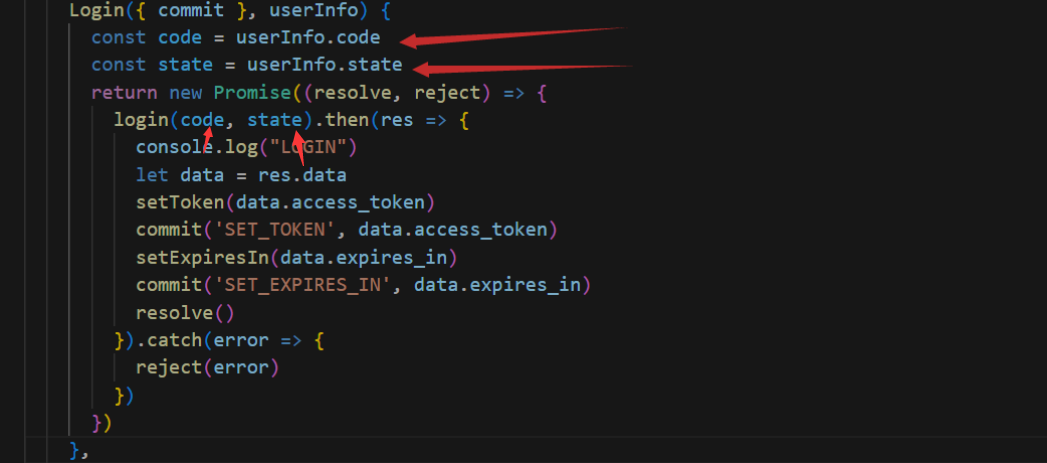
-
在后端引入所需的依赖项。
pom.xml<dependency>
<groupId>org.casbin</groupId>
<artifactId>casdoor-spring-boot-starter</artifactId>
<version>1.2.0</version>
</dependency>您还需要在资源文件中配置 Casdoor。
-
将回调函数定义为重定向函数。对
sysLoginService中的某些方法进行更改。删除密码检查步骤,因为已不再需要它。@PostMapping("login")
public R<?> callback(@RequestBody CodeBody code) {
// Define a CodeBody entity with code and state
String token = casdoorAuthService.getOAuthToken(code.getCode(), code.getState());
CasdoorUser casdoorUser = casdoorAuthService.parseJwtToken(token);
if (casdoorUser.getName() != null) {
String casdoorUserName = casdoorUser.getName();
if (sysLoginService.getUserByCasdoorName(casdoorUserName) == null) {
// If the user is not in the RuoYi-Cloud database but exists in Casdoor, create the user in the database
sysLoginService.casdoorRegister(casdoorUserName);
}
}
LoginUser userInfo = sysLoginService.casdoorLogin(casdoorUser.getName());
// Get the user's information from the database
return R.ok(tokenService.createToken(userInfo));
} -
向
SysLoginService添加新方法。public LoginUser casdoorLogin(String username) {
R<LoginUser> userResult = remoteUserService.getUserInfo(username, SecurityConstants.INNER);
// Execute the user
if (R.FAIL == userResult.getCode()) {
throw new ServiceException(userResult.getMsg());
}
if (StringUtils.isNull(userResult) || StringUtils.isNull(userResult.getData())) {
recordLogService.recordLogininfor(username, Constants.LOGIN_FAIL, "This user does not exist");
throw new ServiceException("User " + username + " does not exist");
}
LoginUser userInfo = userResult.getData();
SysUser user = userResult.getData().getSysUser();
if (UserStatus.DELETED.getCode().equals(user.getDelFlag())) {
recordLogService.recordLogininfor(username, Constants.LOGIN_FAIL, "Sorry, your account has been deleted");
throw new ServiceException("Sorry, your account " + username + " has been deleted");
}
if (UserStatus.DISABLE.getCode().equals(user.getStatus())) {
recordLogService.recordLogininfor(username, Constants.LOGIN_FAIL, "Your account is disabled. Please contact the administrator");
throw new ServiceException("Sorry, your account " + username + " is disabled");
}
recordLogService.recordLogininfor(username, Constants.LOGIN_SUCCESS, "Login successful");
return userInfo;
}public String getUserByCasdoorName(String casdoorUsername) {
R<LoginUser> userResult = remoteUserService.getUserInfo(casdoorUsername, SecurityConstants.INNER);
if (StringUtils.isNull(userResult) || StringUtils.isNull(userResult.getData())) {
// If the user is not in the RuoYi-Cloud database but exists in Casdoor, create the user in the database
return null;
}
String username = userResult.getData().getSysUser().getUserName();
return username;
}public void casdoorRegister(String username) {
if (StringUtils.isAnyBlank(username)) {
throw new ServiceException("User must provide a username");
}
SysUser sysUser = new SysUser();
sysUser.setUserName(username);
sysUser.setNickName(username);
R<?> registerResult = remoteUserService.registerUserInfo(sysUser, SecurityConstants.INNER);
System.out.println(registerResult);
if (R.FAIL == registerResult.getCode()) {
throw new ServiceException(registerResult.getMsg());
}
recordLogService.recordLogininfor(username, Constants.REGISTER, "Registration successful");
}