向 Google Chat 发送通知
本指南介绍如何将 Casdoor 的通知发送到 Google Chat。Casdoor 使用服务账号的 JSON 凭据进行身份验证,正如 Application Default Credentials 所使用的那样。
学习目标
- 使用服务账号凭据将 Google Chat 添加为通知提供商。
所需条件
- 一个拥有 Google Chat 访问权限的 Google Cloud 服务账号及其 JSON 密钥
- Casdoor 管理控制台的管理员访问权限
在 Casdoor 中添加提供商
-
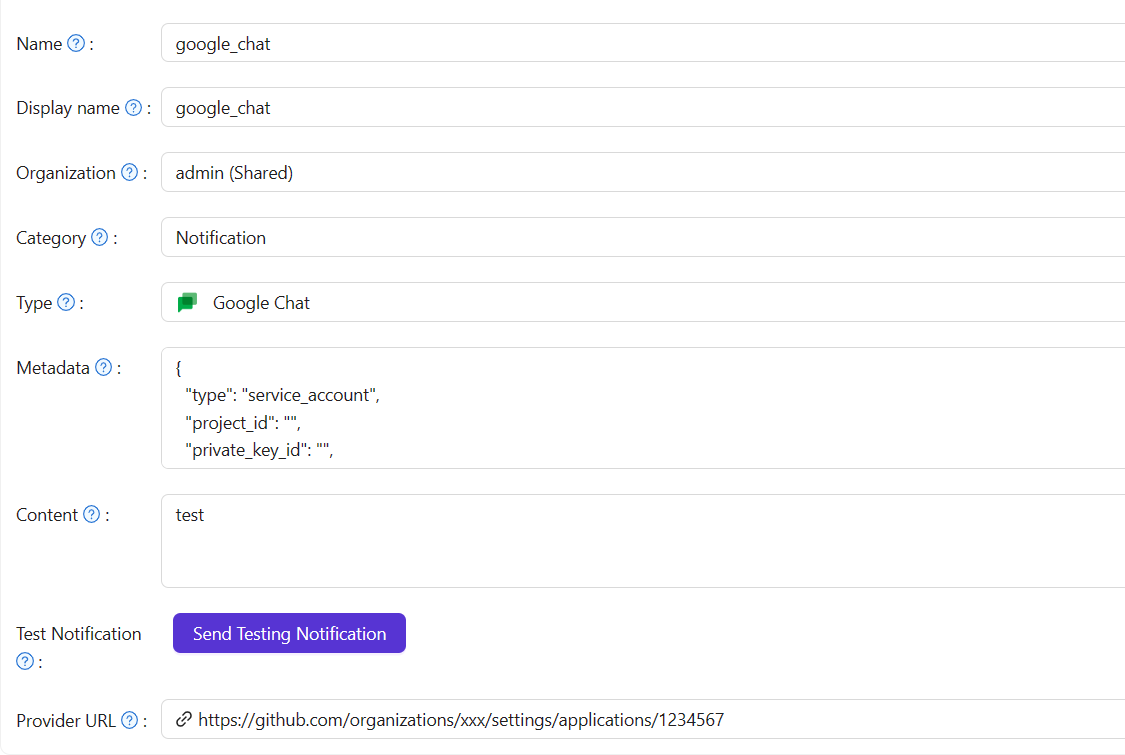
在 Casdoor 管理控制台中,前往 Identity > Providers 并添加一个提供商。
-
将 Category 设置为
Notification,将 Type 设置为Google Chat。 -
将服务账号的完整 JSON 密钥粘贴到 Metadata 中。该密钥的形式如下:
{
  "type": "service_account",
  "project_id": "",
  "private_key_id": "",
  "private_key": "",
  "client_email": "",
  "client_id": "",
  "auth_uri": "",
  "token_uri": "",
  "auth_provider_x509_cert_url": "",
  "client_x509_cert_url": ""
}
-
点击 Send Testing Notification,然后保存该提供商。