添加 Telegram 作为登录提供商
本指南说明如何让用户使用其 Telegram 账户登录 Casdoor。Telegram 不使用 OAuth 2.0 重定向流程:用户通过 Telegram Login Widget 登录,Casdoor 验证该组件返回的签名数据。
学习目标
- 创建 Telegram 机器人并向其注册你的域名。
- 在 Casdoor 中添加 Telegram 作为提供商。
- 了解 Casdoor 接收哪些用户数据。
所需条件
- 一个 Telegram 账户
- 用户打开 Casdoor 时所在的域名
- 管理员访问 Casdoor 管理控制台
创建 Telegram 机器人
-
在 Telegram 中,打开 @BotFather。
-
发送
/newbot并按照提示操作。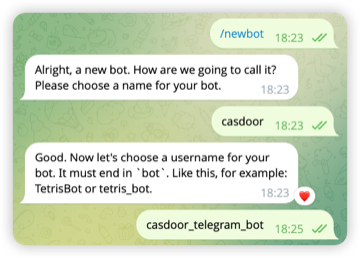
-
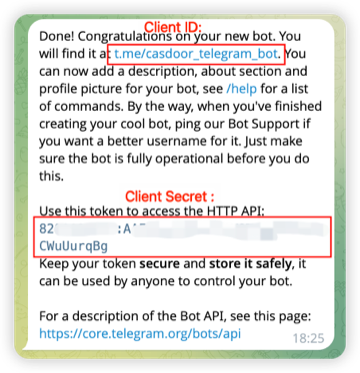
保存 BotFather 发送的机器人令牌。请保持机密:不要分享它也不要将其提交到版本控制系统。
-
发送
/setdomain并输入你的 Casdoor 实例的域名,例如example.com。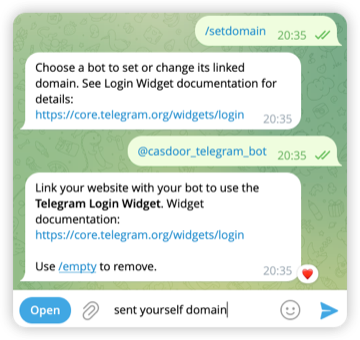
在 Casdoor 中添加提供商
-
在 Casdoor 管理控制台中,转到 Identity > Providers 并添加一个提供商。
-
将 Category 设置为
OAuth,将 Type 设置为Telegram。 -
填写字段:
Field Value Client ID The username of the bot, without @, for examplecasdoor_telegram_botClient secret The bot token 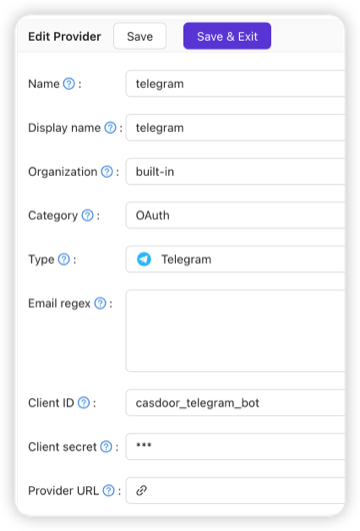
-
保存提供商并将其添加到应用。请参阅向应用添加提供商。
该组件仅在你通过 /setdomain 注册的域名上有效。用户必须在该域名下打开 Casdoor。
验证结果
打开应用的登录页面并使用 Telegram 登录。
用户数据
Casdoor verifies the HMAC-SHA256 signature and the timestamp of the data from the widget, as the Telegram specification describes. It receives the Telegram user ID, the name, the username, and, if available, the photo.
- Email:该组件不提供电子邮件地址。如果需要,请单独收集。
- Username:Telegram 用户名是可选的。对于没有用户名的用户,Casdoor 会生成用户名
telegram_<user-id>,例如telegram_123456789。ID 不会改变,因此用户在每次登录时都保持相同的用户名。
Telegram 还提供 通过 OpenID Connect 登录,签发者为 https://oauth.telegram.org。若要替代小部件使用此功能,请通过 Custom OAuth provider 进行连接。