提供商
提供商将 Casdoor 连接到外部服务,例如用于登录的身份提供商、电子邮件服务或云存储。您只需创建一次提供商,然后将其添加到使用该提供商的应用中。
提供商类别
| Category | 目的 |
|---|---|
| Audit | Send the audit records of Casdoor to a Syslog server. See Syslog audit provider |
| 验证码 | Protect sign-in and sign-up with a captcha. See Captcha providers |
| 电子邮箱 | Send email, such as verification codes and notifications. See Email providers |
| Face ID | Recognize faces for Face ID sign-in. See Face ID providers |
| ID Verification | Verify the identity of users from ID documents. See Identity verification providers |
| 日志 | Forward permission audit events to a logging backend, or store them as entries. See Log providers |
| 多因素身份验证 | Provide a second factor, such as RADIUS. See MFA providers |
| Notification | Send messages to chat services, such as Slack and Telegram. See Notification providers |
| OAuth | Let users sign in with external identity providers, such as GitHub and Google. See OAuth providers |
| 支付 | Take payments for products and subscriptions. See Payment providers |
| SAML | Let users sign in with external SAML identity providers. See SAML providers |
| Scan | Scan servers for security issues and MCP endpoints. See Scan providers |
| 短信 | Send SMS verification codes. See SMS providers |
| 存储 | Store files on the local file system or in cloud object storage. See Storage providers |
谁可以使用提供商
只有管理员可以创建提供商。提供商的可用范围取决于创建者是谁:
| Created by | Available to |
|---|---|
A global administrator: a user of the built-in organization, or a user with IsGlobalAdmin | All applications |
An organization administrator: a user with IsAdmin | Applications of the same organization |
类型为 System Log、SELinux Log 和 Agent 的日志提供商读取 Casdoor 服务器的日志或在其地址接收数据,因此只有全局管理员可以保存它们。组织管理员尝试保存时会收到 Unauthorized operation 错误。
提供商可以访问哪些地址
A provider of an organization other than admin, built-in, and the trusted organizations can connect only to Internet addresses. Casdoor refuses private, loopback, link-local, and unspecified addresses, and the shared address space 100.64.0.0/10. It checks the address that the host name resolves to. For HTTP requests, it checks every connection, including redirects. This stops an organization administrator from reaching the internal network of the Casdoor server, such as a database or a cloud metadata endpoint, through a provider.
该规则涵盖以下连接:
| Category | Connection |
|---|---|
The SMTP server, or the endpoint of Custom HTTP Email | |
| SMS | The endpoint of Custom HTTP SMS |
| Notification | The endpoint of Custom HTTP |
| Storage | The endpoint of the storage service |
| OAuth | The token, user info, and logout endpoints of the provider, and the OIDC discovery that the Request button fetches. The types GitHub, Google, Facebook, LinkedIn, Steam, Line, Amazon, Instagram, TikTok, Twitter, Uber, and Yahoo always use the proxy instead |
若要连接到内部网络上的服务(例如本地 SMTP 服务器),请由全局管理员创建提供商。当组织管理员点击 OIDC 提供商上的 Request 时,无论提供商属于哪个组织,Casdoor 都会对发现获取应用相同的规则。
为了允许组织的管理员管理连接到内部网络的提供商,全局管理员需为其启用 Trusted organization(商业版)。此时,该规则不再适用于该组织的提供商,也不再适用于其管理员使用的 Request 按钮。
创建提供商
- 在 Casdoor 管理控制台中,前往 Identity > Providers 并添加一个提供商。
- 选择 Category 和 Type。Casdoor 会自动填充 Name 和 Display name:名称遵循
provider_<category>_<type>格式,显示名称为<Category> <Type>。一旦您手动编辑某个字段,Casdoor 将不再自动更新该字段。 - 填写对应类型的字段。每种提供商类型页面都列出了所需的字段。
- 保存提供商.
向应用添加提供商
提供商仅在您将其添加到的应用中生效。
-
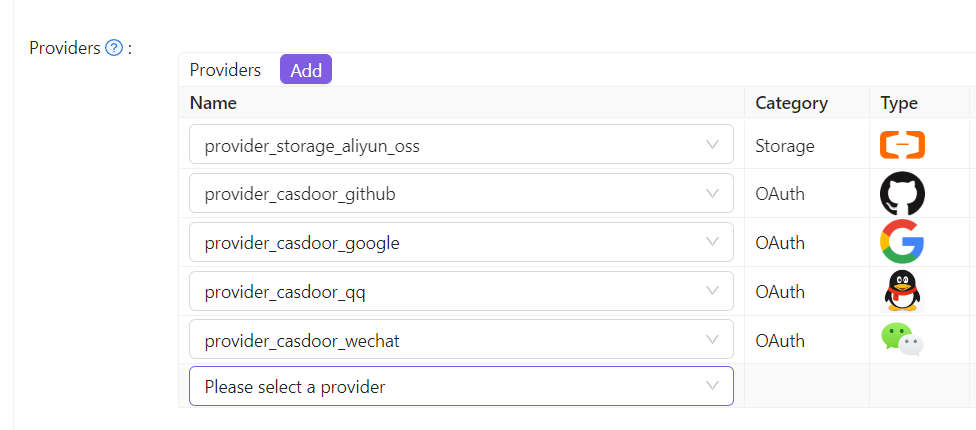
打开应用的编辑页面,转到 Providers 选项卡,并添加一行。
-
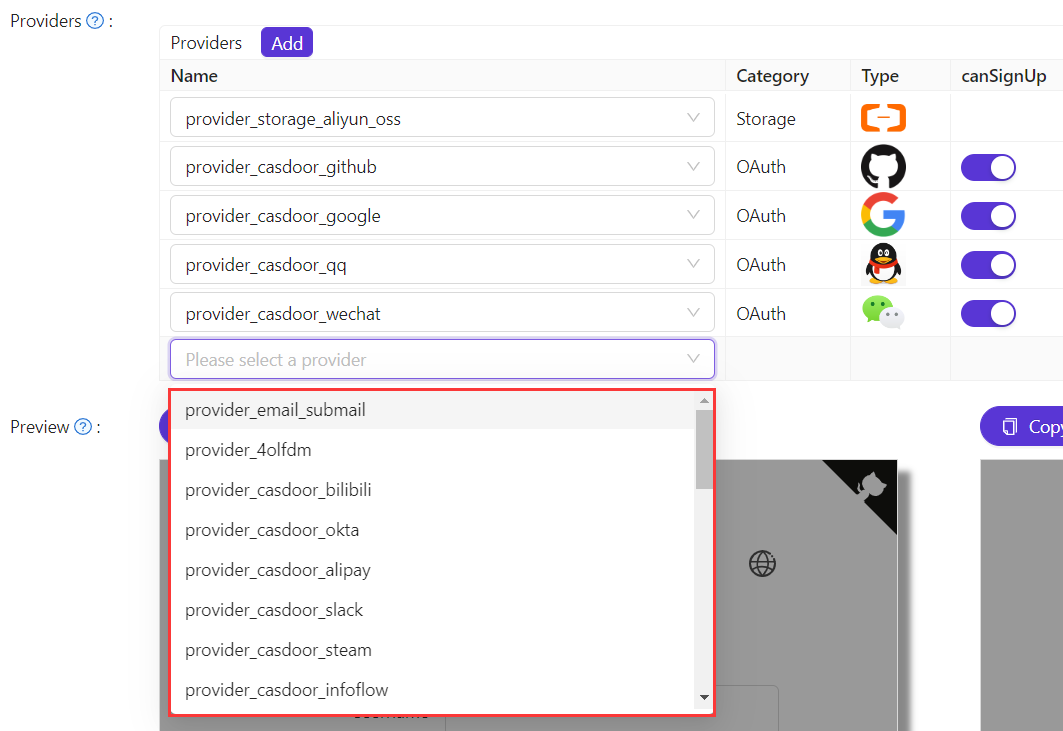
选择提供商。列表中显示了所有对该应用可用的提供商。
-
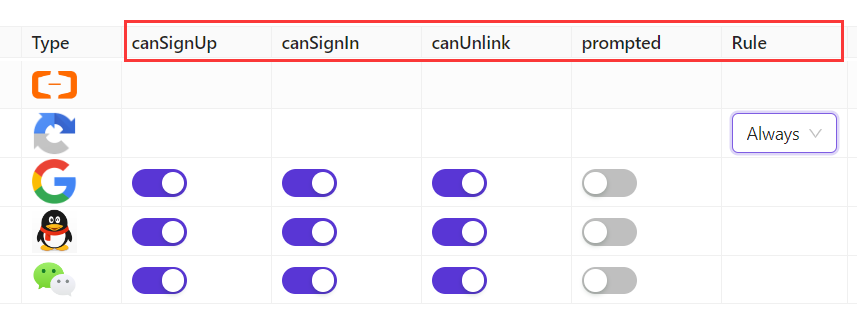
对于 OAuth 和验证码提供商,请设置应用如何使用它们。请参阅 向应用添加提供商 和 配置默认验证码。
-
保存应用。