Store files on a Synology NAS
This guide explains how to store the uploaded files of Casdoor on a Synology NAS through its S3-compatible API.
Learning outcomes
- Add a Synology NAS as a storage provider in Casdoor.
What you need
- A Synology NAS with an S3-compatible endpoint and keys. See the Synology developer documentation.
- Administrator access to the Casdoor admin console
Add the provider in Casdoor
-
In the Casdoor admin console, go to Identity > Providers and add a provider.
-
Set Category to
Storageand Type toSynology. -
Fill in the fields. At least Client ID, Client secret, and Endpoint are required.
Casdoor 字段 群晖对应项 / 含义 必需 Client ID SecretId(access key) 是 Client secret SecretKey 是 Endpoint S3 API 接入地址 是 Bucket 存储桶名称 不 路径前缀 路径前缀 不 Domain 自定义域名 不 Region ID 区域 不 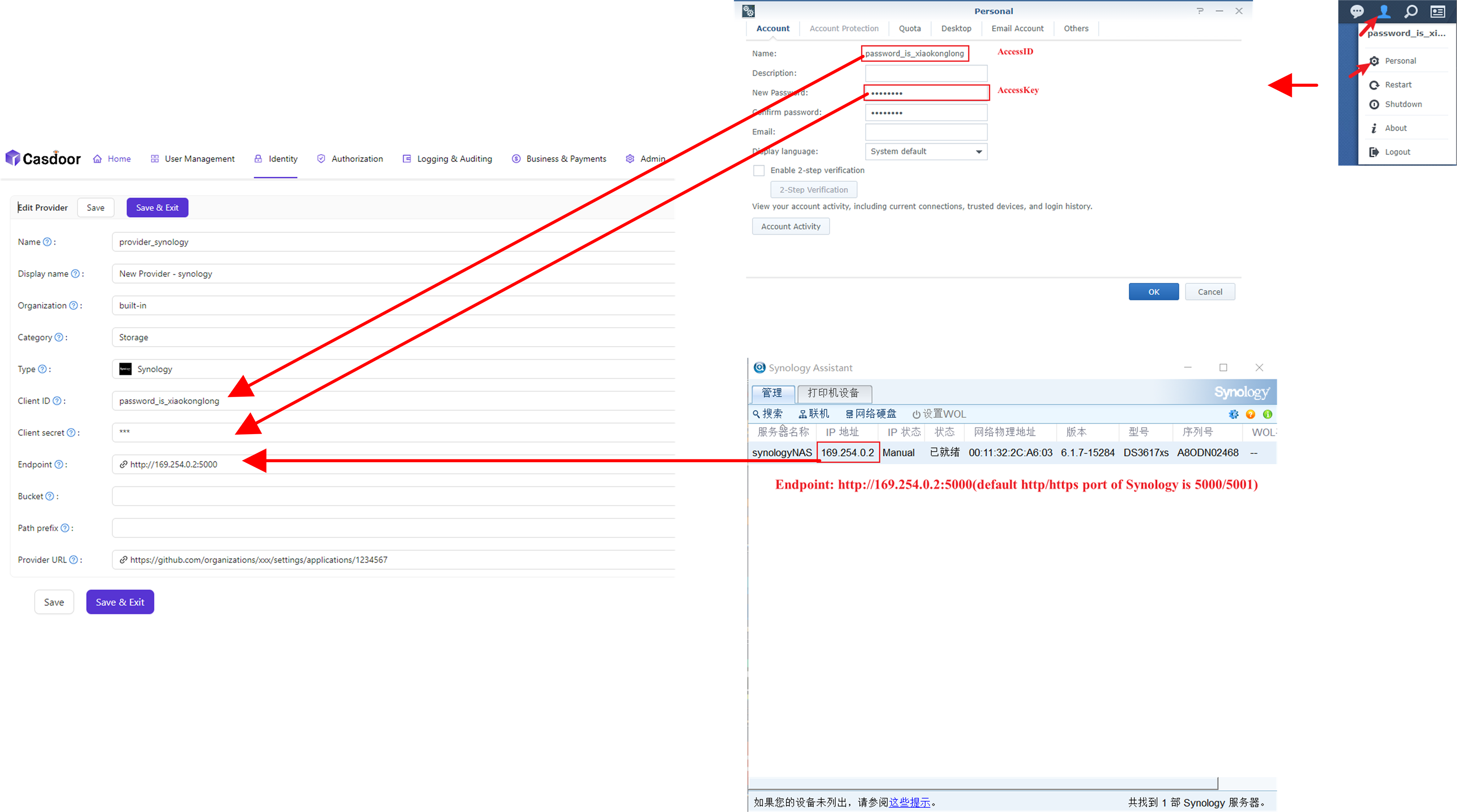
-
Save the provider.