自适应风险
Adaptive risk gives each sign-in a score from what Casdoor sees about it, and acts on the score: a sign-in that looks normal goes through, a risky one has to pass multi-factor authentication (MFA), and a very risky one is blocked.
- A user who signs in from the usual device and place is not asked for anything more.
- A user who signs in from a new country, from a script, or right after many wrong passwords has to pass MFA, even on a device that remembers the MFA.
- A user without MFA of their own verifies the email or the phone of the account instead.
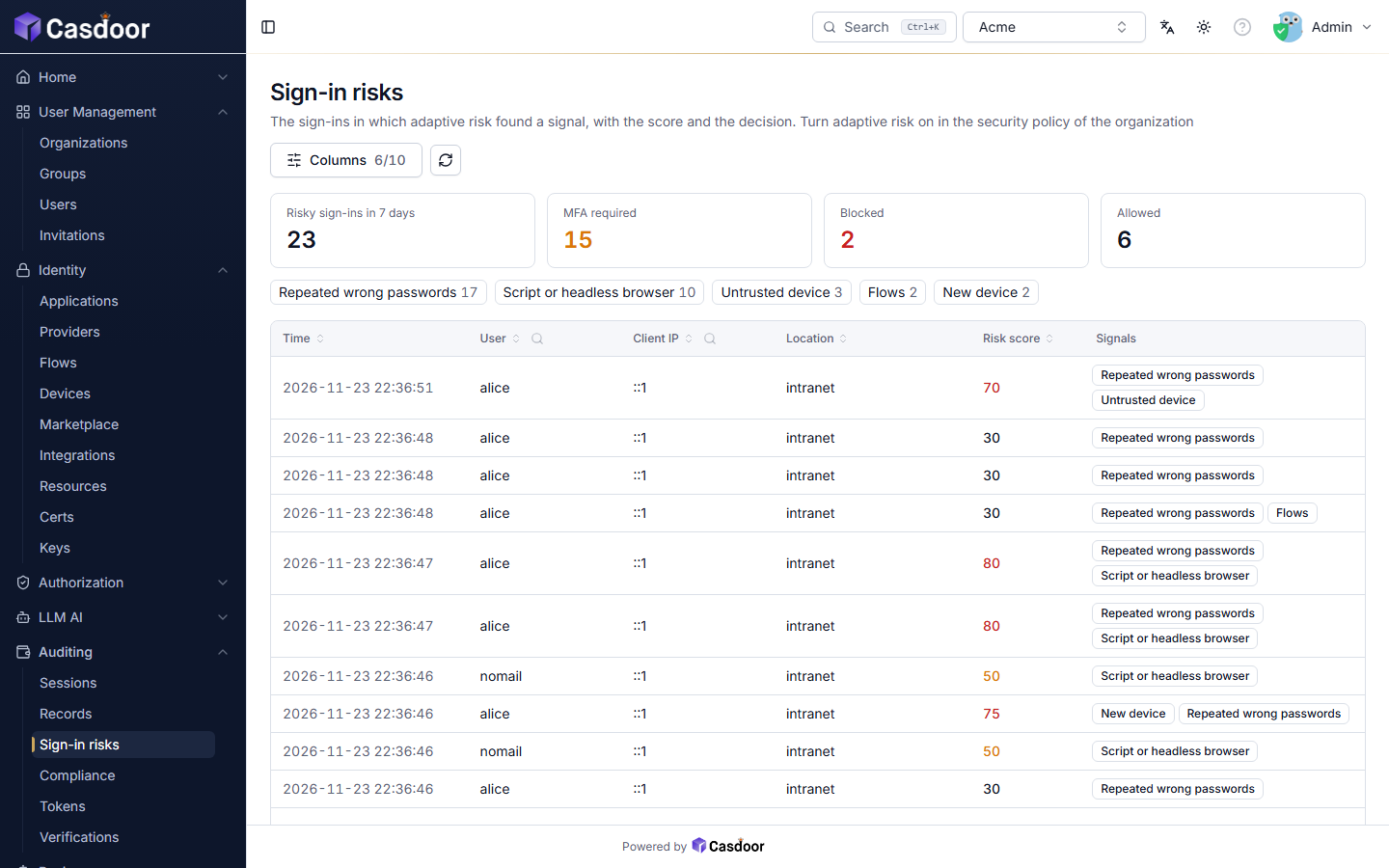
- Every sign-in with a signal is recorded on the Sign-in risks page.
Adaptive risk needs the commercial edition or higher. See pricing.
启用它
-
In the Casdoor admin console, go to User Management > Organizations and edit the organization.
-
Open the Security tab and find the Adaptive risk section.
-
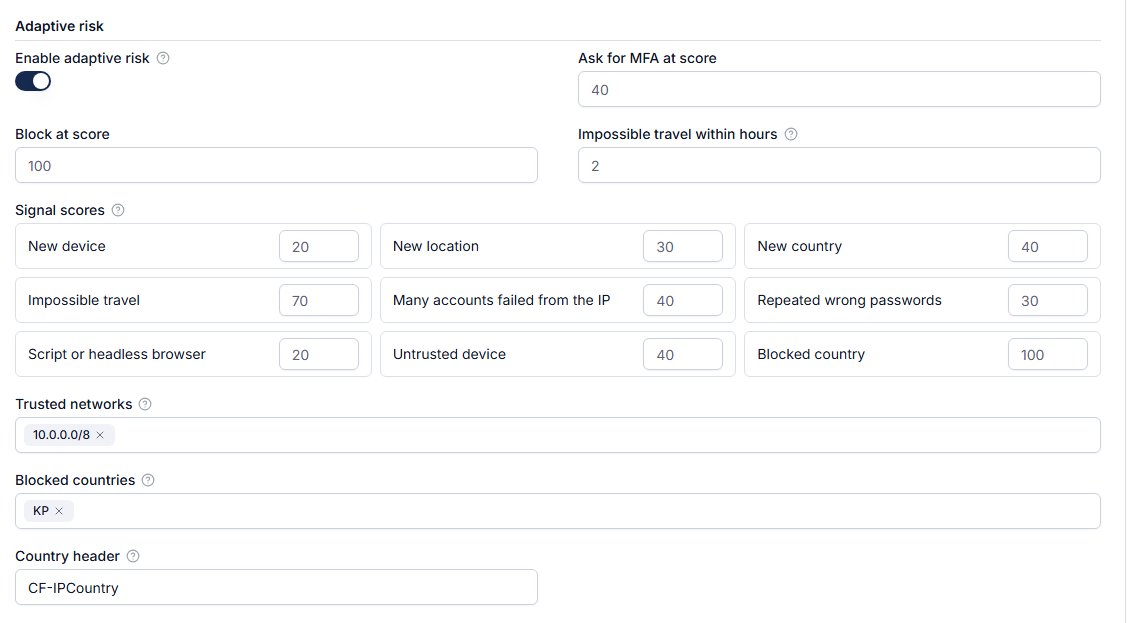
Turn on Enable adaptive risk, adjust the fields below, and click Save.
The policy applies to the next sign-in.
| 字段 | 描述 |
|---|---|
| Enable adaptive risk | Scores the sign-ins of the users of the organization. |
| Ask for MFA at score | The score from which the user has to pass MFA. The default is 40. |
| Block at score | The score from which the sign-in is refused. The default is 100. |
| Impossible travel within hours | A sign-in from another country than the last one within this many hours counts as impossible travel. The default is 2. |
| Signal scores | The score of each signal. Leave a score empty to use the default shown in it. |
| Trusted networks | IP addresses and CIDR ranges, such as 10.0.0.0/8. A sign-in from them gets no score. |
| Blocked countries | Countries whose sign-ins get the Blocked country signal. Write them the way the IP database or the country header names them, such as KP. |
| Country header | The request header in which a CDN in front of Casdoor passes the visitor's country, such as CF-IPCountry. |
信号
The score of a sign-in is the sum of the scores of its signals, at most 100.
| Signal | Default score | When it counts |
|---|---|---|
| New device | 20 | The browser has never signed in to this account before. |
| New location | 30 | The city, or the network when there is no IP database, has never been seen for this account. |
| New country | 40 | The country has never been seen for this account. |
| Impossible travel | 70 | The country differs from the one of the last sign-in, within Impossible travel within hours. |
| Many accounts failed from the IP | 40 | Three or more accounts had a wrong password from this IP address in the last 30 minutes. |
| Repeated wrong passwords | 30 | This account had three or more wrong passwords in the last 30 minutes. |
| Script or headless browser | 20 | The user agent is a command-line tool, an HTTP library or a headless browser, such as curl or python-requests. |
| Untrusted device | 40 | Device trust is set to Untrusted devices add risk and the sign-in doesn't come from a trusted device. |
| Blocked country | 100 | The country is one of Blocked countries. |
The new device, new location and new country signals count only after the user has signed in once, so the first sign-in of an account isn't treated as new. The failed passwords are counted in the memory of the Casdoor process.
The country comes from the IP database that the ipDbFile configuration item points to (the ipip.net format), otherwise from Country header. Without either, the country signals are not checked. Set Country header only when Casdoor is reachable through that CDN alone, because a client can send any header.
What the user sees
| Score | Result |
|---|---|
| Below Ask for MFA at score | The sign-in goes through as usual. The user's own MFA is asked as usual. |
| From Ask for MFA at score | The user has to pass MFA. A device that remembers the MFA doesn't skip it. A user who hasn't set up MFA gets a code at the email or the phone of the account, except the one they signed in with. A user with neither is refused. |
| From Block at score | The sign-in is refused with "This sign-in looks risky and has been blocked, please contact your administrator". The API returns the error code risk-denied. |
A sign-in that has no MFA step, such as the OAuth 2.0 device authorization grant, is only blocked: it isn't asked for MFA. A user who already has a Casdoor session and signs in to another application isn't scored again.
Review the risky sign-ins
In the Casdoor admin console, go to Auditing > Sign-in risks. The page shows the counts of the last seven days by decision and by signal, and each sign-in with a signal: the user, the IP address, the location, the score, the signals, the decision, and whether the user finally signed in.
Combine it with flows
A flow at the Before sign-in trigger sees the score, the signals and the decision of adaptive risk as risk.score, risk.signals and risk.decision. Use it for rules that a score can't express, for example to email the security team about every sign-in with Impossible travel, or to refuse contractors whatever their score is.