OAuth 2.0
Casdoor issues access tokens for authenticating clients. This page describes how to get a token via the API, verify it, and use it. Alternatively use Casdoor SDKs to handle the flow.
Supported grant types:
| Grant Type | RFC | Use Case |
|---|---|---|
| Authorization Code | RFC 6749 §4.1 | Default; web/mobile apps with a backend. Enabled by default. |
| Implicit | RFC 6749 §4.2 | Frontend-only apps without a backend. |
| Resource Owner Password | RFC 6749 §4.3 | Apps with no frontend redirect; user credentials sent directly. |
| Client Credentials | RFC 6749 §4.4 | Service-to-service calls with no user involved. |
| リフレッシュトークン | RFC 6749 §6 | Renew an access token without re-authenticating. |
| Device Authorization | RFC 8628 | Devices with limited input or no browser. |
| Token Exchange | RFC 8693 | Swap an existing token for one with different scope or audience. |
| JWT Bearer | RFC 7523 | Service auth using a signed JWT assertion instead of a client secret. |
Enable non-default grant types on the application edit page.
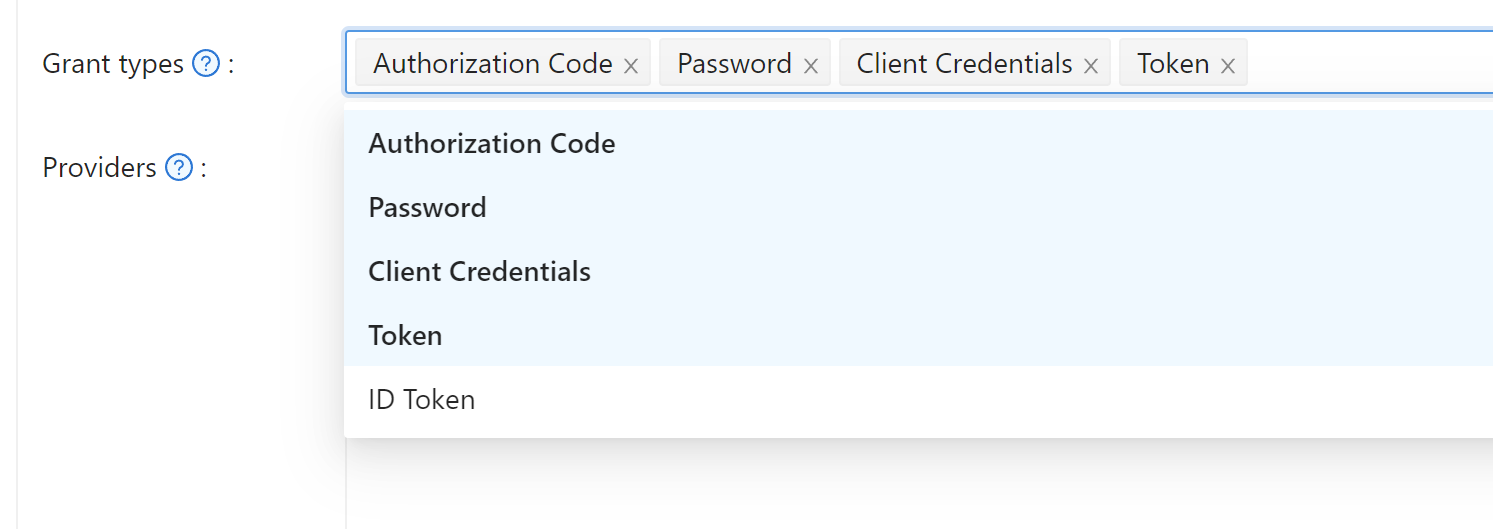
Authorization code grant
Redirect the user to:
https://<CASDOOR_HOST>/login/oauth/authorize?
client_id=CLIENT_ID&
redirect_uri=REDIRECT_URI&
response_type=code&
scope=openid&
state=STATE
Scopes
| Scope | 説明 |
|---|---|
| openid (default) | sub, iss, aud |
| profile | name, displayName, avatar |
| email address | |
| address | address (OIDC object in JWT-Standard; see OIDC address claim) |
| phone | phone number |
%20:https://<CASDOOR_HOST>/login/oauth/authorize?
client_id=...&
scope=openid%20email
See the OIDC spec for details.
After the user signs in, Casdoor redirects to:
https://REDIRECT_URI?code=CODE&state=STATE
Exchange the code for tokens with a POST to:
https://<CASDOOR_HOST>/api/login/oauth/access_token
Request body:
{
    "grant_type": "authorization_code",
    "client_id": ClientId,
    "client_secret": ClientSecret,
    "code": Code,
}
Example response:
{
    "access_token": "eyJhb...",
    "id_token": "eyJhb...",
    "refresh_token": "eyJhb...",
    "token_type": "Bearer",
    "expires_in": 10080,
    "scope": "openid"
}
Casdoor supports PKCE (Proof Key for Code Exchange) for enhanced security. To enable PKCE, add two parameters when requesting the authorization code:
&code_challenge_method=S256&code_challenge=YOUR_CHALLENGE
The code challenge should be a Base64-URL-encoded SHA-256 hash of your randomly generated code verifier (43-128 characters). When requesting the token, include the original code_verifier parameter. With PKCE enabled, client_secret becomes optional, but if provided, it must be correct.
For OAuth providers configured in Casdoor (like Twitter and custom providers with PKCE enabled), Casdoor automatically generates unique code verifiers for each authentication flow, so you don't need to manually implement PKCE.
Binding Tokens to Specific Services
When your application needs to call multiple backend services, you might want tokens that are explicitly bound to a specific service. This prevents security issues where a token meant for one service could accidentally be used with another.
Casdoor supports RFC 8707 Resource Indicators, which lets you specify the intended service when requesting authorization. Add the resource parameter with an absolute URI identifying your service:
https://<CASDOOR_HOST>/login/oauth/authorize?
client_id=CLIENT_ID&
redirect_uri=REDIRECT_URI&
response_type=code&
scope=openid&
state=STATE&
resource=https://api.example.com
When you exchange the authorization code for tokens, include the same resource parameter:
{
    "grant_type": "authorization_code",
    "client_id": ClientId,
    "client_secret": ClientSecret,
    "code": Code,
    "resource": "https://api.example.com"
}
The resulting access token will have its aud (audience) claim set to your resource URI instead of the client ID. Your backend service can then verify that tokens were issued specifically for it by checking the audience claim. The resource must match exactly between the authorization and token requests.
The resource parameter is preserved through browser-based login flows. If a user needs to complete an interactive login (e.g. password entry, MFA, or WebAuthn), the parameter is carried through the entire redirect chain and included when the authorization code is issued.
provider_hint parameter
To skip the Casdoor login page and send the user directly to a specific OAuth provider, add provider_hint=<provider-name> to the authorize URL:
https://<CASDOOR_HOST>/login/oauth/authorize?
client_id=CLIENT_ID&
redirect_uri=REDIRECT_URI&
response_type=code&
scope=openid&
state=STATE&
provider_hint=github
Casdoor serves a lightweight redirect page (without loading the full React app) that immediately bounces the user to that provider's OAuth flow. This reduces time-to-redirect on constrained devices or slow connections.
Signup Flow with OAuth
When users sign up through the OAuth authorization flow, they are automatically redirected to your application's callback URL with the authorization code, just like the sign-in flow. Previously, users had to manually click through intermediate pages after creating their account. Now the signup process matches the streamlined experience of signing in—once registration completes, Casdoor immediately generates the authorization code and redirects to your redirect_uri.
Your application doesn't need any changes to support this. The authorization parameters (client_id, response_type, redirect_uri, etc.) are automatically passed through the signup process when users choose to create a new account during OAuth authorization.
インプリシットグラント
For apps without a backend, use Implicit Grant. Enable it on the application, then redirect users to:
The Implicit Grant token endpoint requires a valid username and password. Pure OAuth users (accounts created exclusively via a third-party provider with no local password set) cannot use this flow and will receive invalid_grant. Use the Authorization Code flow for social-login users.
https://<CASDOOR_HOST>/login/oauth/authorize?client_id=CLIENT_ID&redirect_uri=REDIRECT_URI&response_type=token&scope=openid&state=STATE
Casdoorでユーザーが認証された後、Casdoorは以下にリダイレクトします:
https://REDIRECT_URI/#access_token=ACCESS_TOKEN
Casdoorは、id_tokenをresponse_typeとしてサポートしており、これはOpenIDの機能です。
Device Grant
For devices with limited input or no browser, use Device Grant. Enable it on the application, request device_authorization_endpoint from OIDC discovery, then show verification_uri (e.g. via QR or text) so the user can complete login.
Casdoor provides a built-in device login page at the verification_uri where the user enters the user code and signs in — no custom UI is required. Device login can also be enabled as a sign-in method on the application's Signin methods table.
Second, you should request token endpoint to get Access Token with parameter define in rfc8628.
The pending device-authorization requests (the mapping between the device code and the user code) are held in an in-memory store by default. In a multi-replica / horizontally-scaled deployment, the polling request from the device and the browser confirmation may land on different replicas, so an in-memory store causes the device flow to fail intermittently.
To make the device flow work across replicas, configure redisEndpoint in conf/app.conf. When it is set, Casdoor automatically backs the device-authorization store with Redis so all replicas share the same state. No extra configuration key is needed — the same redisEndpoint value used for shared sessions is reused (format: host:port[,db[,password]]). If Redis cannot be reached at startup, Casdoor logs a warning and falls back to the in-memory store. See Configuration.
リソースオーナーパスワードクレデンシャルグラント
もしアプリケーションにフロントエンドがなく、ユーザーをCasdoorにリダイレクトするものがない場合、これが必要になるかもしれません。
Enable Password Credentials Grant on the application, then send a POST request to:
https://<CASDOOR_HOST>/api/login/oauth/access_token
{
    "grant_type": "password",
    "client_id": ClientId,
    "client_secret": ClientSecret,
    "username": Username,
    "password": Password,
}
Example response:
{
    "access_token": "eyJhb...",
    "id_token": "eyJhb...",
    "refresh_token": "eyJhb...",
    "token_type": "Bearer",
    "expires_in": 10080,
    "scope": "openid"
}
クライアントクレデンシャルグラント
Use Client Credentials Grant when the application has no frontend.
Enable Client Credentials Grant on the application and send a POST request to https://<CASDOOR_HOST>/api/login/oauth/access_token:
{
    "grant_type": "client_credentials",
    "client_id": ClientId,
    "client_secret": ClientSecret,
}
Example response:
{
    "access_token": "eyJhb...",
    "id_token": "eyJhb...",
    "refresh_token": "eyJhb...",
    "token_type": "Bearer",
    "expires_in": 10080,
    "scope": "openid"
}
この方法で取得したAccessTokenは、最初の3つと異なり、ユーザーではなくアプリケーションに対応しているという点に注意が必要です。
Refresh Token
To refresh the access token, use the refreshToken obtained above.
Set the Refresh Token expiration in the application (default 0 hours), then send a POST request to https://<CASDOOR_HOST>/api/login/oauth/refresh_token
{
    "grant_type": "refresh_token",
    "refresh_token": REFRESH_TOKEN,
    "scope": SCOPE,
    "client_id": ClientId,
    "client_secret": ClientSecret,
}
Example response:
{
    "access_token": "eyJhb...",
    "id_token": "eyJhb...",
    "refresh_token": "eyJhb...",
    "token_type": "Bearer",
    "expires_in": 10080,
    "scope": "openid"
}
Token Exchange Grant
Token Exchange (RFC 8693) lets you swap an existing token for a new one with different characteristics—particularly useful when one service needs to call another on behalf of a user, or to narrow a token's scope for a specific downstream service.
To exchange a token, send a POST request to https://<CASDOOR_HOST>/api/login/oauth/access_token:
{
    "grant_type": "urn:ietf:params:oauth:grant-type:token-exchange",
    "client_id": ClientId,
    "client_secret": ClientSecret,
    "subject_token": SubjectToken,
    "subject_token_type": "urn:ietf:params:oauth:token-type:access_token",
    "scope": "openid email"
}
The subject_token is the token you want to exchange—typically an access token or JWT you already have. If you want to narrow the permissions in the new token, specify a scope that's a subset of the original token's scope. When you omit scope, the new token inherits the same scope as the subject token.
Casdoor supports three token types for subject_token_type:
urn:ietf:params:oauth:token-type:access_token(default)urn:ietf:params:oauth:token-type:jwturn:ietf:params:oauth:token-type:id_token
The response returns a new token tied to the same user as your subject token:
{
    "access_token": "eyJhb...",
    "id_token": "eyJhb...",
    "refresh_token": "eyJhb...",
    "token_type": "Bearer",
    "expires_in": 10080,
    "scope": "openid email"
}
For example, an API gateway might exchange a broad-scoped access token for a narrower one before forwarding requests to a downstream microservice. This pattern—called scope downscoping—ensures each service gets only the permissions it needs, rather than inheriting full access from the original token.
Audience binding: Casdoor validates the subject_token using the certificate of its issuing application (identified by the azp claim), not the requesting client's certificate. If the requesting client differs from the token's issuer, the token's aud claim must include the requesting client's ID; otherwise the exchange is rejected with invalid_grant. This prevents one application from exchanging another application's tokens without explicit audience authorization (RFC 8693 §2.1).
JWT Bearer Grant
JWT Bearer (RFC 7523) allows a client to obtain an access token by presenting a signed JWT assertion instead of a client secret. This is useful for service-to-service calls where the client holds a private key and wants to authenticate without sharing a long-lived secret.
Enable JWT Bearer on the application, then upload the client's certificate in the Client cert field under the Security tab. Casdoor uses the public key from that certificate to verify the JWT assertion.
Send a POST request to https://<CASDOOR_HOST>/api/login/oauth/access_token:
{
    "grant_type": "urn:ietf:params:oauth:grant-type:jwt-bearer",
    "client_assertion_type": "urn:ietf:params:oauth:client-assertion-type:jwt-bearer",
    "client_assertion": "<signed-JWT>",
    "client_id": "CLIENT_ID"
}
The JWT assertion (client_assertion) must be signed with the client's private key and contain:
| Claim | Description |
|---|---|
iss | Issuer — the client_id of the application |
sub | Subject — the client_id of the application |
aud | Audience — the Casdoor token endpoint URL |
exp | Expiry time (Unix timestamp) |
Casdoor verifies the signature against the public key in the application's Client cert, checks the standard JWT claims, and—if valid—returns an access token tied to the application (same behavior as the Client Credentials grant).
Example response:
{
    "access_token": "eyJhb...",
    "token_type": "Bearer",
    "expires_in": 10080,
    "scope": "openid"
}
DPoP (sender-constrained tokens)
Casdoor supports DPoP (Demonstrating Proof of Possession, RFC 9449), which binds an access token to a client-held key so that a leaked token cannot be used without the matching private key.
To request a DPoP-bound token, send a DPoP header containing a DPoP proof JWT with your token request:
POST /api/login/oauth/access_token
DPoP: <DPoP proof JWT>
When a valid proof is supplied, Casdoor binds the issued token to the proof's public key (its JWK thumbprint, jkt) and returns token_type as DPoP instead of Bearer:
{
    "access_token": "eyJhb...",
    "token_type": "DPoP",
    "expires_in": 10080,
    "scope": "openid"
}
The same DPoP header is also accepted on the refresh token request. An invalid proof is rejected with the invalid_dpop_proof error.
The supported proof signing algorithms are advertised in the OpenID Connect discovery document (/.well-known/openid-configuration) under dpop_signing_alg_values_supported:
{
    "dpop_signing_alg_values_supported": ["RS256", "RS512", "ES256", "ES384", "ES512", "PS256", "PS384", "PS512"]
}
The token introspection response also exposes the key binding through the cnf.jkt claim (RFC 9449 §8).
AccessTokenの検証方法
Casdoorは現在、トークン内省エンドポイントをサポートしています。 このエンドポイントはBasic認証(ClientId:ClientSecret)によって保護されています。
POST /api/login/oauth/introspect HTTP/1.1
Host: CASDOOR_HOST
Accept: application/json
Content-Type: application/x-www-form-urlencoded
Authorization: Basic Y2xpZW50X2lkOmNsaWVudF9zZWNyZXQ=

token=ACCESS_TOKEN&token_type_hint=access_token
Example response:
{
    "active": true,
    "client_id": "c58c...",
    "username": "admin",
    "token_type": "Bearer",
    "exp": 1647138242,
    "iat": 1646533442,
    "nbf": 1646533442,
    "sub": "7a6b4a8a-b731-48da-bc44-36ae27338817",
    "aud": [
        "c58c..."
    ],
    "iss": "http://localhost:8000"
}
AccessTokenの使用方法
Use the access token to call Casdoor APIs that require authentication.
例えば、/api/userinfoをリクエストするには2つの異なる方法があります。
タイプ1:クエリパラメータ
https://CASDOOR_HOST/api/userinfo?accessToken=your_access_token
タイプ2:HTTPベアラートークン
https://CASDOOR_HOST/api/userinfo with the header: "Authorization: Bearer your_access_token"
Casdoorはaccess_tokenを解析し、scopeに応じて対応するユーザー情報を返します。 The response has the same shape:
{
    "sub": "7a6b4a8a-b731-48da-bc44-36ae27338817",
    "iss": "http://localhost:8000",
    "aud": "c58c..."
}
If you expect more user information, add scope when obtaining the AccessToken in step Authorization code grant.
Accessing OAuth Provider Tokens
When users sign in via OAuth providers (GitHub, Google, etc.), the provider's access token is available to call the third-party API on their behalf; it is stored in the user's originalToken field.
The token is available through the /api/get-account endpoint:
{
  "status": "ok",
  "data": {
    "name": "user123",
    "originalToken": "ya29.a0AfH6SMBx...",
    ...
  }
}
The originalToken is visible only when the user requests their own account or when the requester is an admin. For other requests, it is masked for privacy.
This allows your application to interact with third-party APIs (e.g., GitHub API, Google Drive API) using the provider's access token without requiring additional OAuth flows.
userinfoとget-accountAPIの違い
-
/api/userinfo:このAPIはOIDCプロトコルの一部としてユーザー情報を返します。 OIDC標準で定義されている基本情報のみを含む限定的な情報を提供します。 For a list of available scopes supported by Casdoor, see the Scopes section. -
/api/get-account:このAPIは、現在ログインしているアカウントのユーザーオブジェクトを取得します。 It is a Casdoor-specific API that allows you to obtain all the information of the user in Casdoor, including the OAuth provider's access token when applicable.