Server installation
Requirements
Operating system
Windows, Linux, and macOS are supported.
Build environment
Use Yarn 1.x for the frontend; NPM can cause UI styling issues (casdoor#294).
If Go dependencies fail to download, set GOPROXY (e.g. https://goproxy.cn/).
Database
Casdoor uses XORM and supports these databases (Xorm drivers):
MySQLMariaDBPostgreSQLCockroachDBSQL ServerOracleSQLite 3TiDB
Download
Pre-built binaries
GitHub Releases provide binaries for Linux (x86_64, arm64), macOS (x86_64, arm64), and Windows (x86_64, arm64). Extract the archive and run the casdoor binary. It includes the web frontend and a sample conf/app.conf; set the database connection before first run (see Configure database).
Quick start with binaries
# Linux/macOS example
tar -xzf casdoor_Linux_x86_64.tar.gz
cd casdoor_Linux_x86_64
# Edit conf/app.conf with your database settings
./casdoor
Build from source
Repository: https://github.com/casdoor/casdoor (backend and frontend in one repo).
| Part | Description | Stack |
|---|---|---|
| Frontend | Web UI | JavaScript + React |
| Backend | REST API | Go + Beego + XORM |
Clone the repo (Go Modules are used):
cd path/to/folder
git clone https://github.com/casdoor/casdoor
Configuration
Configure database
Casdoor supports MySQL, MariaDB, PostgreSQL, CockroachDB, SQL Server, Oracle, SQLite3, and TiDB. Default config uses MySQL.
MySQL
Create a database named casdoor if it does not exist. Set the connection in conf/app.conf (see app.conf):
driverName = mysql
dataSourceName = root:123456@tcp(localhost:3306)/
dbName = casdoor
PostgreSQL
Create a database (e.g. casdoor) before running; xorm requires it in the connection string. Example app.conf:
driverName = postgres
dataSourceName = user=postgres password=postgres host=localhost port=5432 sslmode=disable dbname=casdoor
dbName = casdoor
For PostgreSQL, ensure that dataSourceName has a non-empty dbName and also duplicate the database name for the dbname field as shown in the example above.
CockroachDB
CockroachDB can also be used with the PostgreSQL driver and has the same configuration as PostgreSQL.
driverName = postgres
dataSourceName = user=postgres password=postgres host=localhost port=5432 sslmode=disable dbname=casdoor serial_normalization=virtual_sequence
dbName = casdoor
For CockroachDB, remember to add serial_normalization=virtual_sequence to the dataSourceName as shown in the example above. Otherwise, you will get an error regarding an existing database whenever the service starts or restarts. Note that this must be added before the database is created.
SQLite3
To configure SQLite3, you should specify app.conf like this:
driverName = sqlite
dataSourceName = file:casdoor.db?cache=shared
dbName = casdoor
Config files
Backend and frontend options are documented in Configuration. For a minimal setup, set driverName and dataSourceName in conf/app.conf (see Configure database).
Run
Development mode
Backend
Start the Go backend (default port 8000):
go run main.go
Then start the frontend.
Frontend
The frontend is a Create React App project and runs on port 7001 by default:
cd web
yarn install
yarn start
Open http://localhost:7001 and sign in as built-in/admin / 123.
Production mode
Backend
Build and run the binary:
For Linux:
go build
./casdoor
For Windows:
go build
casdoor.exe
To load a config file from a non-default path, pass the --config flag:
./casdoor --config /etc/casdoor/app.conf
The --config flag accepts an absolute or relative path and fully replaces the default conf/app.conf lookup.
Frontend
Build static assets:
cd web
yarn install
yarn build
Open http://localhost:8000 and sign in as built-in/admin / 123.
To use a different port, set httpport in conf/app.conf and restart the backend.
- Dev: Frontend runs on port 7001 (
yarn start). Point apps athttp://localhost:7001for the Casdoor login page. - Prod: Frontend is built and served by the backend on port 8000. Use
https://your-casdoor-domain(or your reverse proxy URL).
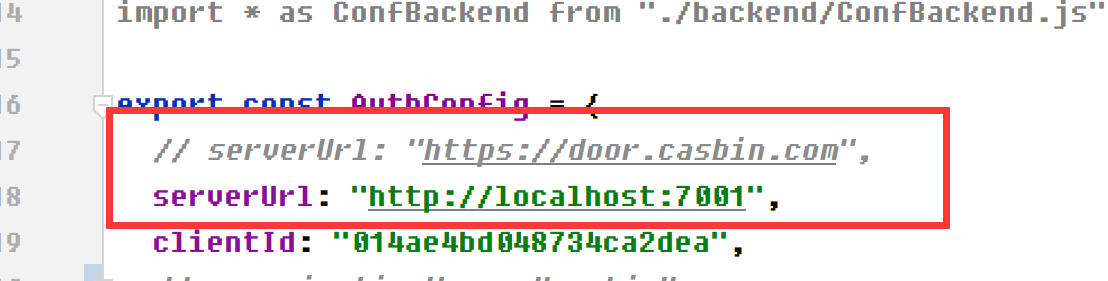
Example: Casnode uses Casdoor. In dev, set serverUrl to http://localhost:7001; in prod, set it to https://door.casdoor.com.