Configure a permission
This page describes the fields of the permission edit page, on which you define the policies of an organization.
To open it, go to the Permissions page of the Casdoor admin console and add a permission or open an existing one.
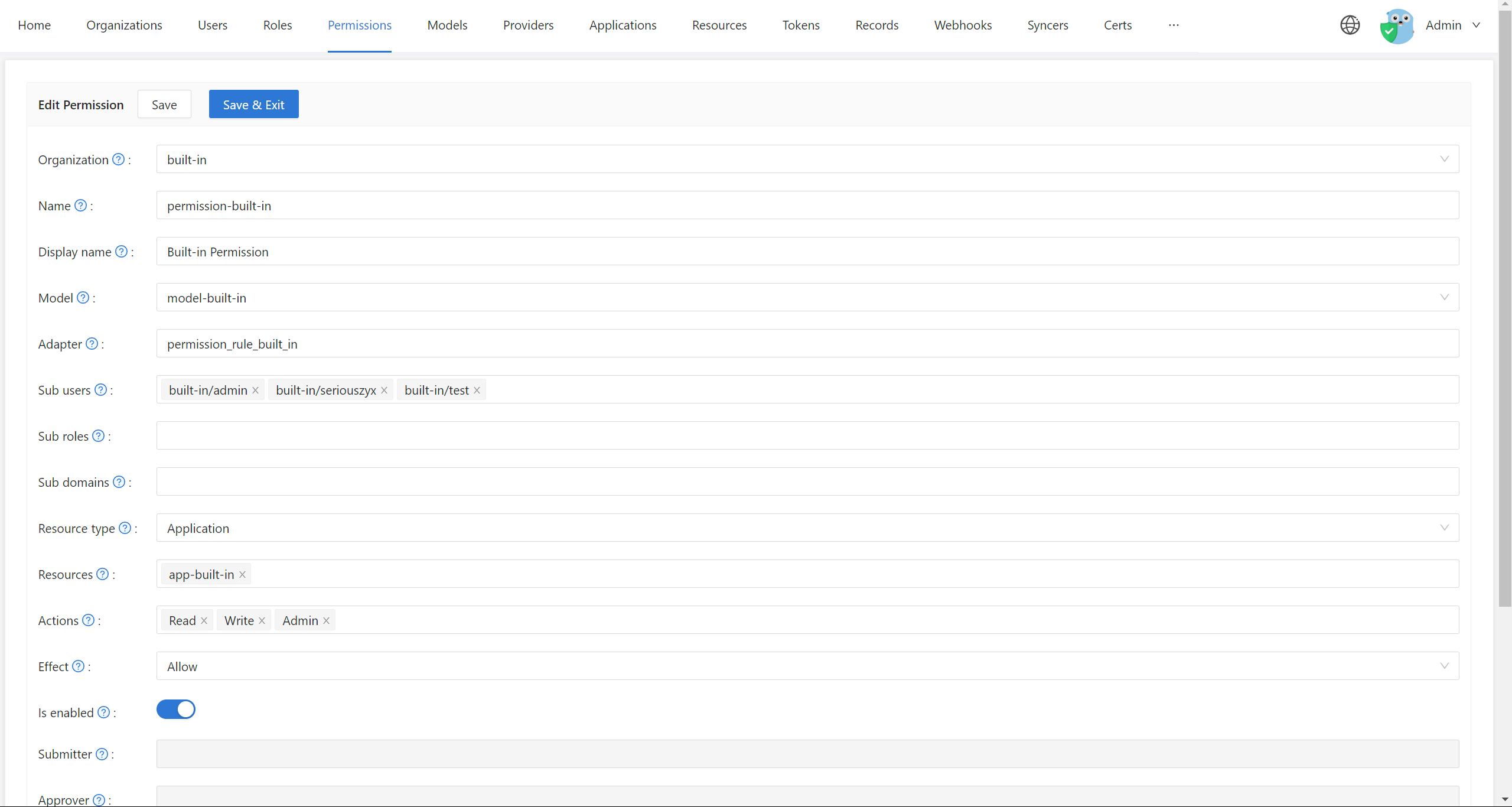
Basic fields
| Field | Description |
|---|---|
| Organization | The organization that owns the permission. An organization can have many permissions |
| Name | Unique name of the permission in the organization. The Casbin APIs refer to the permission by it |
| Display name | Name shown in the UI |
Model and adapter
| Field | Description |
|---|---|
| Model | The model that evaluates the permission, such as ACL, RBAC, or ABAC. You create models on the Models page. See supported models |
| Adapter | The database table in which Casdoor stores the policy rules of the permission. If empty, the rules go to the permission_rule table. If the table doesn't exist, Casdoor creates it |
Give each model its own adapter table. Models with different structures that share a table conflict when Casdoor loads the policies.
The model defines which features the permission has. If the RBAC fields, such as Sub users or Sub roles, are unavailable on the permission page, the selected model has no role_definition. Edit the model to support roles. See also Adapters.
Subjects
These fields define who the permission applies to.
| Field | Description |
|---|---|
| Sub users | Users that the permission applies to, for example alice and bob. Leave empty to not restrict by user |
| Sub roles | Roles that the permission applies to, for example admin and editor. Casdoor adds a rule such as g, user, role for each user of the roles |
| Sub groups | Groups that the permission applies to, for example dev-team. Every member inherits the permission. * matches all groups of the organization |
| Sub domains | Domains that the permission applies to, for multi-tenant models. Leave empty if your model has no domains |
The subjects add up: a user has the permission if the user is listed directly, or has one of the roles, or is a member of one of the groups. A role can contain groups, so a group can also grant a permission through a role.
Resources and actions
These fields define what the permission controls.
| Field | Description |
|---|---|
| Resource type | Casdoor doesn't use this field to authorize external applications. Use it to categorize permissions if you like |
| Resources | Any strings that name what you protect, such as URLs (/api/users), file names (document.pdf), or identifiers (project:123). These aren't the files on the Resources page of Casdoor |
| Actions | Any strings that name what users do, such as HTTP methods (GET, POST), operations (read, write), or your own verbs (approve, publish) |
Casdoor creates a rule for every combination of resource and action.
Casdoor converts actions to lowercase before it stores them, and applies every action to every resource. To allow an action on some resources only, express it in the model, or create separate permissions.
Effect
Effect applies only when Casdoor uses the permission to control access to its own applications. When your application calls the Casbin APIs, the field has no effect: express allow and deny in the model instead.
Example
The following permission uses a model with (sub, obj, act) requests:
| Field | Value |
|---|---|
| Model | rbac_model |
| Sub roles | admin, editor |
| Resources | /api/users, /api/posts |
| Actions | read, write |
Users with the role admin or editor may read and write /api/users and /api/posts.