Customize the account page
This guide explains how to configure the account items of an organization. Account items are the fields on the account page and the user edit page of every member of the organization. For each field, you decide whether it is visible, who can view it, and who can edit it.
Learning outcomes
- Show or hide fields of the account page.
- Restrict who can view and edit a field.
- Group fields into tabs and choose the layout of the tabs.
What you need
- Administrator access to the organization in the Casdoor admin console
About account items
Each account item has the following settings:
| Column | Values | 描述 |
|---|---|---|
| 名称 | A field from the list of account items | The field |
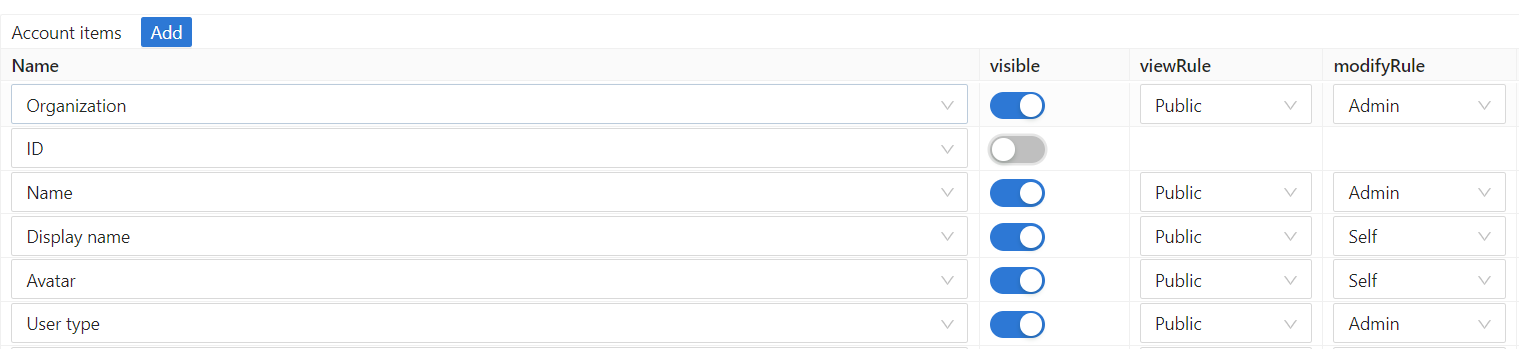
| 可见 | On or off | Whether the field appears on the account page |
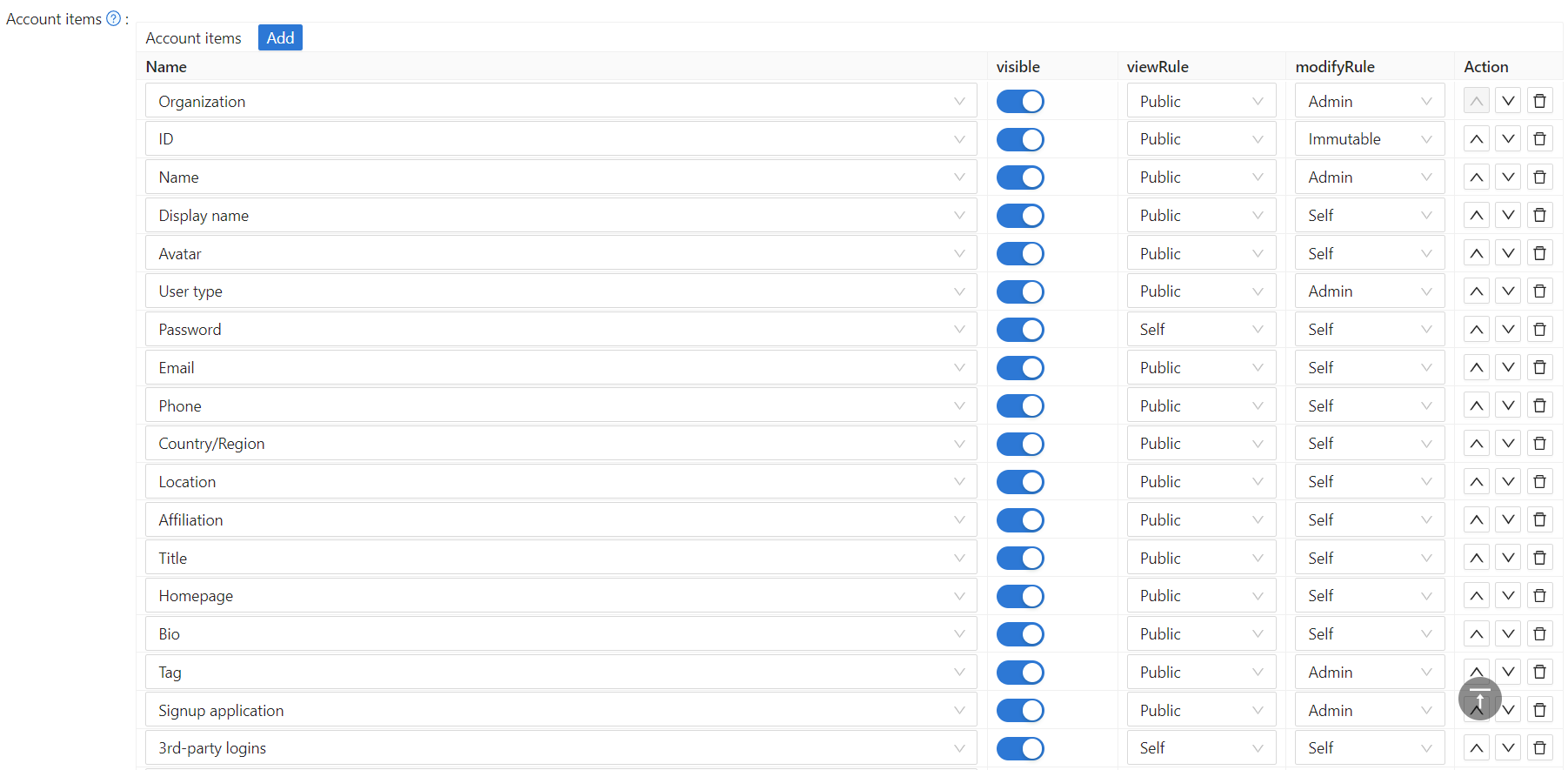
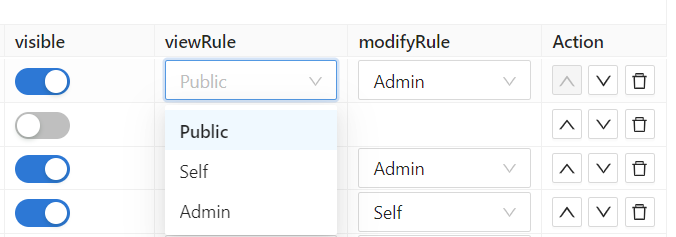
| View rule | Public, Self, Admin | Who can see the value of the field |
| Modify rule | Self, Admin, Immutable | Who can change the value of the field |
| 选项卡 | Text | Tab under which the field appears on the user edit page |
The rules have the following meaning:
| Rule | Who can view or change the field |
|---|---|
Public | View rule only. Everyone can see the field of any user |
Self | Each user, for their own account only. Casdoor matches by user ID, or by organization and username if the ID is missing |
Admin | Administrators of the organization only |
Immutable | Modify rule only. Nobody can change the field on the account page |
View rules and modify rules apply to single fields of a user profile. They are separate from permissions, which control access to applications and resources.
Configure the account items
-
In the Casdoor admin console, go to User Management > Organizations and open the organization.
-
Scroll to Account items.
-
To show or hide a field, switch Visible.
-
To restrict a field, select a View rule and a Modify rule.
-
Save the organization.
Common patterns
| 字段 | View Rule | Modify Rule | Use Case |
|---|---|---|---|
| Name | Public | Self | Everyone can see names, but users can only change their own |
| Self | Self | Users can only see and change their own email | |
| Phone | Admin | Admin | Only admins can see and change phone numbers (for privacy) |
| Display name | Public | Self | Public profile name visible to all |
| Password | Self | Self | Users can only change their own password |
Use the Admin rule for sensitive fields that only administrators should manage, such as phone numbers, addresses, and internal identifiers.
Group fields into tabs
Items with the same Tab value appear together under one tab of the user edit page. Items without a tab value appear first, outside the tabs.
For example, to create a Contact tab with the email address, the phone number, and the location:
- Open the organization and scroll to Account items.
- Set Tab to
Contactin the rows Email, Phone, and Location. - Save the organization. The user edit page now has a
Contacttab with the three fields.
Choose the tab layout
Account menu on the organization edit page sets how the tabs are shown:
| Option | Layout |
|---|---|
| Horizontal (default) | Tabs across the top of the page |
| Vertical | A menu on the left side of the page. Use it for organizations with many tabs |
List of account items
| Field | 描述 |
|---|---|
组织 | 用户所属的组织。 |
ID | 用户的全局唯一标识(UUID)。 |
Name | 用户在组织内唯一的登录用户名。 |
Display name | 用户资料上公开显示的名称。 |
名 | 用户的名。 |
姓 | 用户的姓。 |
头像 | 用户的头像。 |
用户类型 | 用户账号的类别(例如普通用户、服务账号)。 |
密码 | 用户的登录密码。 |
邮箱 | 用户的邮箱地址,用于登录和通知。 |
电话 | 用户的手机号,用于登录和短信验证。 |
国家代码 | 手机号的国家 / 区号(例如美国为 +1),与 Phone 一起使用。 |
国家/地区 | 用户所在的国家或地区。 |
城市 | 用户所在的城市或地址。 |
附属机构 | 用户的公司、学校或其他所属机构。 |
职务 | 用户的职位或头衔。 |
身份证类型 | 政府签发的身份证件类型(例如护照、身份证、驾照)。 |
身份证号 | 用户身份证件的号码。 |
身份证照片 | 身份证件的其他信息(例如签发日期、有效期)。只有用户本人可见。 |
真实姓名 | 用户经过验证的法定姓名。完成身份验证后会被锁定,不能再修改。 |
身份验证 | 控制资料页上 Verify identity 按钮的显示和使用权限。 |
个人主页 | 用户的个人网站或在线资料地址。 |
自我介绍 | 简短的个人简介。 |
标签 | 附加在用户上的一个或多个自定义标签,用于筛选或分组。 |
注册应用 | 用户最初注册时使用的应用。 |
注册类型 | 注册账号的方式(例如邮箱、手机号、OAuth)。 |
注册来源 | 用户注册的渠道或提供商(例如 Google、GitHub、邀请链接)。 |
角色 | 分配给这个用户的角色,决定其在 Casdoor 中的访问权限。 |
权限 | 明确授予这个用户的权限。 |
用户所属的组 | 这个用户所属的用户群组。 |
第三方登录 | 用于社交登录的已关联第三方 OAuth 账号(例如 Google、GitHub、微信)。 |
属性 | 自定义键值对,用于存放与用户相关的其他应用数据。 |
余额 | 用户的账户余额,用于内置的支付或积分功能。 |
余额积分 | 用户账户余额的下限。必须 ≤ 0。设为 0(默认)表示余额不能为负。设为负值(例如 -50)表示余额最低可以降到该值,再低交易就会被拒绝。 |
余额币种 | 用户余额的币种(例如 USD、CNY)。 |
购物车 | 加入用户购物车的商品(用于电商集成)。 |
得分 | 分配给用户的积分,通常由应用逻辑设定。 |
信誉分 | 反映用户活跃度或社区地位的声望值。 |
排名 | 用户在所有用户中的排名,由积分或其他指标得出。 |
语言 | 用户偏好的 Casdoor 界面语言。 |
是否为管理员 | 用户是否拥有组织管理员权限。 |
是否被禁用 | 用户账号是否被封禁;被封禁的用户不能登录。 |
是否已删除 | 用户账号是否已被软删除(标记为删除,但仍保留在数据库中)。 |
多因素认证 | 用户的 MFA 设置和已绑定的第二因素方式(例如 TOTP 应用、短信)。 |
MFA设置项 | 用户已绑定的各项 MFA 方式列表。 |
WebAuthn凭据 | 用于无密码登录的已注册通行密钥或硬件安全密钥(WebAuthn/FIDO2)。 |
上次修改密码时间 | 用户最近一次修改密码的时间。仅管理员可见。 |
托管账户 | 这个用户可以代为管理的子账号或委托账号。 |
面容ID | 用于生物识别登录的已录入人脸数据。 |
MFA账户 | 专门为多因素认证关联的外部账号。 |
需要更新密码 | 用户下次登录时是否必须修改密码。仅管理员可见。设置后,用户登录后会被跳转到 Account 页面,修改密码之前不能去其他页面。 |
IP白名单 | 允许该用户登录的 IP 地址或 CIDR 网段。仅管理员可见。 |