Use Casdoor as a SAML identity provider
Casdoor is a SAML 2.0 identity provider (IdP). This page explains what you configure in the service provider (SP) and in Casdoor, and which user data the SAML response carries. For step-by-step guides for specific service providers, see the other pages of this section.
Configure the service provider
A service provider typically asks for three values: the single sign-on URL, the issuer, and the public certificate of the IdP. Most service providers read all three from the SAML metadata of the IdP, by URL or from an uploaded file.
The metadata URL of a Casdoor application is:
<casdoor-host>/api/saml/metadata?application=admin/<application-name>
For example, for Casdoor at https://door.casdoor.com and the application app-built-in:
https://door.casdoor.com/api/saml/metadata?application=admin/app-built-in
To get the URL in the Casdoor admin console, open the edit page of the application, go to the SAML tab, and click Copy SAML metadata URL. To download the metadata as an XML file, open the URL in a browser.
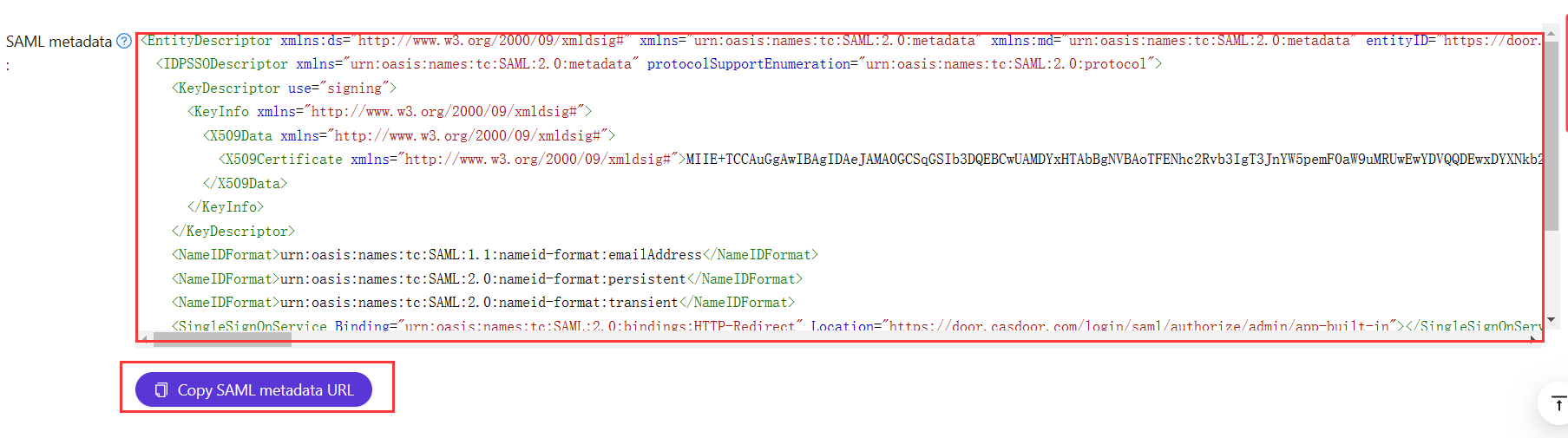
Configure the Casdoor application
On the edit page of the application, set two fields:
| Field | 值 |
|---|---|
| Redirect URLs | The identifier of the service provider, which the SP calls the audience or the entity ID. Enter exactly the same value as in the SP |
| SAML reply URL | The Assertion Consumer Service (ACS) URL of the SP, which receives and verifies the SAML response. Leave it empty to use the redirect binding |
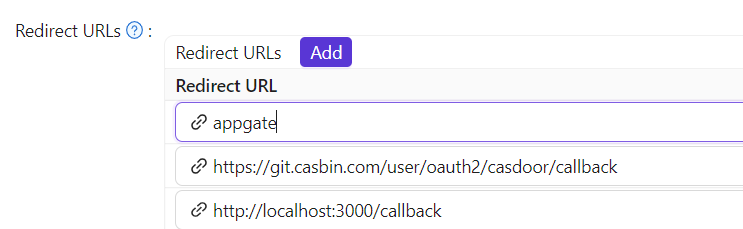
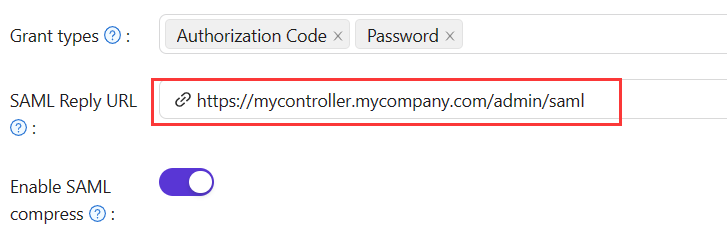
Response binding
Casdoor can send the SAMLResponse with an HTTP POST request or an HTTP GET request. Choose what your service provider supports:
| SAML reply URL | Binding | Where Casdoor sends the response |
|---|---|---|
| Set | POST | To the reply URL. The reply URL overrides the AssertionConsumerServiceURL of the SAMLRequest |
| Empty | GET | To the AssertionConsumerServiceURL that Casdoor reads from the SAMLRequest |
When Casdoor itself signs users in at an external SAML IdP, such as Azure AD, the external IdP posts its SAML response to the /api/acs endpoint of Casdoor. This endpoint accepts cross-origin POST requests, so that an IdP on another domain can send the response.
User profile in the response
By default, the SAMLResponse carries three attributes of the user:
| XML属性名称 | 用户字段 |
|---|---|
| 邮箱 | 电子邮件 |
| DisplayName | displayName |
| Name | name |
If the service provider needs only the NameID and no attributes, turn on Disable SAML attributes on the application. Casdoor then leaves the attributes out of the response. This avoids XML namespace problems with service providers that validate the response strictly.
Add SAML attributes
If the service provider requires other attributes, add them to the SAML attributes table of the application. A value can contain the following variables: $user.owner, $user.name, $user.email, $user.id, $user.phone, $user.roles, $user.permissions, and $user.groups.
For example, the following two rows:
| Name | 名称格式 | Value |
|---|---|---|
https://www.aliyun.com/SAML-Role/Attributes/RoleSessionName | 未指定 | $user.name |
https://www.aliyun.com/SAML-Role/Attributes/Role | 未指定 | acs:ram::1879818006829152:role/$user.roles,acs:ram::1879818006829152:saml-provider/testa |
Produce these attributes in the response:
<saml:Attribute Name="https://www.aliyun.com/SAML-Role/Attributes/RoleSessionName" NameFormat="urn:oasis:names:tc:SAML:2.0:attrname-format:unspecified">
    <saml:AttributeValue xsi:type="xs:string">admi122n@outlook.com</saml:AttributeValue>
</saml:Attribute>
<saml:Attribute Name="https://www.aliyun.com/SAML-Role/Attributes/Role" NameFormat="urn:oasis:names:tc:SAML:2.0:attrname-format:unspecified">
    <saml:AttributeValue xsi:type="xs:string"> acs:ram::1879818006829152:role/role1,acs:ram::1879818006829152:saml-provider/testa</saml:AttributeValue>
    <saml:AttributeValue xsi:type="xs:string"> acs:ram::1879818006829152:role/role2,acs:ram::1879818006829152:saml-provider/testa</saml:AttributeValue>
</saml:Attribute>
Control the assertion signature
Casdoor always signs the SAML response. Since version 2.81.0, it also signs the assertion inside the response, as SAML 2.0 best practice recommends. Some service providers, such as Sentry, don't handle signed assertions correctly.
For such a service provider, turn off Enable SAML assertion signature on the application. Casdoor then signs only the response envelope, which keeps the response authentic and works with more service providers.
Test with a Go service provider
gosaml2 is a SAML 2.0 implementation for service providers in Go. The following program uses it to test Casdoor as an IdP.
The example assumes Casdoor at http://localhost:7001/ and the application app-built-in of the organization built-in.
-
Add
http://localhost:6900/acs/exampleandhttp://localhost:6900/saml/acs/exampleto the Redirect URLs ofapp-built-in. -
Run the program:
import (
    "crypto/x509"
    "fmt"
    "net/http"

    "io/ioutil"

    "encoding/base64"
    "encoding/xml"

    saml2 "github.com/russellhaering/gosaml2"
    "github.com/russellhaering/gosaml2/types"
    dsig "github.com/russellhaering/goxmldsig"
)

func main() {
    res, err := http.Get("http://localhost:7001/api/saml/metadata?application=admin/app-built-in")
    if err != nil {
        panic(err)
    }

    rawMetadata, err := ioutil.ReadAll(res.Body)
    if err != nil {
        panic(err)
    }

    metadata := &types.EntityDescriptor{}
    err = xml.Unmarshal(rawMetadata, metadata)
    if err != nil {
        panic(err)
    }

    certStore := dsig.MemoryX509CertificateStore{
        Roots: []*x509.Certificate{},
    }

    for _, kd := range metadata.IDPSSODescriptor.KeyDescriptors {
        for idx, xcert := range kd.KeyInfo.X509Data.X509Certificates {
            if xcert.Data == "" {
                panic(fmt.Errorf("metadata certificate(%d) must not be empty", idx))
            }
            certData, err := base64.StdEncoding.DecodeString(xcert.Data)
            if err != nil {
                panic(err)
            }

            idpCert, err := x509.ParseCertificate(certData)
            if err != nil {
                panic(err)
            }

            certStore.Roots = append(certStore.Roots, idpCert)
        }
    }

    randomKeyStore := dsig.RandomKeyStoreForTest()

    sp := &saml2.SAMLServiceProvider{
        IdentityProviderSSOURL:      metadata.IDPSSODescriptor.SingleSignOnServices[0].Location,
        IdentityProviderIssuer:      metadata.EntityID,
        ServiceProviderIssuer:       "http://localhost:6900/acs/example",
        AssertionConsumerServiceURL: "http://localhost:6900/v1/_saml_callback",
        SignAuthnRequests:           true,
        AudienceURI:                 "http://localhost:6900/saml/acs/example",
        IDPCertificateStore:         &certStore,
        SPKeyStore:                  randomKeyStore,
    }

    http.HandleFunc("/v1/_saml_callback", func(rw http.ResponseWriter, req *http.Request) {
        err := req.ParseForm()
        if err != nil {
            rw.WriteHeader(http.StatusBadRequest)
            return
        }
        samlReponse := req.URL.Query().Get("SAMLResponse")
        assertionInfo, err := sp.RetrieveAssertionInfo(samlReponse)
        if err != nil {
            fmt.Println(err)
            rw.WriteHeader(http.StatusForbidden)
            return
        }
        fmt.Println(assertionInfo)
        if assertionInfo.WarningInfo.InvalidTime {
            fmt.Println("here12:", assertionInfo.WarningInfo.InvalidTime)
            rw.WriteHeader(http.StatusForbidden)
            return
        }

        if assertionInfo.WarningInfo.NotInAudience {
            fmt.Println(assertionInfo)
            fmt.Println("here13:", assertionInfo.WarningInfo.NotInAudience)
            rw.WriteHeader(http.StatusForbidden)
            return
        }

        fmt.Fprintf(rw, "NameID: %s\n", assertionInfo.NameID)

        fmt.Fprintf(rw, "Assertions:\n")

        for key, val := range assertionInfo.Values {
            fmt.Fprintf(rw, "  %s: %+v\n", key, val)
        }
        fmt.Println(assertionInfo.Values.Get("FirstName"))
        fmt.Fprintf(rw, "\n")

        fmt.Fprintf(rw, "Warnings:\n")
        fmt.Fprintf(rw, "%+v\n", assertionInfo.WarningInfo)
    })

    println("Visit this URL To Authenticate:")
    authURL, err := sp.BuildAuthURL("")
    if err != nil {
        panic(err)
    }

    println(authURL)

    println("Supply:")
    fmt.Printf("  SP ACS URL      : %s\n", sp.AssertionConsumerServiceURL)

    err = http.ListenAndServe(":6900", nil)
    if err != nil {
        panic(err)
    }
}
The console shows:
Visit this URL To Authenticate:
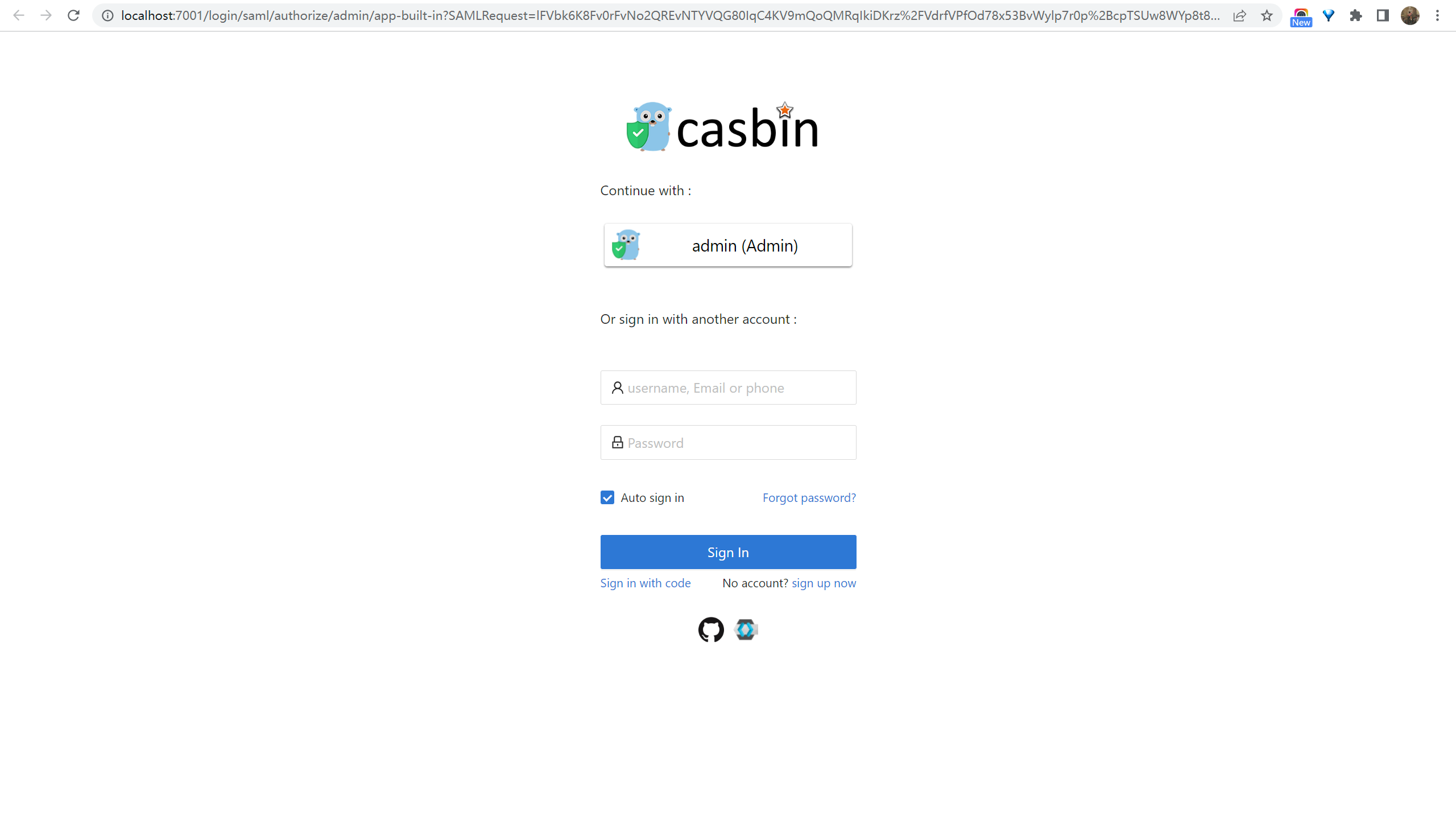
http://localhost:7001/login/saml/authorize/admin/app-built-in?SAMLRequest=lFVbk6K8Fv0rFvNo2QR...
Supply:
SP ACS URL : http://localhost:6900/v1/_saml_callback -
Open the URL. The Casdoor sign-in page appears.
-
Sign in. The program prints the SAML response.

See also
- Keycloak (SAML)
- AWS Client VPN (SAML)
- SAML providers: Sign users in to Casdoor with an external SAML IdP.
- SAML 2.0 on Wikipedia