Store files in Alibaba Cloud OSS
This guide explains how to store the uploaded files of Casdoor in Alibaba Cloud OSS. Casdoor authenticates with a static AccessKey, or with RAM Roles for Service Accounts (RRSA) in environments that provide OpenID Connect (OIDC) tokens, such as Alibaba Cloud ACK.
Learning outcomes
- Add Alibaba Cloud OSS as a storage provider with an AccessKey.
- Use RRSA instead of stored credentials.
What you need
- An Alibaba Cloud account and an OSS bucket
- Administrator access to the Casdoor admin console
Use an AccessKey
-
在阿里云控制台。
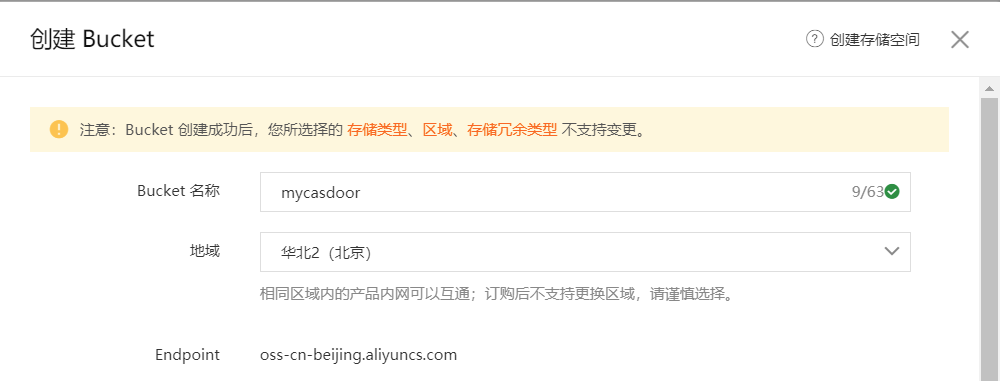
-
In the Casdoor admin console, go to Identity > Providers and add a provider.
-
Set Category to
Storageand Type toAliyun OSS. -
Fill in the AccessKey ID as the Client ID and the AccessKey Secret as the Client secret, and set Endpoint, Bucket, and Region ID.
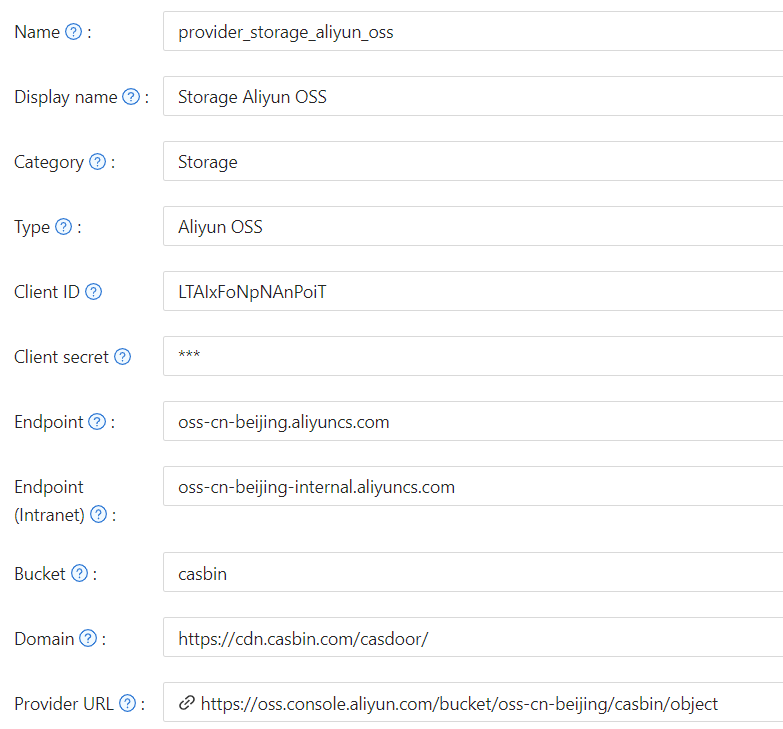
-
Save the provider.
Use RRSA
With RRSA, Casdoor stores no long-lived secret and uses short-lived tokens. This is the recommended setup on Alibaba Cloud ACK.
-
Set the following environment variables for Casdoor, with the values from the RAM console:
ALIBABA_CLOUD_ROLE_ARN=acs:ram::YOUR_ACCOUNT_ID:role/YOUR_ROLE_NAME
ALIBABA_CLOUD_OIDC_PROVIDER_ARN=acs:ram::YOUR_ACCOUNT_ID:oidc-provider/YOUR_PROVIDER_NAME
ALIBABA_CLOUD_OIDC_TOKEN_FILE=/var/run/secrets/tokens/oidc-token -
In the storage provider, leave Client ID and Client secret empty.
Casdoor then exchanges the OIDC token for temporary credentials. If RRSA isn't available, Casdoor uses the static credentials.