Require an invitation code at sign-up
This guide explains how to restrict the sign-up of an application to invited users. Users then need a valid invitation code to create an account.
Learning outcomes
- Add the invitation code field to the sign-up form.
- Create invitation codes for the application.
What you need
- An application with Enable signup turned on
Add the invitation code field
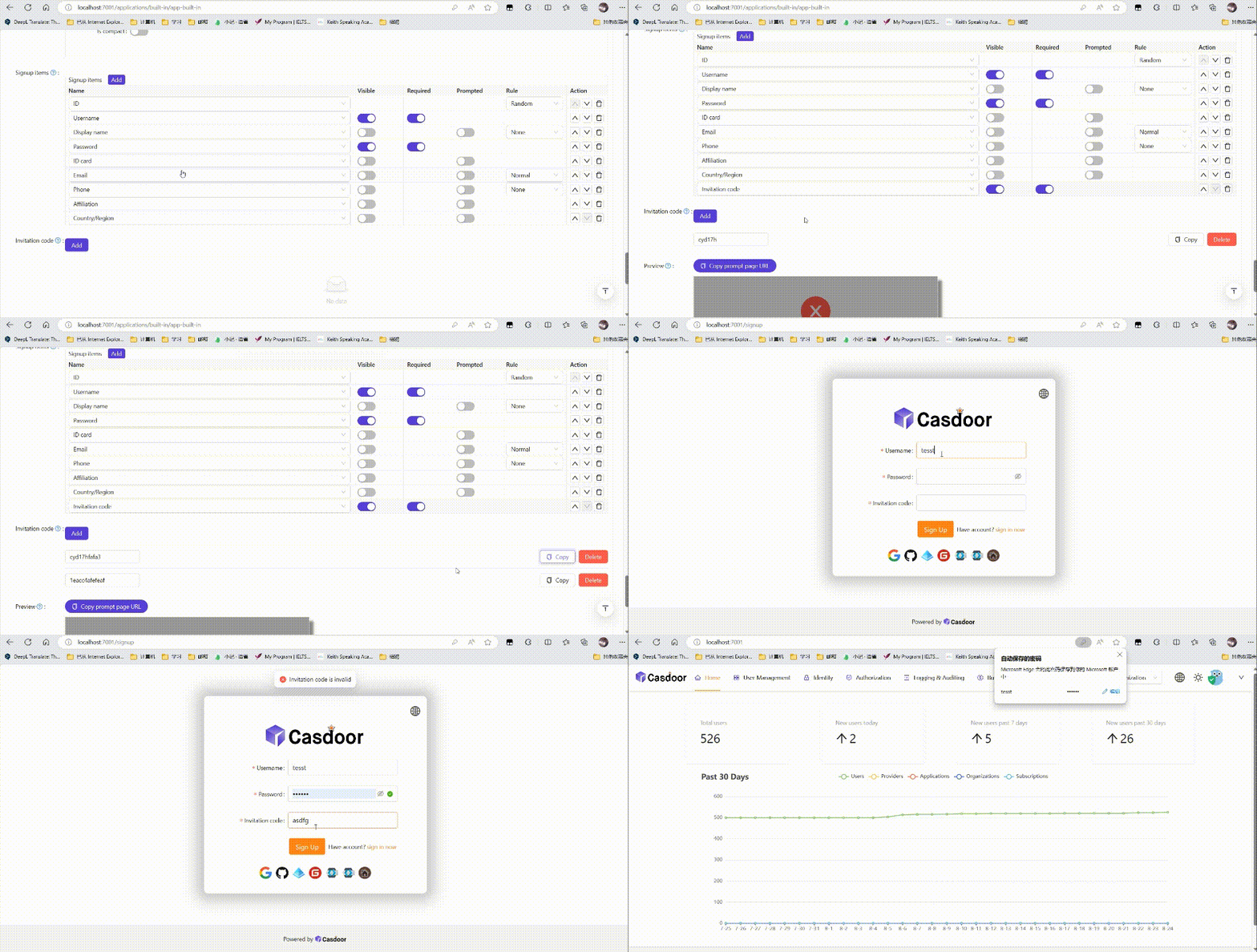
- In the Casdoor admin console, open the edit page of the application.
- In Signup items, add the Invitation code item and turn on Visible and Required.
- Save the application.
Create invitation codes
- Go to the Invitations page and add an invitation.
- In Application, select the application, or
ALLfor every application of the organization. - Set the Quota, the number of times that the code can be used, and optionally an expiry time.
- Save the invitation and give the code or the invitation link to the user.
For all properties of an invitation, including codes that are regular expressions and invitations for a specific user, see Invitations.
Verify the result
Open the sign-up page of the application. Sign-up succeeds only with a valid code.
conseil
To keep public sign-up closed while invited users can still register, turn on Disable self signup on the application. The sign-up page then accepts only invitation codes. See the Application settings reference.