Subscription
A Subscription links a user to a Plan, so you can control access to application features. Because each Plan is tied to a Role, you can assign the plan’s role to the user and use the enforce API for permission checks.
Use the Plan’s Role with the enforce API to check subscription-based access.
Subscriptions can be created:
- By an admin (manual)
- Through the pricing/purchase flow (any user)
- Via API
Only users with type = "paid-user" are subject to subscription enforcement (active subscription required for access). Global administrators and organization administrators are never checked, so a paid-user type can't lock an administrator out.
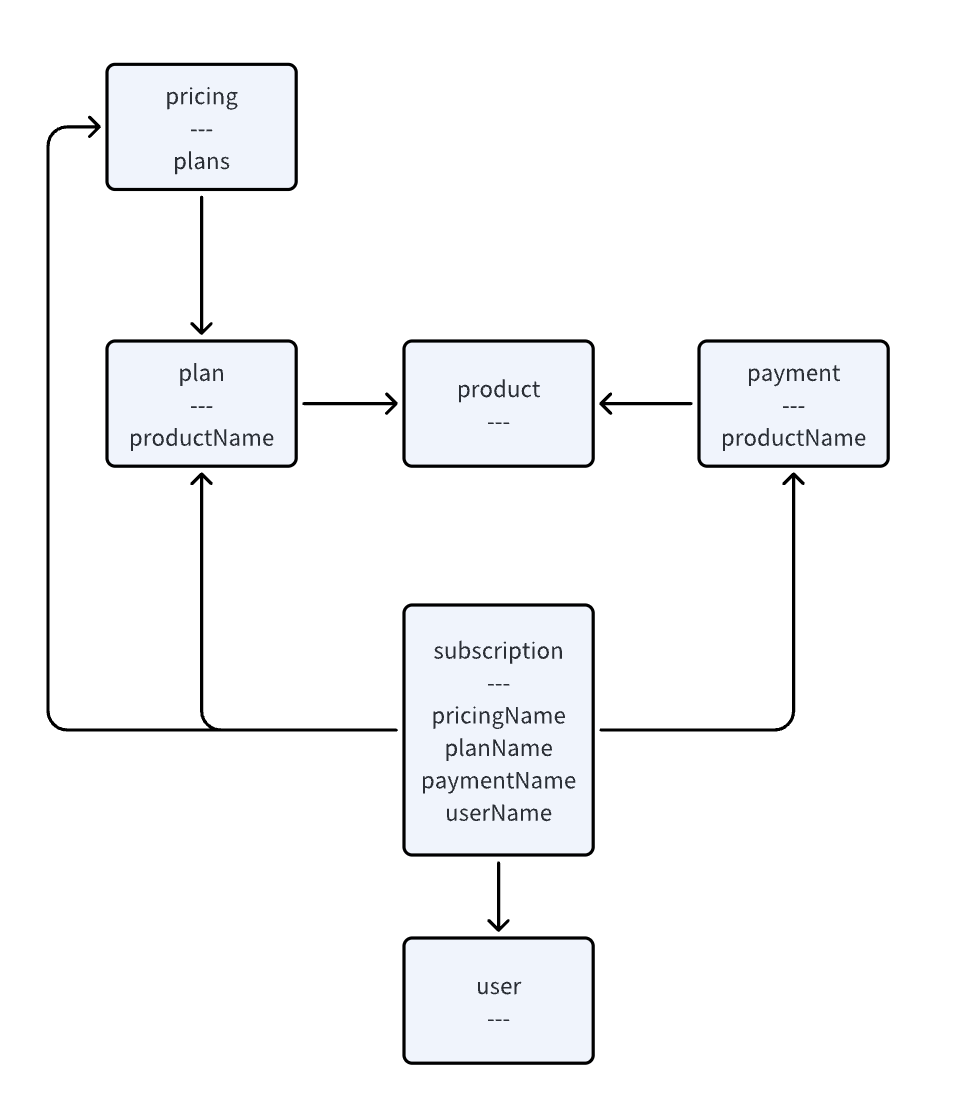
Subscription properties
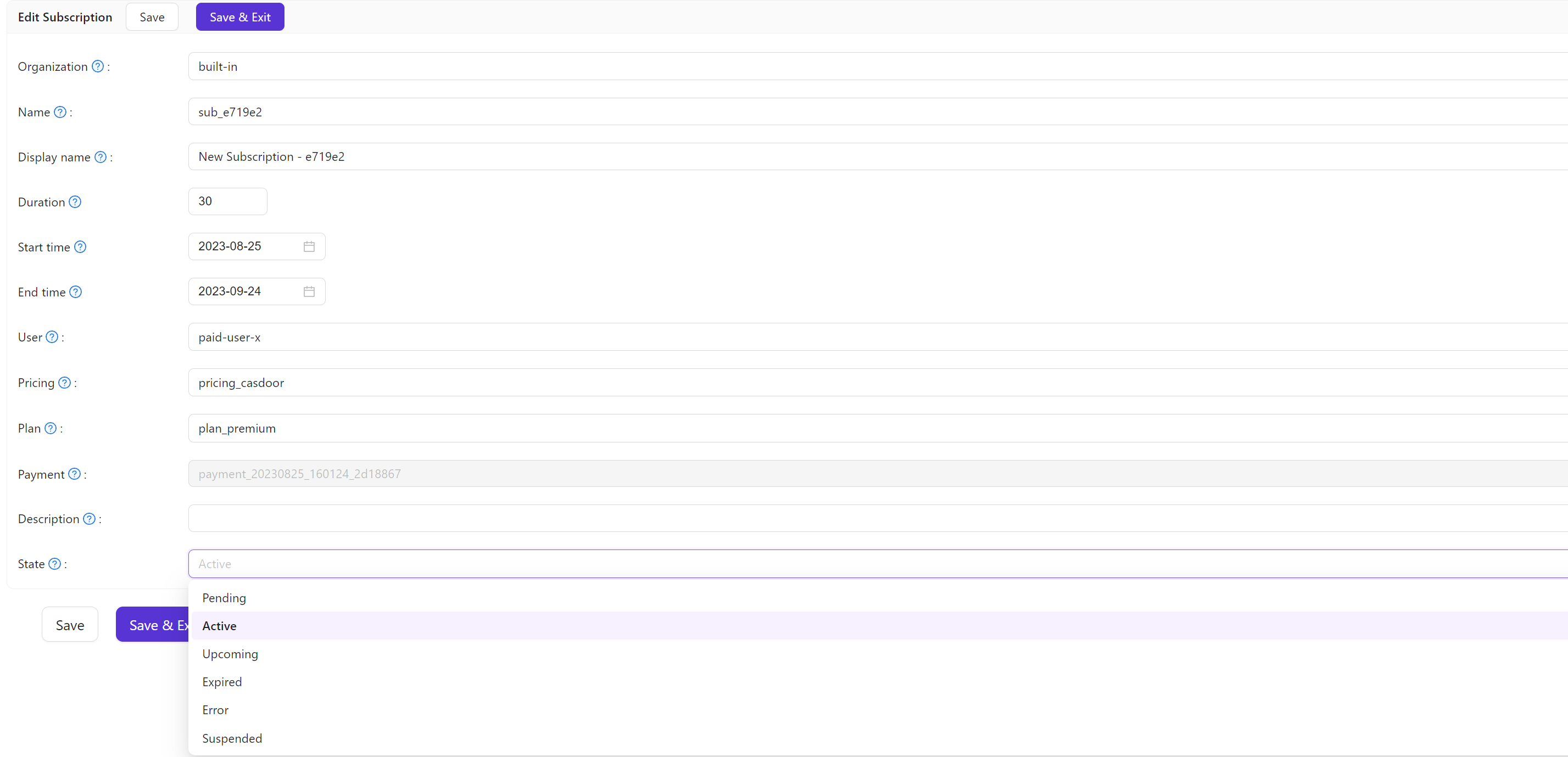
| Property | Description |
|---|---|
| Owner | Owning organization. |
| Name | Subscription id. |
| CreatedTime | Creation time. |
| DisplayName | Display name. |
| Description | Optional description. |
| Duration | Subscription duration. |
| StartTime | When the subscription starts. |
| EndTime | When the subscription ends. |
| Pricing | Related Pricing. |
| Plan | Related Plan. |
| Payment | Related Payment. |
| User | User who holds the subscription. |
| Group | Group that holds the subscription. See Subscriptions for a group. |
| State | Pending, Error, Suspended, Active, Upcoming, or Expired. |
| AutoRenew | Whether Casdoor buys the next period before this one ends. See Auto renewal. |
| RenewalState | Read-only. Empty until Casdoor tries to renew, then Renewing, Renewed, or Failed. |
| RenewalSubscription | Read-only. The subscription of the next period, after a successful renewal. |
| RenewalMessage | Read-only. Why the renewal failed. |
Subscriptions for a group
A subscription can be held by a user (User), by a group (Group), or by both. A user is covered by:
- The subscriptions whose User is the user.
- The subscriptions whose Group is a group that the user belongs to, or any ancestor of that group up to the top group. A subscription of a parent group covers all of its subgroups.
Only groups of the subscription's organization count. When you rename a group, Casdoor updates the Group of its subscriptions.
The subscriptions that a user inherits from groups count everywhere that the user's own subscriptions count:
- The active-subscription check of a paid user at sign-in.
- The subscription list of the user, see List subscriptions.
- The check of a plan with Is exclusive.
POST /api/add-subscriptionrejects a second active subscription to the same plan withUser already has an active subscription for plan: <plan-name>, also when the user already has the plan through a group. For a group, the error isGroup already has an active subscription for plan: <plan-name>.
Auto renewal
A subscription with AutoRenew on is renewed by Casdoor itself: the next period is paid with the payment method of the current one, and a new subscription is added for it. The user doesn't need to buy the plan again.
Supported payment methods
Auto renewal works only for subscriptions paid with these payment providers:
| Provider | How the next period is paid |
|---|---|
| Balance | Casdoor takes the price from the user's balance. |
| Stripe | Casdoor charges the card that the user saved at the first checkout, with an off-session PaymentIntent. When the user buys with auto renewal on, the Stripe Checkout page creates a Stripe customer and saves the card for future payments. |
Other providers, such as Alipay, WeChat Pay, and PayPal, can't renew automatically, because charging them without the user needs a separate recurring-payment agreement with the provider, which Casdoor doesn't support. For these providers, the auto renewal switch isn't shown and Casdoor never turns auto renewal on, and the user buys the plan again when the subscription ends. Subscriptions added by an administrator without a payment can't renew automatically either.
Turn auto renewal on or off
- When buying: the order payment page has an Auto renew switch when the order contains a plan and the product has a supported payment provider. The switch starts with the plan's AutoRenew value, see Plan. It only takes effect when the user pays with a supported provider. API callers pass
autoRenew=trueorautoRenew=falsetoPOST /api/pay-order; without the parameter, the plan's default applies. - After buying: the Auto renew column of the subscription list has a switch for subscriptions paid with a supported provider. A user can turn it on or off for their own subscriptions, and an organization administrator for any subscription of the organization. The switch calls
POST /api/set-subscription-auto-renew?id=<owner>/<name>&autoRenew=true|false. Administrators can also change AutoRenew on the subscription edit page.
Turning auto renewal on is rejected when the subscription can't be renewed, for example when it was paid with an unsupported provider, or with Stripe without saving the card. In that case, buy the plan again with auto renewal on.
When and how renewal happens
Casdoor checks subscriptions once an hour. A subscription is renewed when all of these hold:
- Its state is
Active. - AutoRenew is on.
- It ends within the next 24 hours.
- Casdoor hasn't tried to renew it yet (RenewalState is empty).
Casdoor then creates an order and a payment for the plan's product at the product's current price, without coupons, and pays it:
- On success, the payment and the order are
Paid, and a new subscription starts when the current one ends and lasts one plan period. The new subscription has AutoRenew on, so it renews in turn. RenewalState of the current subscription becomesRenewed, and RenewalSubscription names the new one. The plan's role isn't taken away between the two periods. - On failure, for example when the balance is too low or the card is declined, the payment is
Errorand the orderFailed, both with the reason in their message. RenewalState becomesFailedand RenewalMessage says why. The current subscription stays valid until its end time and then expires as usual.
Casdoor tries to renew a subscription only once. After a failure, fix the cause (for example, top up the balance), then turn auto renewal on again: this clears the failure, and Casdoor tries again within the hour if the subscription still ends within 24 hours.
A subscription is renewed at most once, also when several Casdoor instances share the database or Casdoor restarts: an instance first marks the subscription as Renewing with a conditional database update, and only the instance that succeeds charges the user.
Turning auto renewal off stops future renewals only. When the next period has already been paid, it stays, and its own AutoRenew is still on, so turn it off there too.
List subscriptions
GET /api/get-subscriptions?owner=<organization> returns:
- For an administrator of the organization: all subscriptions of the organization. Add
field=user&value=<username>to get the subscriptions of one user. - For any other user: only the user's own subscriptions, including the ones inherited from groups. Other filters apply on top of that. A user of another organization gets
Unauthorized operation.