What is Casdoor
Casdoor is an open-source identity and access management (IAM) and single sign-on (SSO) platform. Your applications send users to Casdoor to sign in, and Casdoor gives them back a verified identity over OAuth 2.0, OpenID Connect, SAML, or CAS. You manage users, applications, sign-in pages, and providers in a web-based admin console.
What Casdoor does
- Single sign-on for your applications: Casdoor is an OAuth 2.0 and OIDC provider, a SAML identity provider, and a CAS server. It also serves LDAP and RADIUS for applications, VPNs, and network devices that only speak those protocols.
- Sign-in with existing accounts: More than 70 OAuth providers are built in, from Google, GitHub, and Microsoft to WeChat, DingTalk, and Lark, plus any SAML or OIDC identity provider.
- Strong authentication: Casdoor supports passwords, email and SMS codes, WebAuthn and passkeys, TOTP, and multi-factor authentication that an organization can make optional or required.
- Users and organizations: Several organizations can share one Casdoor, each with its own users, groups, roles, applications, and branding. Syncers import users from LDAP, Active Directory, Keycloak, Okta, and other systems and keep them in sync. SCIM provisions users from other identity systems.
- Authorization: Casdoor has permissions built on Casbin, with ACL, RBAC, and ABAC models, and an API your services can call to check them.
- Sign-in pages without code: You configure the sign-in and sign-up pages, fields, and providers of each application in the admin console. See UI customization.
- AI agents: Casdoor exposes its management API as an MCP server and acts as an OAuth 2.1 authorization server for MCP servers.
- Operations: Casdoor is one Go binary and a SQL database (MySQL, PostgreSQL, SQL Server, Oracle, SQLite, and others). The admin console is available in 11 languages.
How sign-in works
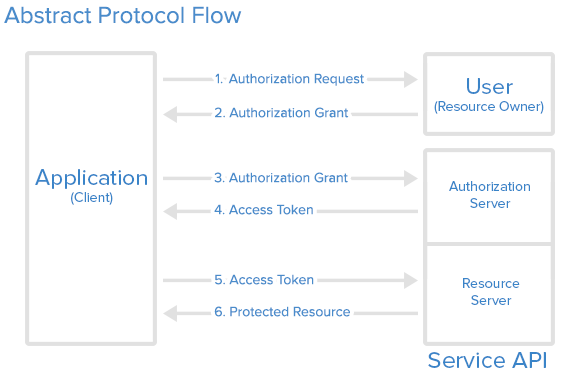
Casdoor uses the standard OAuth 2.0 authorization code flow. In most cases a Casdoor SDK or any OIDC library handles these steps for you.

-
Your application sends the user to Casdoor. It redirects the browser to the authorization endpoint:
https://<casdoor-host>/login/oauth/authorize?client_id=<client-id>&response_type=code&redirect_uri=<callback-url>&scope=openid%20profile%20email&state=<random-value>client_id: The Client ID of the application in Casdoor.redirect_uri: Your application's callback URL. It must be listed in the application's Redirect URLs.state: A random value your application generates and checks when the user comes back, to protect against cross-site request forgery.
-
The user signs in. Casdoor shows the sign-in page of that application. The user enters a password, uses a passkey, or picks a provider such as Google or GitHub.
-
Casdoor sends the user back with a code. It redirects the browser to
redirect_uriwith a one-timecodeand the samestate. -
Your application exchanges the code for tokens. Your backend calls
https://<casdoor-host>/api/login/oauth/access_tokenwith the code and the application's Client secret, and receives an access token, an ID token, and a refresh token. -
Your application uses the tokens. The ID token is a JWT that identifies the user. The access token authorizes calls to Casdoor's APIs, such as
/api/userinfo, and to your own resource servers.
For the details of each request, see OAuth 2.0 and OIDC client.
Try the online demo
- Casdoor demo: Sign in as the global administrator with the username
adminand the password123. - Casbin-OA (source code): A Casbin web application that signs users in with Casdoor.
- Casnode (source code): The Casbin community forum, which uses Casdoor for accounts and sign-in.
Architecture
| Part | Description | Language | Source code |
|---|---|---|---|
| Frontend | Admin console and sign-in pages | TypeScript, React | casdoor/web |
| Backend | REST API, protocol endpoints, and the server that serves the frontend | Go, Beego | casdoor/casdoor |
Compare Casdoor with other identity providers
To evaluate Casdoor against Keycloak, ZITADEL, authentik, Auth0, or Logto, see Casdoor vs. alternatives and the feature comparison.
Next steps
- Core concepts: Learn what organizations, users, applications, and providers are.
- Run Casdoor with Docker: Start a Casdoor instance in one command.
- Connect an application to Casdoor: Sign users in to your own application.