Traefik
casdoor-forward-auth puts Casdoor single sign-on in front of any service behind Traefik, without changing the service. Traefik asks casdoor-forward-auth about every request through its built-in forwardAuth middleware: signed-in users reach the service with their identity in request headers, everyone else is sent to the Casdoor login page first.
The same service also works with Caddy (forward_auth) and Nginx (auth_request).
How it works
- Traefik calls
/authof casdoor-forward-auth for every request to a protected service. - With a valid session cookie,
/authanswers200with headers likeX-Forwarded-User, which Traefik copies into the request to your service. - Without a session, page loads are redirected to Casdoor. Other requests (
POST,PUT, ...) get401, since they can't follow a login redirect. - After the login, Casdoor redirects to
/callback. casdoor-forward-auth checks thestate, exchanges the authorization code, verifies the access token, stores the user in a signedHttpOnlysession cookie and sends the user back to the page they asked for.
casdoor-forward-auth keeps no state on the server, so you can run several replicas as long as they share the same cookie secret.
Prérequis
- Traefik v2 or v3
- A Casdoor instance (see Server Installation)
- Two host names pointing to Traefik, e.g.,
auth.example.comfor casdoor-forward-auth andapp.example.comfor the protected service. With only one host, see Using a single host.
Step 1: Configure the Casdoor application
-
Create or edit an application in Casdoor.
-
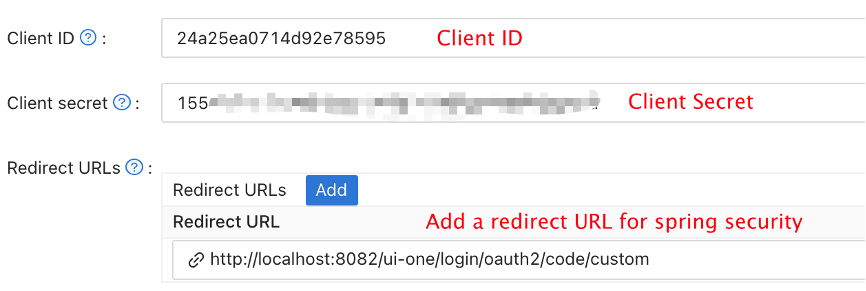
Add the callback of casdoor-forward-auth to Redirect URLs:
https://auth.example.com/callback -
Note the Client ID and Client secret.
Step 2: Deploy casdoor-forward-auth and Traefik
Create a docker-compose.yml:
services:
  traefik:
    image: traefik:v3.1
    command:
      - --providers.docker=true
      - --providers.docker.exposedbydefault=false
      - --entrypoints.web.address=:80
    ports:
      - "80:80"
    volumes:
      - /var/run/docker.sock:/var/run/docker.sock:ro

  casdoor-forward-auth:
    image: ghcr.io/casdoor/casdoor-forward-auth:latest
    environment:
      CASDOOR_ENDPOINT: https://door.casdoor.com
      CLIENT_ID: <client ID>
      CLIENT_SECRET: <client secret>
      EXTERNAL_URL: http://auth.example.com
      COOKIE_DOMAIN: example.com
      COOKIE_SECRET: <random string of at least 32 characters>
    labels:
      - traefik.enable=true
      - traefik.http.routers.casdoor-auth.rule=Host(`auth.example.com`)
      - traefik.http.routers.casdoor-auth.entrypoints=web
      - traefik.http.services.casdoor-auth.loadbalancer.server.port=9999
      - traefik.http.middlewares.casdoor.forwardauth.address=http://casdoor-forward-auth:9999/auth
      - traefik.http.middlewares.casdoor.forwardauth.authResponseHeaders=X-Forwarded-User,X-Forwarded-User-Id,X-Forwarded-Organization,X-Forwarded-Email,X-Forwarded-Groups,X-Forwarded-Roles

  # the protected service
  whoami:
    image: traefik/whoami
    labels:
      - traefik.enable=true
      - traefik.http.routers.whoami.rule=Host(`app.example.com`)
      - traefik.http.routers.whoami.entrypoints=web
      - traefik.http.routers.whoami.middlewares=casdoor
Replace the placeholders:
CASDOOR_ENDPOINT: the URL of your Casdoor serverCLIENT_IDandCLIENT_SECRET: the values from Step 1EXTERNAL_URL: the public URL of casdoor-forward-auth.<EXTERNAL_URL>/callbackmust be a Redirect URL of the applicationCOOKIE_DOMAIN: the parent domain of the protected hosts, so the session cookie is sent to all of themCOOKIE_SECRET: a random secret, e.g., fromopenssl rand -hex 32. Keep it stable: changing it signs everybody out
Use https:// URLs in production, so the cookies are only sent over HTTPS.
Start the services:
docker compose up -d
To protect another service, add traefik.http.routers.<router>.middlewares=casdoor to its router. Don't add the middleware to the router of casdoor-forward-auth itself.
Using the file provider
If you configure Traefik with files instead of Docker labels, define the middleware and routers in the dynamic configuration:
http:
  middlewares:
    casdoor:
      forwardAuth:
        address: http://casdoor-forward-auth:9999/auth
        authResponseHeaders:
          - X-Forwarded-User
          - X-Forwarded-User-Id
          - X-Forwarded-Organization
          - X-Forwarded-Email
          - X-Forwarded-Groups
          - X-Forwarded-Roles

  routers:
    casdoor-auth:
      rule: Host(`auth.example.com`)
      service: casdoor-auth
    app:
      rule: Host(`app.example.com`)
      service: app
      middlewares:
        - casdoor

  services:
    casdoor-auth:
      loadBalancer:
        servers:
          - url: http://casdoor-forward-auth:9999
    app:
      loadBalancer:
        servers:
          - url: http://app:8080
casdoor-forward-auth can also run without Docker: go install github.com/casdoor/casdoor-forward-auth@latest, then start it with the same environment variables or a JSON config file (casdoor-forward-auth -config config.json, see conf/config.json).
Using a single host
With only one host name, mount casdoor-forward-auth under a path of the service, e.g., EXTERNAL_URL=https://app.example.com/_auth without COOKIE_DOMAIN. Route that path to casdoor-forward-auth without the middleware:
  routers:
    casdoor-auth:
      rule: Host(`app.example.com`) && PathPrefix(`/_auth`)
      service: casdoor-auth
    app:
      rule: Host(`app.example.com`)
      service: app
      middlewares:
        - casdoor
Set the forwardAuth address to http://casdoor-forward-auth:9999/_auth/auth, and add https://app.example.com/_auth/callback to the Redirect URLs in Casdoor.
Step 3: Test the integration
- Open the protected service, e.g.,
http://app.example.com. - You are redirected to the Casdoor login page.
- After signing in, you are back on the page you opened, and the service receives the identity headers.
traefik/whoamiprints them, so you can check them there.
Identity headers
| Header | Value |
|---|---|
X-Forwarded-User | User name, e.g., alice |
X-Forwarded-User-Id | User ID |
X-Forwarded-Organization | Organization of the user |
X-Forwarded-Email | Email address |
X-Forwarded-Groups | Comma-separated groups, e.g., built-in/dev,built-in/ops |
X-Forwarded-Roles | Comma-separated role names |
casdoor-forward-auth always returns all of them, possibly empty, so Traefik replaces whatever the client sent in the same headers. Make sure the protected service is only reachable through Traefik, otherwise anyone can send these headers directly.
Restricting access
By default every user who can sign in to the Casdoor application is let in. To let in only users with certain Casdoor roles or groups, add roles and/or groups (comma separated) to the address of the middleware. Define one middleware per rule:
- traefik.http.middlewares.casdoor-admin.forwardauth.address=http://casdoor-forward-auth:9999/auth?roles=admin,ops
A user passes with at least one of the listed roles and, if groups is given too (e.g., groups=built-in/dev), at least one of the listed groups. Everyone else who is signed in gets 403. ALLOWED_ROLES and ALLOWED_GROUPS set one rule for all services.
This also covers "sign up first, get access later": new users, e.g., from Google sign-up, have no role and get 403 until an admin assigns them one on the Roles page of Casdoor. Roles and groups are read at login, so after a change the user has to open /logout and sign in again, or wait for the session to end (SESSION_TTL).
Configuration
Every setting can be given as an environment variable or in a JSON config file:
| Environment variable | Default | Libellé descriptif |
|---|---|---|
CASDOOR_ENDPOINT | required | URL of the Casdoor server |
CLIENT_ID | required | Client ID of the Casdoor application |
CLIENT_SECRET | required | Client secret of the Casdoor application |
EXTERNAL_URL | required | Public URL of casdoor-forward-auth, may include a path |
COOKIE_SECRET | required | Secret of at least 32 characters for signing the cookies |
COOKIE_DOMAIN | empty | Domain of the session cookie, e.g., example.com |
COOKIE_NAME | casdoor_forward_auth | Name of the session cookie |
SESSION_TTL | 24h | Session lifetime, never longer than the access token from Casdoor |
ALLOWED_REDIRECT_DOMAINS | host of EXTERNAL_URL and .<COOKIE_DOMAIN> | Comma-separated domains users may be sent back to after login |
ALLOWED_ROLES | empty | Comma-separated Casdoor roles. Only users with at least one of them are let in, see Restricting access |
ALLOWED_GROUPS | empty | Comma-separated Casdoor groups, e.g., built-in/dev. Only users in at least one of them are let in |
CERTIFICATE | empty | PEM certificate for verifying access tokens. By default it's looked up in Casdoor's /.well-known/jwks |
LISTEN_ADDR | :9999 | Address to listen on |
/logout clears the session of casdoor-forward-auth (with ?rd=<url> to redirect afterwards). The user stays signed in to Casdoor.
Dépannage
Casdoor shows "Redirect URI ... doesn't exist in the allowed Redirect URI list"
<EXTERNAL_URL>/callback is not in the Redirect URLs of the application. The scheme, host, port and path must match.
Redirected to the login page again after signing in
The session cookie isn't sent to the protected host:
- Set
COOKIE_DOMAINto a domain that covers bothEXTERNAL_URLand the protected hosts. - With
https://inEXTERNAL_URLthe cookie isSecure, so the protected service must be served over HTTPS as well.
"the login state is missing or has expired"
The login took longer than 10 minutes, or the browser blocked the cookie set by /login. Open the protected page again to start a new login.
Requests from the frontend get 401
Without a session, only GET and HEAD requests are redirected to the login. API calls with other methods get 401; let the user reload the page to sign in.
Upgrading from traefik-casdoor-auth
casdoor-forward-auth was called traefik-casdoor-auth before v2 and needed a Traefik plugin. To upgrade:
- Remove the local plugin (
experimental.localPluginsandplugins-local) and use theforwardAuthmiddleware shown above. - Rename the config keys:
casdoorClientId→clientId,casdoorClientSecret→clientSecret,pluginEndpoint→externalUrl.casdoorOrganizationandcasdoorApplicationare no longer needed, andcookieSecretis new and required. - The Redirect URL in Casdoor stays
<externalUrl>/callback.
Ressources
- casdoor-forward-auth on GitHub
- Traefik forwardAuth middleware
- ELK: protecting Kibana with casdoor-forward-auth or elk-auth-casdoor